<figure class="wp-block-image aligncenter"><img alt="Step by Step Guide to solve n8n vs zapier features comparison" decoding="async" src="https://flowgenius.in/wp-content/uploads/2026/01/n8n-vs-zapier-features-comparison.png"/> <figcaption style="text-align: center;">Step by Step Guide to solve n8n vs zapier features comparison</p>
<hr/>
</figcaption></figure>
<h2 style="margin-bottom: 45px; line-height: 1.3;">Who this is for:</h2>
<p style="margin-bottom: 2em; line-height: 1.9;">Automation engineers, DevOps teams, and product managers who need to choose the right workflow‑automation platform for production workloads. <strong>We cover this in detail in the </strong>n8n vs Zapier Comparison Guide.</p>
<hr style="margin: 60px 0;"/>
<figure class="wp-block-image aligncenter" style="padding-top:20px; padding-bottom:40px;">
<img src="https://flowgenius.in/wp-content/uploads/2026/02/6196_diagram-1-3.png"/><br />
</figure>
<h2 style="margin-bottom: 45px; line-height: 1.3;">Quick Diagnosis</h2>
<p><strong>If you wanna know about </strong><a href="/n8n-vs-zapier-pricing-cost">n8n vs zapier pricing cost </a><strong>explore them before continuing with the setup.</strong></p>
<ul style="margin-bottom: 1.5em; line-height: 1.9;">
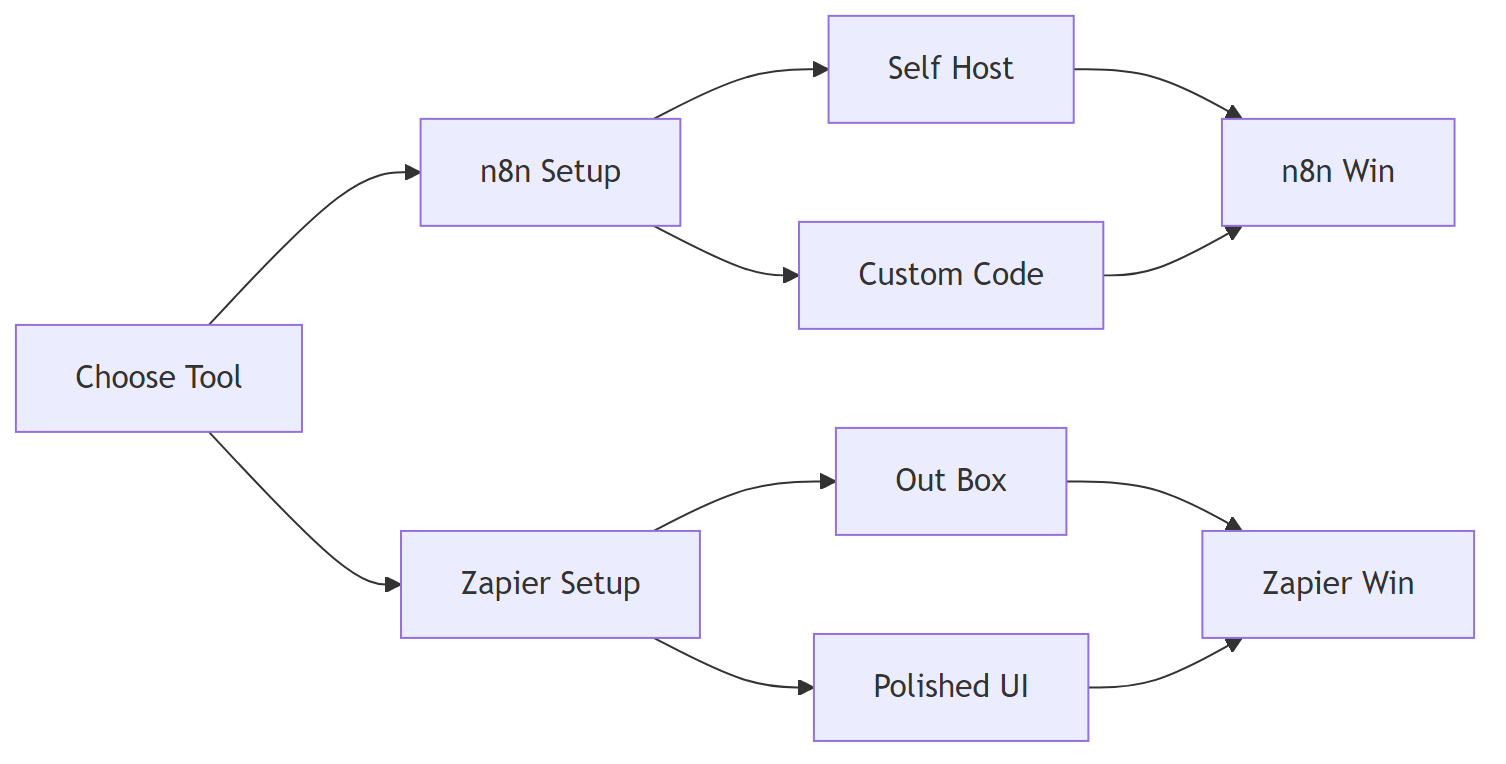
<li><strong>n8n</strong> shines when you need <strong>self‑hosting, unlimited nodes, custom code, and granular control</strong>.</li>
<li><strong>Zapier</strong> excels with <strong>out‑of‑the‑box integrations, polished UI, and enterprise‑grade support</strong>.</li>
</ul>
<p style="margin-bottom: 2em; line-height: 1.9;">Pick n8n for on‑prem data residency, heavy branching, or high‑volume tasks. Choose Zapier for rapid, no‑code automations that non‑technical users can own.</p>
<blockquote style="margin: 2em 0; padding: 1em; border-left: 4px solid #e0e0e0; background: #fafafa;">
<p style="margin-bottom: 0; line-height: 1.9;">In production, the data‑residency check is easy to miss the first time you spin up Zapier; you’ll notice it once audits start.</p>
</blockquote>
<hr style="margin: 60px 0;"/>
<figure class="wp-block-image aligncenter" style="padding-top:20px; padding-bottom:40px;">
<img src="https://flowgenius.in/wp-content/uploads/2026/02/6196_diagram-2-3.png"/><br />
</figure>
<h2 style="margin-bottom: 45px; line-height: 1.3;">When to pick one over the other?</h2>
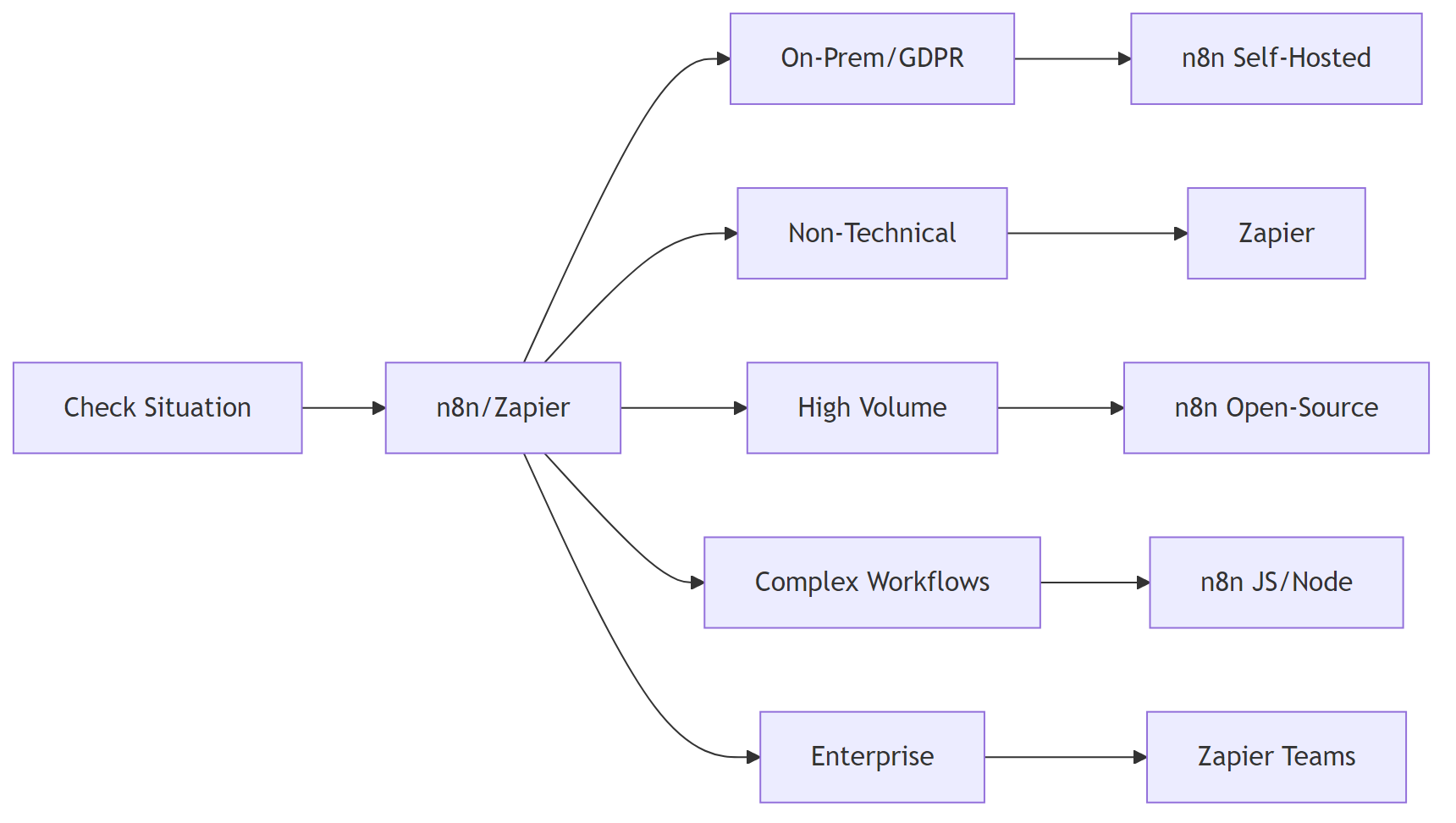
<p>If you encounter any <a href="/n8n-vs-zapier-enterprise-security">n8n vs zapier enterprise security </a>resolve them before continuing with the setup.</p>
<table style="border-collapse: collapse; width: 100%; margin-bottom: 2em;">
<thead>
<tr>
<th style="border: 1px solid #e0e0e0; padding: 13px; text-align: left;">Situation</th>
<th style="border: 1px solid #e0e0e0; padding: 13px; text-align: left;">Best Fit</th>
<th style="border: 1px solid #e0e0e0; padding: 13px; text-align: left;">Why?</th>
</tr>
</thead>
<tbody>
<tr>
<td style="border: 1px solid #e0e0e0; padding: 13px;">Keep data on‑prem or under strict GDPR</td>
<td style="border: 1px solid #e0e0e0; padding: 13px;"><strong>n8n</strong> (self‑hosted)</td>
<td style="border: 1px solid #e0e0e0; padding: 13px;">Full control of runtime, no third‑party data transfer.</td>
</tr>
<tr>
<td style="border: 1px solid #e0e0e0; padding: 13px;">Team is non‑technical & needs 5‑minute automations</td>
<td style="border: 1px solid #e0e0e0; padding: 13px;"><strong>Zapier</strong></td>
<td style="border: 1px solid #e0e0e0; padding: 13px;">3 000+ pre‑built Zaps, drag‑and‑drop UI, instant support.</td>
</tr>
<tr>
<td style="border: 1px solid #e0e0e0; padding: 13px;">> 100 000 tasks/mo on a tight budget</td>
<td style="border: 1px solid #e0e0e0; padding: 13px;"><strong>n8n</strong> (open‑source)</td>
<td style="border: 1px solid #e0e0e0; padding: 13px;">Unlimited executions on your own server; Zapier pricing spikes after 100 k tasks.</td>
</tr>
<tr>
<td style="border: 1px solid #e0e0e0; padding: 13px;">Complex branching, loops, or custom API calls</td>
<td style="border: 1px solid #e0e0e0; padding: 13px;"><strong>n8n</strong> (JS/Node‑JS nodes)</td>
<td style="border: 1px solid #e0e0e0; padding: 13px;">Full Node.js runtime, reusable functions, workflow versioning.</td>
</tr>
<tr>
<td style="border: 1px solid #e0e0e0; padding: 13px;">Enterprise SLA, 24/7 support, compliance certifications</td>
<td style="border: 1px solid #e0e0e0; padding: 13px;"><strong>Zapier</strong> (Teams/Enterprise)</td>
<td style="border: 1px solid #e0e0e0; padding: 13px;">ISO‑27001, SOC‑2, dedicated account manager.</td>
</tr>
</tbody>
</table>
<p style="margin-bottom: 2em; line-height: 1.9;">If any row matches your situation, you likely have your answer.</p>
<hr style="margin: 60px 0;"/>
<figure class="wp-block-image aligncenter" style="padding-top:20px; padding-bottom:40px;">
<img src="https://flowgenius.in/wp-content/uploads/2026/02/6196_diagram-3-3.png"/><br />
</figure>
<h2 style="margin-bottom: 45px; line-height: 1.3;">Core Feature Matrix</h2>
<p>If you encounter any <a href="/n8n-vs-zapier-performance-scaling">n8n vs zapier performance scaling </a>resolve them before continuing with the setup.</p>
<table style="border-collapse: collapse; width: 100%; margin-bottom: 2em;">
<thead>
<tr>
<th style="border: 1px solid #e0e0e0; padding: 13px; text-align: left;">Feature</th>
<th style="border: 1px solid #e0e0e0; padding: 13px; text-align: left;">n8n</th>
<th style="border: 1px solid #e0e0e0; padding: 13px; text-align: left;">Zapier</th>
<th style="border: 1px solid #e0e0e0; padding: 13px; text-align: left;">EEFA Note</th>
</tr>
</thead>
<tbody>
<tr>
<td style="border: 1px solid #e0e0e0; padding: 13px;">Self‑hosting / On‑prem</td>
<td style="border: 1px solid #e0e0e0; padding: 13px;">✅ (Docker, Helm, binary)</td>
<td style="border: 1px solid #e0e0e0; padding: 13px;">❌ (cloud‑only)</td>
<td style="border: 1px solid #e0e0e0; padding: 13px;">Self‑hosting removes vendor lock‑in but adds ops overhead.</td>
</tr>
<tr>
<td style="border: 1px solid #e0e0e0; padding: 13px;">Free tier limits</td>
<td style="border: 1px solid #e0e0e0; padding: 13px;">Unlimited (limited by infra)</td>
<td style="border: 1px solid #e0e0e0; padding: 13px;">100 tasks/mo</td>
<td style="border: 1px solid #e0e0e0; padding: 13px;">Scale‑out on n8n by adding workers; Zapier costs rise sharply.</td>
</tr>
<tr>
<td style="border: 1px solid #e0e0e0; padding: 13px;">Number of integrations</td>
<td style="border: 1px solid #e0e0e0; padding: 13px;">350+ community + custom HTTP</td>
<td style="border: 1px solid #e0e0e0; padding: 13px;">3 000+ official apps</td>
<td style="border: 1px solid #e0e0e0; padding: 13px;">Zapier’s marketplace is larger, but n8n can call any REST API.</td>
</tr>
<tr>
<td style="border: 1px solid #e0e0e0; padding: 13px;">Custom code</td>
<td style="border: 1px solid #e0e0e0; padding: 13px;">Full Node.js (JS, TS, Python via Docker)</td>
<td style="border: 1px solid #e0e0e0; padding: 13px;">Code step (JS, limited runtime)</td>
<td style="border: 1px solid #e0e0e0; padding: 13px;">n8n can <code>require()</code> packages; Zapier sandbox restricts network calls.</td>
</tr>
<tr>
<td style="border: 1px solid #e0e0e0; padding: 13px;">Error handling</td>
<td style="border: 1px solid #e0e0e0; padding: 13px;">“Continue on Fail”, “Retry”, “Catch” nodes</td>
<td style="border: 1px solid #e0e0e0; padding: 13px;">“Path” branching, “Auto‑Replay” (Enterprise)</td>
<td style="border: 1px solid #e0e0e0; padding: 13px;">n8n gives deterministic retries; Zapier’s auto‑replay can hide failures.</td>
</tr>
<tr>
<td style="border: 1px solid #e0e0e0; padding: 13px;">Workflow versioning</td>
<td style="border: 1px solid #e0e0e0; padding: 13px;">Git‑compatible JSON export, built‑in “Versions”</td>
<td style="border: 1px solid #e0e0e0; padding: 13px;">No native versioning (requires external backup)</td>
<td style="border: 1px solid #e0e0e0; padding: 13px;">n8n supports CI/CD pipelines; Zapier needs third‑party version control.</td>
</tr>
<tr>
<td style="border: 1px solid #e0e0e0; padding: 13px;">Parallelism & loops</td>
<td style="border: 1px solid #e0e0e0; padding: 13px;">True parallel execution, <code>SplitInBatches</code>, <code>Loop</code> nodes</td>
<td style="border: 1px solid #e0e0e0; padding: 13px;">Limited loops via “Looping” app</td>
<td style="border: 1px solid #e0e0e0; padding: 13px;">n8n scales horizontally; Zapier may hit rate limits.</td>
</tr>
<tr>
<td style="border: 1px solid #e0e0e0; padding: 13px;">Security & compliance</td>
<td style="border: 1px solid #e0e0e0; padding: 13px;">TLS, OAuth2, JWT, custom certs, self‑cert SOC‑2</td>
<td style="border: 1px solid #e0e0e0; padding: 13px;">SOC‑2, ISO‑27001, GDPR (cloud)</td>
<td style="border: 1px solid #e0e0e0; padding: 13px;">Choose based on where you can meet compliance requirements.</td>
</tr>
<tr>
<td style="border: 1px solid #e0e0e0; padding: 13px;">Pricing model</td>
<td style="border: 1px solid #e0e0e0; padding: 13px;">Open‑source + optional “n8n.cloud” (pay‑as‑you‑go)</td>
<td style="border: 1px solid #e0e0e0; padding: 13px;">Tiered subscription (Free → Enterprise)</td>
<td style="border: 1px solid #e0e0e0; padding: 13px;">n8n cost = infra + optional cloud; Zapier = per‑task subscription.</td>
</tr>
<tr>
<td style="border: 1px solid #e0e0e0; padding: 13px;">Community & support</td>
<td style="border: 1px solid #e0e0e0; padding: 13px;">Active GitHub, Discord, community nodes</td>
<td style="border: 1px solid #e0e0e0; padding: 13px;">Official support (paid tiers), community forums</td>
<td style="border: 1px solid #e0e0e0; padding: 13px;">n8n community contributes nodes; Zapier’s support SLA is stronger.</td>
</tr>
</tbody>
</table>
<hr style="margin: 60px 0;"/>
<h2 style="margin-bottom: 45px; line-height: 1.3;">Cost & Scalability Deep‑Dive</h2>
<h3 style="margin-bottom: 45px; line-height: 1.3;">2.1 n8n Cost Model</h3>
<table style="border-collapse: collapse; width: 100%; margin-bottom: 2em;">
<thead>
<tr>
<th style="border: 1px solid #e0e0e0; padding: 13px; text-align: left;">Component</th>
<th style="border: 1px solid #e0e0e0; padding: 13px; text-align: left;">Approx. Monthly Cost (USD)</th>
<th style="border: 1px solid #e0e0e0; padding: 13px; text-align: left;">Notes</th>
</tr>
</thead>
<tbody>
<tr>
<td style="border: 1px solid #e0e0e0; padding: 13px;">Infrastructure (e.g., 1 vCPU + 2 GB RAM Docker on DigitalOcean)</td>
<td style="border: 1px solid #e0e0e0; padding: 13px;">$15</td>
<td style="border: 1px solid #e0e0e0; padding: 13px;">Scales linearly; add workers for more parallelism.</td>
</tr>
<tr>
<td style="border: 1px solid #e0e0e0; padding: 13px;">Kubernetes on GKE (small cluster)</td>
<td style="border: 1px solid #e0e0e0; padding: 13px;">$80</td>
<td style="border: 1px solid #e0e0e0; padding: 13px;">Provides HA out of the box.</td>
</tr>
<tr>
<td style="border: 1px solid #e0e0e0; padding: 13px;">n8n.cloud (managed)</td>
<td style="border: 1px solid #e0e0e0; padding: 13px;">$20‑$200 per worker</td>
<td style="border: 1px solid #e0e0e0; padding: 13px;">Includes auto‑scaling, backups, and TLS.</td>
</tr>
<tr>
<td style="border: 1px solid #e0e0e0; padding: 13px;">Add‑ons (extra DB storage, backup)</td>
<td style="border: 1px solid #e0e0e0; padding: 13px;">$0‑$50</td>
<td style="border: 1px solid #e0e0e0; padding: 13px;">Optional based on retention needs.</td>
</tr>
<tr>
<td style="border: 1px solid #e0e0e0; padding: 13px;"><strong>Total</strong></td>
<td style="border: 1px solid #e0e0e0; padding: 13px;"><strong>$15‑$250</strong></td>
<td style="border: 1px solid #e0e0e0; padding: 13px;">Unlimited tasks; cost grows with infra, not per‑task.</td>
</tr>
</tbody>
</table>
<h3 style="margin-bottom: 45px; line-height: 1.3;">2.2 Zapier Cost Model</h3>
<table style="border-collapse: collapse; width: 100%; margin-bottom: 2em;">
<thead>
<tr>
<th style="border: 1px solid #e0e0e0; padding: 13px; text-align: left;">Plan</th>
<th style="border: 1px solid #e0e0e0; padding: 13px; text-align: left;">Monthly Price (USD)</th>
<th style="border: 1px solid #e0e0e0; padding: 13px; text-align: left;">Included Tasks</th>
<th style="border: 1px solid #e0e0e0; padding: 13px; text-align: left;">Extra‑Task Rate</th>
</tr>
</thead>
<tbody>
<tr>
<td style="border: 1px solid #e0e0e0; padding: 13px;">Free</td>
<td style="border: 1px solid #e0e0e0; padding: 13px;">$0</td>
<td style="border: 1px solid #e0e0e0; padding: 13px;">100</td>
<td style="border: 1px solid #e0e0e0; padding: 13px;">–</td>
</tr>
<tr>
<td style="border: 1px solid #e0e0e0; padding: 13px;">Starter</td>
<td style="border: 1px solid #e0e0e0; padding: 13px;">$29.99</td>
<td style="border: 1px solid #e0e0e0; padding: 13px;">3 000</td>
<td style="border: 1px solid #e0e0e0; padding: 13px;">$0.003 per extra task</td>
</tr>
<tr>
<td style="border: 1px solid #e0e0e0; padding: 13px;">Professional</td>
<td style="border: 1px solid #e0e0e0; padding: 13px;">$73.99</td>
<td style="border: 1px solid #e0e0e0; padding: 13px;">20 000</td>
<td style="border: 1px solid #e0e0e0; padding: 13px;">$0.0015 per extra task</td>
</tr>
<tr>
<td style="border: 1px solid #e0e0e0; padding: 13px;">Teams</td>
<td style="border: 1px solid #e0e0e0; padding: 13px;">$299</td>
<td style="border: 1px solid #e0e0e0; padding: 13px;">100 000</td>
<td style="border: 1px solid #e0e0e0; padding: 13px;">$0.001 per extra task</td>
</tr>
<tr>
<td style="border: 1px solid #e0e0e0; padding: 13px;">Enterprise</td>
<td style="border: 1px solid #e0e0e0; padding: 13px;">Custom</td>
<td style="border: 1px solid #e0e0e0; padding: 13px;">Unlimited</td>
<td style="border: 1px solid #e0e0e0; padding: 13px;">Custom SLA</td>
</tr>
</tbody>
</table>
<p style="margin-bottom: 2em; line-height: 1.9;"><strong>Break‑even example (150 k tasks/mo):</strong></p>
<ul style="margin-bottom: 1.5em; line-height: 1.9;">
<li>n8n on a $50 VPS → <strong>$50</strong> total.</li>
<li>Zapier Professional → $73.99 + (130 k × $0.0015) ≈ <strong>$267</strong>.</li>
</ul>
<blockquote style="margin: 2em 0; padding: 1em; border-left: 4px solid #e0e0e0; background: #fafafa;">
<p style="margin-bottom: 0; line-height: 1.9;">Bottom line: for over 50 k tasks/mo, n8n is usually 3‑5× cheaper. If you already have spare VMs, n8n often ends up being the cheaper side.</p>
</blockquote>
<hr style="margin: 60px 0;"/>
<h2 style="margin-bottom: 45px; line-height: 1.3;">Building the Same Real‑World Workflow in Both Platforms</h2>
<p style="margin-bottom: 2em; line-height: 1.9;"><strong>Use case:</strong> a new Google Sheets row triggers a HubSpot lookup, Clearbit enrichment, and a Slack notification.</p>
<h3 style="margin-bottom: 45px; line-height: 1.3;">3.1 n8n Implementation</h3>
<p style="margin-bottom: 2em; line-height: 1.9;">Here are the four core nodes, shown separately.</p>
<p style="margin-bottom: 2em; line-height: 1.9;"><strong>Google Sheet trigger</strong> – fires when a new row appears.</p>
<pre style="background: #fafafa; padding: 20px; border: 1px solid #e0e0e0; overflow: auto;">{
"name": "Google Sheet Trigger",
"type": "n8n-nodes-base.googleSheet",
"parameters": {
"operation": "onNewRow",
"sheetId": "1ABCDEF..."
}
}</pre>
<p style="margin-bottom: 2em; line-height: 1.9;"><strong>HubSpot contact fetch</strong> – uses stored OAuth2 credentials.</p>
<pre style="background: #fafafa; padding: 20px; border: 1px solid #e0e0e0; overflow: auto;">{
"name": "HubSpot Get Contact",
"type": "n8n-nodes-base.httpRequest",
"parameters": {
"url": "https://api.hubapi.com/contacts/v1/contact/email/{{ $json.email }}/profile",
"authentication": "hubspotOAuth2"
}
}</pre>
<p style="margin-bottom: 2em; line-height: 1.9;"><strong>Clearbit enrichment</strong> – simple HTTP request that returns JSON.</p>
<pre style="background: #fafafa; padding: 20px; border: 1px solid #e0e0e0; overflow: auto;">{
"name": "Clearbit Enrichment",
"type": "n8n-nodes-base.httpRequest",
"parameters": {
"url": "https://person.clearbit.com/v2/people/find?email={{ $json.email }}",
"authentication": "clearbitApiKey",
"options": { "json": true }
}
}</pre>
<p style="margin-bottom: 2em; line-height: 1.9;"><strong>Slack notification</strong> – posts a formatted message to a channel.</p>
<pre style="background: #fafafa; padding: 20px; border: 1px solid #e0e0e0; overflow: auto;">{
"name": "Slack Message",
"type": "n8n-nodes-base.slack",
"parameters": {
"channel": "#sales-leads",
"text": "New lead: *{{ $json.fullName }}* – {{ $json.clearbit.company }}",
"authentication": "slackOAuth2"
}
}</pre>
<p style="margin-bottom: 2em; line-height: 1.9;"><strong>Connecting the nodes</strong> – the <code>connections</code> object wires the flow from trigger to Slack.</p>
<pre style="background: #fafafa; padding: 20px; border: 1px solid #e0e0e0; overflow: auto;">{
"connections": {
"Google Sheet Trigger": { "main": [ [ { "node": "HubSpot Get Contact", "type": "main", "index": 0 } ] ] },
"HubSpot Get Contact": { "main": [ [ { "node": "Clearbit Enrichment", "type": "main", "index": 0 } ] ] },
"Clearbit Enrichment": { "main": [ [ { "node": "Slack Message", "type": "main", "index": 0 } ] ] }
}
}</pre>
<p style="margin-bottom: 2em; line-height: 1.9;"><strong>Why n8n stands out</strong></p>
<ul style="margin-bottom: 1.5em; line-height: 1.9;">
<li>OAuth2 flow stored centrally.</li>
<li>A “Function” node can be inserted to transform data without leaving the workflow.</li>
<li>Export the JSON, commit to Git, and run a CI lint step – true version control.</li>
<li>When you need a quick tweak, dropping a tiny function in n8n is usually faster than hunting for a Zapier app update.</li>
</ul>
<h3 style="margin-bottom: 45px; line-height: 1.3;">3.2 Zapier Implementation</h3>
<p style="margin-bottom: 2em; line-height: 1.9;">Zapier’s UI is linear; each step appears as plain text.</p>
<ol style="margin-bottom: 1.5em; line-height: 1.9;">
<li><strong>Trigger:</strong> Google Sheets – New Spreadsheet Row</li>
<li><strong>Action:</strong> HubSpot – Find Contact (search by email)</li>
<li><strong>Action:</strong> Code by Zapier – custom JavaScript to call Clearbit (runtime limited to 10 s).</li>
</ol>
<pre style="background: #fafafa; padding: 20px; border: 1px solid #e0e0e0; overflow: auto;">const fetch = require('node-fetch');
const email = inputData.email;
return fetch(`https://person.clearbit.com/v2/people/find?email=${email}`, {
headers: { Authorization: `Bearer ${process.env.CLEARBIT_API_KEY}` }
})
.then(res => res.json())
.then(data => ({
fullName: data.name.fullName,
company: data.company.name
}));</pre>
<p style="margin-bottom: 2em; line-height: 1.9;">4. <strong>Action:</strong> Slack – Send Channel Message – uses the output of the code step.</p>
<p style="margin-bottom: 2em; line-height: 1.9;"><strong>Zapier constraints</strong></p>
<ul style="margin-bottom: 1.5em; line-height: 1.9;">
<li>No external npm packages – only built‑in <code>node-fetch</code>.</li>
<li>No native retry; you must add “Delay” and “Path” steps manually.</li>
<li>No built‑in versioning – duplicate the Zap for changes.</li>
</ul>
<hr style="margin: 60px 0;"/>
<h2 style="margin-bottom: 45px; line-height: 1.3;">Limitations & Gotchas</h2>
<table style="border-collapse: collapse; width: 100%; margin-bottom: 2em;">
<thead>
<tr>
<th style="border: 1px solid #e0e0e0; padding: 13px; text-align: left;">Limitation</th>
<th style="border: 1px solid #e0e0e0; padding: 13px; text-align: left;">n8n</th>
<th style="border: 1px solid #e0e0e0; padding: 13px; text-align: left;">Zapier</th>
<th style="border: 1px solid #e0e0e0; padding: 13px; text-align: left;">Mitigation (EEFA)</th>
</tr>
</thead>
<tbody>
<tr>
<td style="border: 1px solid #e0e0e0; padding: 13px;">Rate‑limit handling</td>
<td style="border: 1px solid #e0e0e0; padding: 13px;">Add “Throttle” or “Wait” nodes manually</td>
<td style="border: 1px solid #e0e0e0; padding: 13px;">Auto‑throttles for most apps, but hidden limits exist</td>
<td style="border: 1px solid #e0e0e0; padding: 13px;">Use n8n’s <code>Rate Limit</code> node; in Zapier, monitor task usage and add “Delay” steps.</td>
</tr>
<tr>
<td style="border: 1px solid #e0e0e0; padding: 13px;">OAuth token refresh</td>
<td style="border: 1px solid #e0e0e0; padding: 13px;">Credential store handles it, requires DB persistence</td>
<td style="border: 1px solid #e0e0e0; padding: 13px;">Managed automatically by Zapier</td>
<td style="border: 1px solid #e0e0e0; padding: 13px;">Back up n8n DB; keep Zapier connections healthy.</td>
</tr>
<tr>
<td style="border: 1px solid #e0e0e0; padding: 13px;">Complex loops</td>
<td style="border: 1px solid #e0e0e0; padding: 13px;">Supported via <code>Loop</code> node (watch for infinite loops)</td>
<td style="border: 1px solid #e0e0e0; padding: 13px;">“Looping” app caps at 100 iterations</td>
<td style="border: 1px solid #e0e0e0; padding: 13px;">Add a “Maximum Iterations” guard in n8n; test Zapier loops with small data sets.</td>
</tr>
<tr>
<td style="border: 1px solid #e0e0e0; padding: 13px;">Large payloads (>10 MB)</td>
<td style="border: 1px solid #e0e0e0; padding: 13px;">No hard limit (depends on server)</td>
<td style="border: 1px solid #e0e0e0; padding: 13px;">10 MB per request</td>
<td style="border: 1px solid #e0e0e0; padding: 13px;">Split payloads in n8n using <code>SplitInBatches</code>; in Zapier, chunk data in a “Code” step.</td>
</tr>
<tr>
<td style="border: 1px solid #e0e0e0; padding: 13px;">Debugging UI</td>
<td style="border: 1px solid #e0e0e0; padding: 13px;">“Execution Log” shows node‑by‑node data</td>
<td style="border: 1px solid #e0e0e0; padding: 13px;">“Task History” limited to last 30 days (Free)</td>
<td style="border: 1px solid #e0e0e0; padding: 13px;">Export n8n logs to Loki/Grafana; enable Zapier history retention via paid plan.</td>
</tr>
</tbody>
</table>
<blockquote style="margin: 2em 0; padding: 1em; border-left: 4px solid #e0e0e0; background: #fafafa;">
<p style="margin-bottom: 0; line-height: 1.9;">Watch out for infinite loops – they can silently consume all your worker resources.</p>
</blockquote>
<hr style="margin: 60px 0;"/>
<h2 style="margin-bottom: 45px; line-height: 1.3;">Production‑Ready Checklist</h2>
<table style="border-collapse: collapse; width: 100%; margin-bottom: 2em;">
<thead>
<tr>
<th style="border: 1px solid #e0e0e0; padding: 13px; text-align: left;">Checklist Item</th>
<th style="border: 1px solid #e0e0e0; padding: 13px; text-align: left;">n8n Implementation</th>
<th style="border: 1px solid #e0e0e0; padding: 13px; text-align: left;">Zapier Implementation</th>
</tr>
</thead>
<tbody>
<tr>
<td style="border: 1px solid #e0e0e0; padding: 13px;">Secure credential storage</td>
<td style="border: 1px solid #e0e0e0; padding: 13px;">Encrypted PostgreSQL + env‑var secrets</td>
<td style="border: 1px solid #e0e0e0; padding: 13px;">Encrypted vault (built‑in).</td>
</tr>
<tr>
<td style="border: 1px solid #e0e0e0; padding: 13px;">High‑availability</td>
<td style="border: 1px solid #e0e0e0; padding: 13px;">Deploy with Docker Swarm/K8s, health checks, multiple workers</td>
<td style="border: 1px solid #e0e0e0; padding: 13px;">SaaS‑HA by default.</td>
</tr>
<tr>
<td style="border: 1px solid #e0e0e0; padding: 13px;">Rate‑limit monitoring</td>
<td style="border: 1px solid #e0e0e0; padding: 13px;">“Rate Limit” node + Prometheus metrics</td>
<td style="border: 1px solid #e0e0e0; padding: 13px;">“Task History” alerts (Enterprise).</td>
</tr>
<tr>
<td style="border: 1px solid #e0e0e0; padding: 13px;">Logging & Auditing</td>
<td style="border: 1px solid #e0e0e0; padding: 13px;">Centralized Loki/Grafana; retain ≥30 days</td>
<td style="border: 1px solid #e0e0e0; padding: 13px;">Export via Zapier API for archiving.</td>
</tr>
<tr>
<td style="border: 1px solid #e0e0e0; padding: 13px;">Backup & DR</td>
<td style="border: 1px solid #e0e0e0; padding: 13px;">Daily DB dump + Docker image snapshot</td>
<td style="border: 1px solid #e0e0e0; padding: 13px;">Zapier retains history per plan.</td>
</tr>
<tr>
<td style="border: 1px solid #e0e0e0; padding: 13px;">Compliance (GDPR/CCPA)</td>
<td style="border: 1px solid #e0e0e0; padding: 13px;">Host in EU region, expose data‑subject request endpoint</td>
<td style="border: 1px solid #e0e0e0; padding: 13px;">Verify Zapier’s DPA covers your use case.</td>
</tr>
<tr>
<td style="border: 1px solid #e0e0e0; padding: 13px;">Testing before prod</td>
<td style="border: 1px solid #e0e0e0; padding: 13px;">“Execute Workflow” with mock data; CI lint JSON</td>
<td style="border: 1px solid #e0e0e0; padding: 13px;">Clone Zap, run “Run” test with sample payloads.</td>
</tr>
<tr>
<td style="border: 1px solid #e0e0e0; padding: 13px;">Alerting on failures</td>
<td style="border: 1px solid #e0e0e0; padding: 13px;">“Error Trigger” node → PagerDuty/Webhook</td>
<td style="border: 1px solid #e0e0e0; padding: 13px;">Zapier “Email” on “Task Failure” (Enterprise)</td>
</tr>
</tbody>
</table>
<hr style="margin: 60px 0;"/>
<h2 style="margin-bottom: 45px; line-height: 1.3;">Real‑World Use Cases & Decision Framework</h2>
<table style="border-collapse: collapse; width: 100%; margin-bottom: 2em;">
<thead>
<tr>
<th style="border: 1px solid #e0e0e0; padding: 13px; text-align: left;">Industry</th>
<th style="border: 1px solid #e0e0e0; padding: 13px; text-align: left;">Typical Scenario</th>
<th style="border: 1px solid #e0e0e0; padding: 13px; text-align: left;">Preferred Platform</th>
<th style="border: 1px solid #e0e0e0; padding: 13px; text-align: left;">Rationale</th>
</tr>
</thead>
<tbody>
<tr>
<td style="border: 1px solid #e0e0e0; padding: 13px;">FinTech (PCI‑DSS)</td>
<td style="border: 1px solid #e0e0e0; padding: 13px;">Sync transaction logs to internal fraud engine</td>
<td style="border: 1px solid #e0e0e0; padding: 13px;"><strong>n8n (self‑hosted)</strong></td>
<td style="border: 1px solid #e0e0e0; padding: 13px;">Data must stay on‑prem; custom encryption modules needed.</td>
</tr>
<tr>
<td style="border: 1px solid #e0e0e0; padding: 13px;">E‑commerce</td>
<td style="border: 1px solid #e0e0e0; padding: 13px;">Auto‑create Shopify orders → QuickBooks → Slack alerts</td>
<td style="border: 1px solid #e0e0e0; padding: 13px;"><strong>Zapier (Teams)</strong></td>
<td style="border: 1px solid #e0e0e0; padding: 13px;">Speed of deployment, built‑in connectors, SLA guarantees.</td>
</tr>
<tr>
<td style="border: 1px solid #e0e0e0; padding: 13px;">Marketing Agencies</td>
<td style="border: 1px solid #e0e0e0; padding: 13px;">Bulk lead enrichment across 10 k contacts daily</td>
<td style="border: 1px solid #e0e0e0; padding: 13px;"><strong>n8n (clustered)</strong></td>
<td style="border: 1px solid #e0e0e0; padding: 13px;">Unlimited tasks, custom batching, cost‑effective at scale.</td>
</tr>
<tr>
<td style="border: 1px solid #e0e0e0; padding: 13px;">Healthcare (HIPAA)</td>
<td style="border: 1px solid #e0e0e0; padding: 13px;">Patient intake → EMR API → Secure email</td>
<td style="border: 1px solid #e0e0e0; padding: 13px;"><strong>n8n (on‑prem with audit logs)</strong></td>
<td style="border: 1px solid #e0e0e0; padding: 13px;">Full control of PHI, ability to sign BAAs.</td>
</tr>
<tr>
<td style="border: 1px solid #e0e0e0; padding: 13px;">SaaS Start‑ups</td>
<td style="border: 1px solid #e0e0e0; padding: 13px;">New user → Stripe invoice → Mailchimp campaign</td>
<td style="border: 1px solid #e0e0e0; padding: 13px;"><strong>Zapier (Professional)</strong></td>
<td style="border: 1px solid #e0e0e0; padding: 13px;">Non‑technical founders; low volume, quick ROI.</td>
</tr>
</tbody>
</table>
<p style="margin-bottom: 2em; line-height: 1.9;"><strong>Decision flow (textual)</strong></p>
<ol style="margin-bottom: 1.5em; line-height: 1.9;">
<li>Need on‑prem data residency? → <strong>n8n</strong>.</li>
<li>Team non‑technical & wants instant UI? → <strong>Zapier</strong>.</li>
<li>Projected tasks > 50 k/mo? → <strong>n8n</strong> (cost).</li>
<li>Require enterprise SLA & certifications? → <strong>Zapier Enterprise</strong> (unless you can certify your own infra).</li>
</ol>
<hr style="margin: 60px 0;"/>
<h2 style="margin-bottom: 45px; line-height: 1.3;">Frequently Asked Technical Questions</h2>
<table style="border-collapse: collapse; width: 100%; margin-bottom: 2em;">
<thead>
<tr>
<th style="border: 1px solid #e0e0e0; padding: 13px; text-align: left;">Question</th>
<th style="border: 1px solid #e0e0e0; padding: 13px; text-align: left;">n8n Answer</th>
<th style="border: 1px solid #e0e0e0; padding: 13px; text-align: left;">Zapier Answer</th>
</tr>
</thead>
<tbody>
<tr>
<td style="border: 1px solid #e0e0e0; padding: 13px;">Can I run n8n serverless?</td>
<td style="border: 1px solid #e0e0e0; padding: 13px;">Yes – via AWS Lambda wrapper (<code>n8n-serverless</code>), but cold‑start latency applies.</td>
<td style="border: 1px solid #e0e0e0; padding: 13px;">Zapier is already serverless; no extra setup.</td>
</tr>
<tr>
<td style="border: 1px solid #e0e0e0; padding: 13px;">How do I handle OAuth token refresh for a custom API?</td>
<td style="border: 1px solid #e0e0e0; padding: 13px;">Create an OAuth2 credential; n8n automatically refreshes using stored <code>refresh_token</code>.</td>
<td style="border: 1px solid #e0e0e0; padding: 13px;">Define a “Refresh URL” in the Zapier app; Zapier handles it internally.</td>
</tr>
<tr>
<td style="border: 1px solid #e0e0e0; padding: 13px;">Is there a way to test a workflow without hitting live APIs?</td>
<td style="border: 1px solid #e0e0e0; padding: 13px;">Add a “Set” node with static JSON and use “Execute Workflow” in the UI.</td>
<td style="border: 1px solid #e0e0e0; padding: 13px;">Use Zapier’s “Test” button with mock data.</td>
</tr>
<tr>
<td style="border: 1px solid #e0e0e0; padding: 13px;">Can I run multiple workflows in parallel?</td>
<td style="border: 1px solid #e0e0e0; padding: 13px;">Yes – each workflow runs in its own process; configure async execution.</td>
<td style="border: 1px solid #e0e0e0; padding: 13px;">Zapier runs tasks sequentially per Zap; parallelism only across different Zaps.</td>
</tr>
<tr>
<td style="border: 1px solid #e0e0e0; padding: 13px;">Do I get version control for my automations?</td>
<td style="border: 1px solid #e0e0e0; padding: 13px;">Export JSON, commit to Git; UI also offers “Workflow Versions”.</td>
<td style="border: 1px solid #e0e0e0; padding: 13px;">No native versioning; you must duplicate Zaps or use external backup.</td>
</tr>
</tbody>
</table>
<hr style="margin: 60px 0;"/>
<h2 style="margin-bottom: 45px; line-height: 1.3;">Conclusion</h2>
<p style="margin-bottom: 2em; line-height: 1.9;">Both n8n and Zapier solve automation, but they sit at opposite ends of the spectrum:</p>
<ul style="margin-bottom: 1.5em; line-height: 1.9;">
<li><strong>n8n</strong> gives you <strong>full control</strong>, unlimited executions, and the ability to embed any REST API or custom script. It’s the pragmatic choice when compliance, cost, or complex branching matter more than UI polish.</li>
<li><strong>Zapier</strong> delivers <strong>speed‑to‑value</strong>, a massive library of pre‑built integrations, and enterprise‑grade SLAs. It’s ideal for teams that need to empower non‑technical users quickly.</li>
</ul>
<p style="margin-bottom: 2em; line-height: 1.9;">Use the matrix, cost analysis, and scenarios above to match the platform to your constraints, budget, and compliance needs. The right tool will let you ship reliable, maintainable automations at production scale.</p>
Step by Step Guide to solve n8n vs zapier features comparison
Who this is for:
Automation engineers, DevOps teams, and product managers who need to choose the right workflow‑automation platform for production workloads. We cover this in detail in the n8n vs Zapier Comparison Guide.
n8n shines when you need self‑hosting, unlimited nodes, custom code, and granular control.
Zapier excels with out‑of‑the‑box integrations, polished UI, and enterprise‑grade support.
Pick n8n for on‑prem data residency, heavy branching, or high‑volume tasks. Choose Zapier for rapid, no‑code automations that non‑technical users can own.
In production, the data‑residency check is easy to miss the first time you spin up Zapier; you’ll notice it once audits start.
Speed of deployment, built‑in connectors, SLA guarantees.
Marketing Agencies
Bulk lead enrichment across 10 k contacts daily
n8n (clustered)
Unlimited tasks, custom batching, cost‑effective at scale.
Healthcare (HIPAA)
Patient intake → EMR API → Secure email
n8n (on‑prem with audit logs)
Full control of PHI, ability to sign BAAs.
SaaS Start‑ups
New user → Stripe invoice → Mailchimp campaign
Zapier (Professional)
Non‑technical founders; low volume, quick ROI.
Decision flow (textual)
Need on‑prem data residency? → n8n.
Team non‑technical & wants instant UI? → Zapier.
Projected tasks > 50 k/mo? → n8n (cost).
Require enterprise SLA & certifications? → Zapier Enterprise (unless you can certify your own infra).
Frequently Asked Technical Questions
Question
n8n Answer
Zapier Answer
Can I run n8n serverless?
Yes – via AWS Lambda wrapper (n8n-serverless), but cold‑start latency applies.
Zapier is already serverless; no extra setup.
How do I handle OAuth token refresh for a custom API?
Create an OAuth2 credential; n8n automatically refreshes using stored refresh_token.
Define a “Refresh URL” in the Zapier app; Zapier handles it internally.
Is there a way to test a workflow without hitting live APIs?
Add a “Set” node with static JSON and use “Execute Workflow” in the UI.
Use Zapier’s “Test” button with mock data.
Can I run multiple workflows in parallel?
Yes – each workflow runs in its own process; configure async execution.
Zapier runs tasks sequentially per Zap; parallelism only across different Zaps.
Do I get version control for my automations?
Export JSON, commit to Git; UI also offers “Workflow Versions”.
No native versioning; you must duplicate Zaps or use external backup.
Conclusion
Both n8n and Zapier solve automation, but they sit at opposite ends of the spectrum:
n8n gives you full control, unlimited executions, and the ability to embed any REST API or custom script. It’s the pragmatic choice when compliance, cost, or complex branching matter more than UI polish.
Zapier delivers speed‑to‑value, a massive library of pre‑built integrations, and enterprise‑grade SLAs. It’s ideal for teams that need to empower non‑technical users quickly.
Use the matrix, cost analysis, and scenarios above to match the platform to your constraints, budget, and compliance needs. The right tool will let you ship reliable, maintainable automations at production scale.