<figure class="wp-block-image aligncenter"><img alt="Step by Step Guide to solve n8n vs zapier enterprise security" decoding="async" src="https://flowgenius.in/wp-content/uploads/2026/01/n8n-vs-zapier-enterprise-security.png"/> <figcaption style="text-align: center;">Step by Step Guide to solve n8n vs zapier enterprise security</p>
<hr/>
</figcaption></figure>
<p style="margin-bottom: 2em; line-height: 1.9;"><strong>Who this is for:</strong> Security‑focused architects and engineering leads evaluating automation platforms for regulated, large‑scale environments.</p>
<p style="margin-bottom: 2em; line-height: 1.9;"><strong>Quick Diagnosis:</strong> <em>Your organization needs a platform that meets strict security, compliance, and governance requirements.</em></p>
<ul style="margin-bottom: 1.5em; line-height: 1.9;">
<li><strong>Need on‑premise control, granular IAM, and custom audit logs? → n8n</strong></li>
<li><strong>Prefer a fully managed SaaS with built‑in SOC‑2 coverage and limited self‑service security config? → Zapier</strong></li>
</ul>
<p style="margin-bottom: 2em; line-height: 1.9;"><em>In the field, teams often run into missing TLS hardening only when the first external audit flags it.<br />
We cover this in detail in the n8n vs Zapier Comparison Guide.<br />
</em></p>
<hr style="margin: 55px 0; border: none; border-top: 1px solid #eee;"/>
<h2 style="margin-bottom: 45px; line-height: 1.3;">Fast‑track security checklist</h2>
<table style="border-collapse: collapse; width: 100%; margin-bottom: 1.5em;">
<thead>
<tr>
<th style="padding: 13px; border: 1px solid #ddd;">Requirement</th>
<th style="padding: 13px; border: 1px solid #ddd;">n8n (self‑hosted)</th>
<th style="padding: 13px; border: 1px solid #ddd;">Zapier (cloud)</th>
</tr>
</thead>
<tbody>
<tr>
<td style="padding: 13px; border: 1px solid #ddd;">TLS 1.2+ encryption in transit</td>
<td style="padding: 13px; border: 1px solid #ddd;">✅ Configurable via reverse‑proxy (NGINX/Traefik)</td>
<td style="padding: 13px; border: 1px solid #ddd;">✅ Managed by Zapier</td>
</tr>
<tr>
<td style="padding: 13px; border: 1px solid #ddd;">Encryption at rest</td>
<td style="padding: 13px; border: 1px solid #ddd;">✅ Disk‑level (LUKS, BitLocker)</td>
<td style="padding: 13px; border: 1px solid #ddd;">✅ Encrypted storage, no customer control</td>
</tr>
<tr>
<td style="padding: 13px; border: 1px solid #ddd;">SOC 2 / ISO 27001</td>
<td style="padding: 13px; border: 1px solid #ddd;">❌ Only with your own audit</td>
<td style="padding: 13px; border: 1px solid #ddd;">✅ Included in Zapier Enterprise</td>
</tr>
<tr>
<td style="padding: 13px; border: 1px solid #ddd;">HIPAA / PHI</td>
<td style="padding: 13px; border: 1px solid #ddd;">✅ Possible with HIPAA‑ready stack</td>
<td style="padding: 13px; border: 1px solid #ddd;">❌ Not offered</td>
</tr>
<tr>
<td style="padding: 13px; border: 1px solid #ddd;">GDPR / Data residency</td>
<td style="padding: 13px; border: 1px solid #ddd;">✅ Choose any region</td>
<td style="padding: 13px; border: 1px solid #ddd;">✅ EU data centers (limited regions)</td>
</tr>
<tr>
<td style="padding: 13px; border: 1px solid #ddd;">SAML / OIDC SSO</td>
<td style="padding: 13px; border: 1px solid #ddd;">✅ Full SAML, OIDC, LDAP, Azure AD</td>
<td style="padding: 13px; border: 1px solid #ddd;">✅ SAML & OIDC (Enterprise tier)</td>
</tr>
<tr>
<td style="padding: 13px; border: 1px solid #ddd;">IP allow‑list / VPC isolation</td>
<td style="padding: 13px; border: 1px solid #ddd;">✅ Network firewalls, private subnets</td>
<td style="padding: 13px; border: 1px solid #ddd;">✅ IP allow‑list (Enterprise)</td>
</tr>
<tr>
<td style="padding: 13px; border: 1px solid #ddd;">Granular RBAC</td>
<td style="padding: 13px; border: 1px solid #ddd;">✅ Fine‑grained per‑workflow</td>
<td style="padding: 13px; border: 1px solid #ddd;">✅ Role groups, less granularity</td>
</tr>
<tr>
<td style="padding: 13px; border: 1px solid #ddd;">Immutable audit log</td>
<td style="padding: 13px; border: 1px solid #ddd;">✅ Write‑once logs (e.g., Elasticsearch)</td>
<td style="padding: 13px; border: 1px solid #ddd;">✅ Event logs, limited retention</td>
</tr>
<tr>
<td style="padding: 13px; border: 1px solid #ddd;">Secret management</td>
<td style="padding: 13px; border: 1px solid #ddd;">✅ Vault, AWS Secrets Manager, .env encryption</td>
<td style="padding: 13px; border: 1px solid #ddd;">✅ Encrypted API keys, no external store</td>
</tr>
</tbody>
</table>
<hr style="margin: 55px 0; border: none; border-top: 1px solid #eee;"/>
<figure class="wp-block-image aligncenter" style="padding-top:20px; padding-bottom:40px;">
<img src="https://flowgenius.in/wp-content/uploads/2026/02/6197_diagram-1-3.png"/><br />
</figure>
<h2 style="margin-bottom: 45px; line-height: 1.3;">1. Enterprise‑grade Network Security</h2>
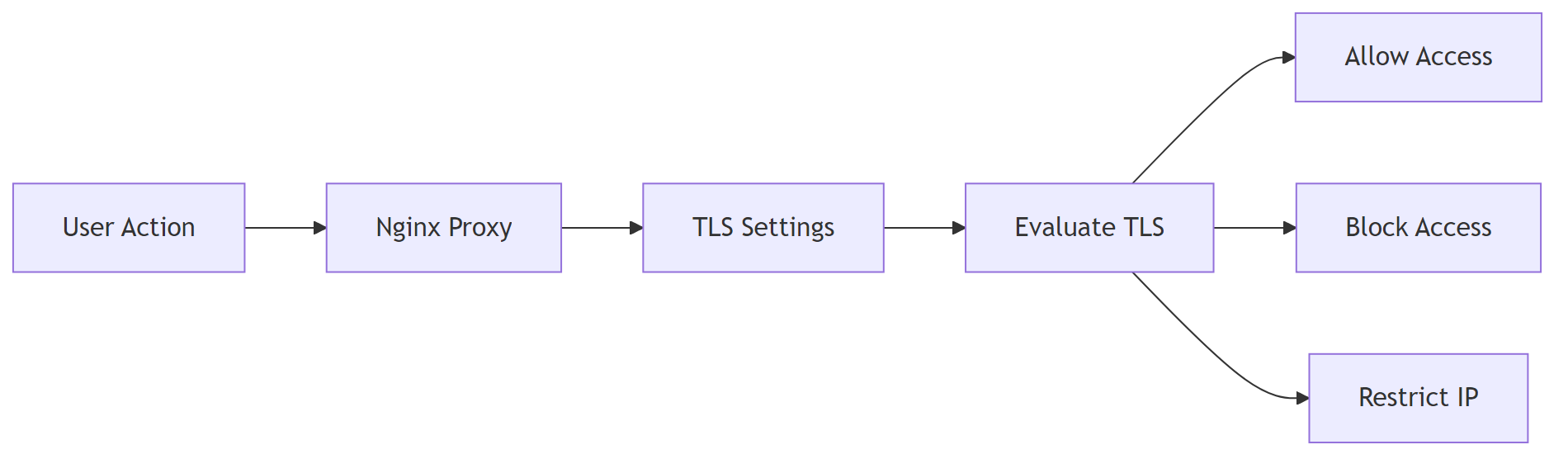
<p style="margin-bottom: 2em; line-height: 1.9;"><strong>Purpose:</strong> Harden the transport layer and restrict who can reach your automation endpoint.<br />
If you encounter any <a href="/n8n-vs-zapier-pricing-cost">n8n vs zapier pricing cost </a>resolve them before continuing with the setup.</p>
<h3 style="margin-bottom: 45px; line-height: 1.3;">1.1 TLS termination & HSTS on n8n</h3>
<p style="margin-bottom: 2em; line-height: 1.9;">Use Nginx as a reverse‑proxy; enforce TLS 1.2+ and add HSTS.</p>
<pre style="background: #fafafa; padding: 20px; border: 1px solid #e0e0e0; overflow: auto;"># /etc/nginx/conf.d/n8n.conf – basic server block
server {
listen 443 ssl http2;
server_name automation.example.com;
</pre>
<pre style="background: #fafafa; padding: 20px; border: 1px solid #e0e0e0; overflow: auto;"># TLS settings – certificates and protocols
ssl_certificate /etc/letsencrypt/live/automation.example.com/fullchain.pem;
ssl_certificate_key /etc/letsencrypt/live/automation.example.com/privkey.pem;
ssl_protocols TLSv1.2 TLSv1.3;
ssl_prefer_server_ciphers on;
</pre>
<pre style="background: #fafafa; padding: 20px; border: 1px solid #e0e0e0; overflow: auto;"># Security header
add_header Strict-Transport-Security "max-age=31536000; includeSubDomains" always;
</pre>
<pre style="background: #fafafa; padding: 20px; border: 1px solid #e0e0e0; overflow: auto;"># Proxy to the local n8n process
location / {
proxy_pass http://localhost:5678;
proxy_set_header Host $host;
proxy_set_header X-Real-IP $remote_addr;
proxy_set_header X-Forwarded-Proto $scheme;
}
}
</pre>
<p style="margin-bottom: 2em; line-height: 1.9;"><em>EEFA note:</em> If n8n runs on plain HTTP, keep <code>proxy_set_header X-Forwarded-Proto https;</code> to avoid mixed‑content warnings in the UI.<br />
<strong>Why it matters:</strong> without the header the browser still tries HTTP assets, breaking the UI for some users.</p>
<h3 style="margin-bottom: 45px; line-height: 1.3;">1.2 IP allow‑list (n8n)</h3>
<p style="margin-bottom: 2em; line-height: 1.9;">Restrict inbound traffic to known corporate ranges using the host firewall.</p>
<pre style="background: #fafafa; padding: 20px; border: 1px solid #e0e0e0; overflow: auto;"># Allow only the corporate subnet (example)
sudo ufw allow from 203.0.113.0/24 to any port 443 comment 'Enterprise IP range'
sudo ufw enable
</pre>
<p style="margin-bottom: 2em; line-height: 1.9;">Zapier Enterprise offers the same via a UI setting—no code.</p>
<hr style="margin: 55px 0; border: none; border-top: 1px solid #eee;"/>
<figure class="wp-block-image aligncenter" style="padding-top:20px; padding-bottom:40px;">
<img src="https://flowgenius.in/wp-content/uploads/2026/02/6197_diagram-2-3.png"/><br />
</figure>
<h2 style="margin-bottom: 45px; line-height: 1.3;">2. Identity & Access Management</h2>
<p>If you encounter any <a href="/n8n-vs-zapier-features-comparison">n8n vs zapier features comparison </a>resolve them before continuing with the setup.<br />
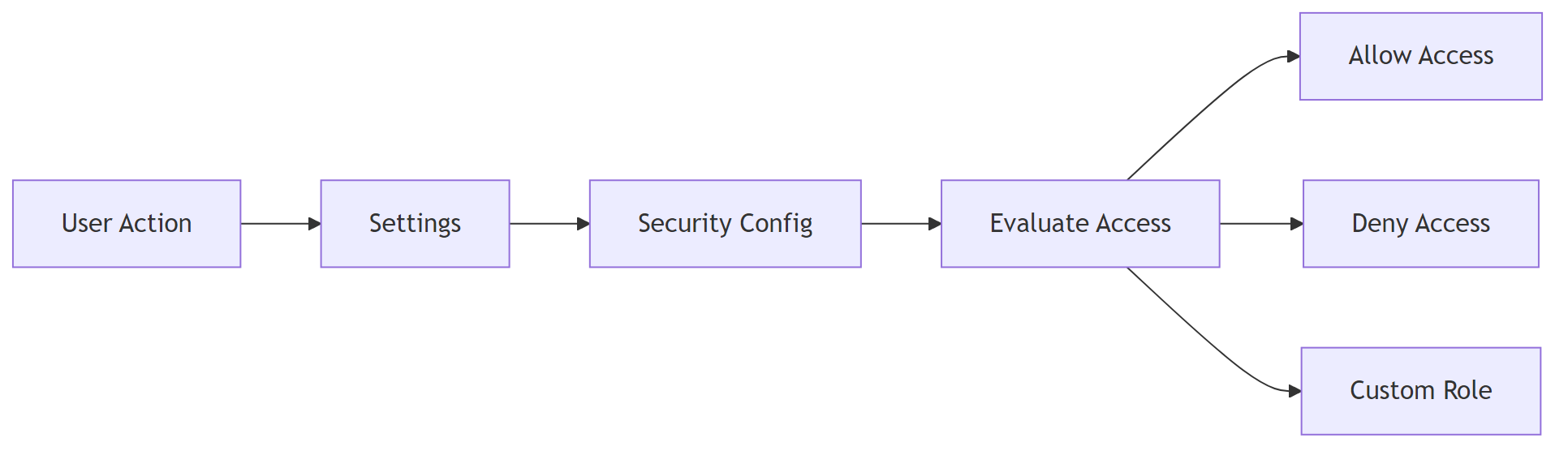
<strong>Purpose:</strong> ensure only authorized users can log in and act on workflows.</p>
<h3 style="margin-bottom: 45px; line-height: 1.3;">2.1 SAML SSO configuration (n8n)</h3>
<ol style="margin-bottom: 1.5em; line-height: 1.9;">
<li>Navigate to <strong>Settings → Security → SAML</strong>.</li>
<li>Paste the IdP metadata URL.</li>
<li>Map the IdP <strong>NameID</strong> to the n8n user email.</li>
<li>Enable <strong>Just‑In‑Time provisioning</strong> for auto‑creation.</li>
</ol>
<pre style="background: #fafafa; padding: 20px; border: 1px solid #e0e0e0; overflow: auto;"># n8n.config.yml – SAML endpoint & certificate
saml:
entryPoint: "https://idp.example.com/saml2/idp/SSOService.php"
issuer: "https://n8n.example.com/"
cert: |
-----BEGIN CERTIFICATE-----
MIID...
-----END CERTIFICATE-----
</pre>
<pre style="background: #fafafa; padding: 20px; border: 1px solid #e0e0e0; overflow: auto;"># Attribute mapping – email claim
attributeMapping:
email: "http://schemas.xmlsoap.org/ws/2005/05/identity/claims/emailaddress"
</pre>
<p style="margin-bottom: 2em; line-height: 1.9;"><em>EEFA:</em> The cert must be PEM‑encoded with line‑breaks ≤64 chars; otherwise n8n rejects the SAML response.</p>
<h3 style="margin-bottom: 45px; line-height: 1.3;">2.2 Role‑Based Access (n8n)</h3>
<table style="border-collapse: collapse; width: 100%; margin-bottom: 1.5em;">
<thead>
<tr>
<th style="padding: 13px; border: 1px solid #ddd;">Role</th>
<th style="padding: 13px; border: 1px solid #ddd;">Permissions</th>
<th style="padding: 13px; border: 1px solid #ddd;">Typical use‑case</th>
</tr>
</thead>
<tbody>
<tr>
<td style="padding: 13px; border: 1px solid #ddd;">Owner</td>
<td style="padding: 13px; border: 1px solid #ddd;">Full admin, workflow CRUD, credential mgmt</td>
<td style="padding: 13px; border: 1px solid #ddd;">Platform admins</td>
</tr>
<tr>
<td style="padding: 13px; border: 1px solid #ddd;">Editor</td>
<td style="padding: 13px; border: 1px solid #ddd;">Create/modify workflows, no credential delete</td>
<td style="padding: 13px; border: 1px solid #ddd;">Power users</td>
</tr>
<tr>
<td style="padding: 13px; border: 1px solid #ddd;">Viewer</td>
<td style="padding: 13px; border: 1px solid #ddd;">Execute workflows, read‑only access</td>
<td style="padding: 13px; border: 1px solid #ddd;">Auditors, compliance officers</td>
</tr>
</tbody>
</table>
<p style="margin-bottom: 2em; line-height: 1.9;">Create custom roles via the UI (<strong>Settings → Users → Roles</strong>) <strong>or</strong> the API:</p>
<pre style="background: #fafafa; padding: 20px; border: 1px solid #e0e0e0; overflow: auto;"># Create a role (API call)
curl -X POST https://n8n.example.com/api/v1/role \
-H "Authorization: Bearer $ADMIN_TOKEN" \
-H "Content-Type: application/json" \
</pre>
<pre style="background: #fafafa; padding: 20px; border: 1px solid #e0e0e0; overflow: auto;">{
"name":"Auditor",
"permissions":["workflow:read","execution:read"]
}
</pre>
<p style="margin-bottom: 2em; line-height: 1.9;">Zapier Enterprise supplies predefined team and admin roles but no custom permission sets.<br />
<em>In practice, if you need a role that only views logs, a custom n8n role is usually quicker than working around Zapier’s fixed groups.</em></p>
<hr style="margin: 55px 0; border: none; border-top: 1px solid #eee;"/>
<figure class="wp-block-image aligncenter" style="padding-top:20px; padding-bottom:40px;">
<img src="https://flowgenius.in/wp-content/uploads/2026/02/6197_diagram-3-3.png"/><br />
</figure>
<h2 style="margin-bottom: 45px; line-height: 1.3;">3. Data Governance & Auditability</h2>
<p>If you encounter any <a href="/n8n-vs-zapier-performance-scaling">n8n vs zapier performance scaling </a>resolve them before continuing with the setup.</p>
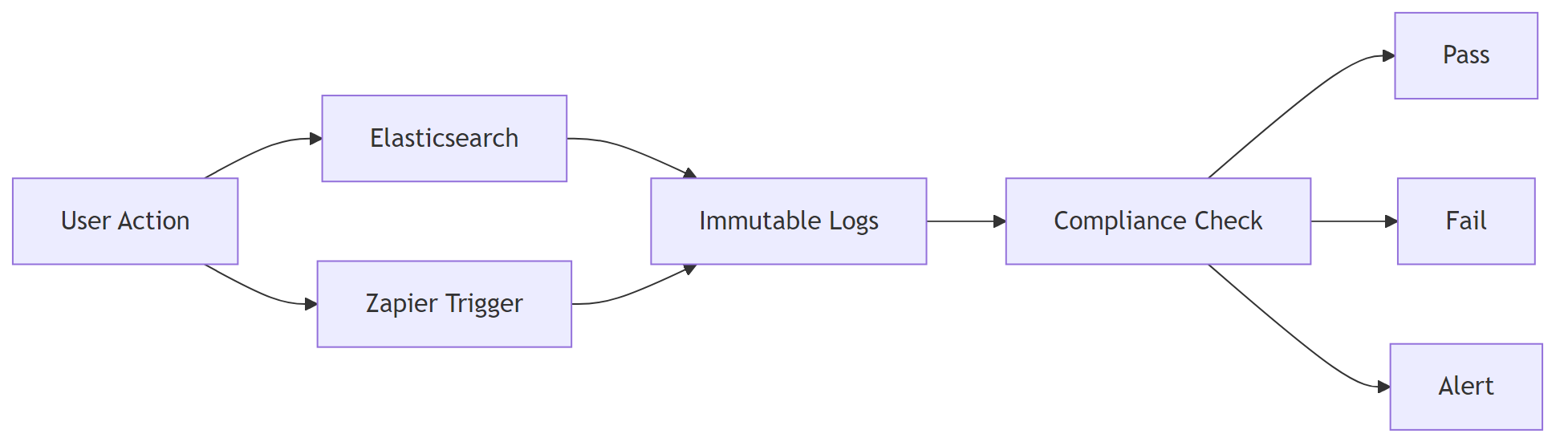
<p style="margin-bottom: 2em; line-height: 1.9;"><strong>Purpose:</strong> capture immutable execution records for forensic and compliance purposes.</p>
<h3 style="margin-bottom: 45px; line-height: 1.3;">3.1 Immutable execution logs (n8n)</h3>
<p style="margin-bottom: 2em; line-height: 1.9;">Deploy Elasticsearch with a write‑once index lifecycle policy.</p>
<pre style="background: #fafafa; padding: 20px; border: 1px solid #e0e0e0; overflow: auto;"># elasticsearch.yml – enable ILM
index.lifecycle.name: immutable_policy
index.lifecycle.rollover_alias: n8n-logs
</pre>
<pre style="background: #fafafa; padding: 20px; border: 1px solid #e0e0e0; overflow: auto;"># Policy definition – 30‑day rollover, 365‑day retention
PUT _ilm/policy/immutable_policy
{
"policy": {
"phases": {
"hot": { "actions": { "rollover": { "max_age": "30d" } } },
"delete": { "min_age": "365d", "actions": { "delete": {} } }
}
}
}
</pre>
<pre style="background: #fafafa; padding: 20px; border: 1px solid #e0e0e0; overflow: auto;"># Push a workflow execution to Elasticsearch
curl -X POST http://elasticsearch:9200/n8n-logs/_doc \
-H "Content-Type: application/json" \
-d '@execution.json'
</pre>
<p style="margin-bottom: 2em; line-height: 1.9;"><em>EEFA:</em> Verify the delete phase matches your retention policy; otherwise logs could be removed early.</p>
<h3 style="margin-bottom: 45px; line-height: 1.3;">3.2 Zapier event‑log export</h3>
<p style="margin-bottom: 2em; line-height: 1.9;">Zapier Enterprise lets you export Task History as CSV (max 90 days). For longer retention, forward each completed task to a SIEM:</p>
<ol style="margin-bottom: 1.5em; line-height: 1.9;">
<li>Create a Zap with <strong>Trigger:</strong> “Zapier Task Completed”.</li>
<li><strong>Action:</strong> Webhooks → POST → your SIEM endpoint.</li>
</ol>
<p style="margin-bottom: 2em; line-height: 1.9;"><em>Limitation:</em> Zapier does not provide a native immutable log; durability depends on downstream storage.</p>
<hr style="margin: 55px 0; border: none; border-top: 1px solid #eee;"/>
<h2 style="margin-bottom: 45px; line-height: 1.3;">4. Compliance Matrix</h2>
<table style="border-collapse: collapse; width: 100%; margin-bottom: 1.5em;">
<thead>
<tr>
<th style="padding: 13px; border: 1px solid #ddd;">Standard</th>
<th style="padding: 13px; border: 1px solid #ddd;">n8n (self‑host)</th>
<th style="padding: 13px; border: 1px solid #ddd;">Zapier (Enterprise)</th>
<th style="padding: 13px; border: 1px solid #ddd;">Implementation guidance</th>
</tr>
</thead>
<tbody>
<tr>
<td style="padding: 13px; border: 1px solid #ddd;">SOC 2 Type II</td>
<td style="padding: 13px; border: 1px solid #ddd;">(requires your own audit)</td>
<td style="padding: 13px; border: 1px solid #ddd;">(provided)</td>
<td style="padding: 13px; border: 1px solid #ddd;">Engage a CPA to audit your deployment for n8n.</td>
</tr>
<tr>
<td style="padding: 13px; border: 1px solid #ddd;">ISO 27001</td>
<td style="padding: 13px; border: 1px solid #ddd;">(if you align infra)</td>
<td style="padding: 13px; border: 1px solid #ddd;">(provided)</td>
<td style="padding: 13px; border: 1px solid #ddd;">Map controls to ISO Annex A; document in your ISMS.</td>
</tr>
<tr>
<td style="padding: 13px; border: 1px solid #ddd;">HIPAA</td>
<td style="padding: 13px; border: 1px solid #ddd;">(with encrypted storage & audit logs)</td>
<td style="padding: 13px; border: 1px solid #ddd;">(not offered)</td>
<td style="padding: 13px; border: 1px solid #ddd;">Use encrypted EBS volumes and enable CloudTrail‑style logging.</td>
</tr>
<tr>
<td style="padding: 13px; border: 1px solid #ddd;">GDPR</td>
<td style="padding: 13px; border: 1px solid #ddd;">(data residency, DPA)</td>
<td style="padding: 13px; border: 1px solid #ddd;">(EU data centers)</td>
<td style="padding: 13px; border: 1px solid #ddd;">Sign data‑processing agreements for both platforms.</td>
</tr>
<tr>
<td style="padding: 13px; border: 1px solid #ddd;">PCI‑DSS</td>
<td style="padding: 13px; border: 1px solid #ddd;">(with network segmentation)</td>
<td style="padding: 13px; border: 1px solid #ddd;">(Zapier not PCI‑validated)</td>
<td style="padding: 13px; border: 1px solid #ddd;">Deploy n8n behind a PCI‑validated firewall; mask card data.</td>
</tr>
</tbody>
</table>
<p style="margin-bottom: 2em; line-height: 1.9;"><strong>EEFA:</strong> Audits are only as strong as surrounding processes—keep documented change‑management, credential rotation, and incident‑response playbooks for either tool.</p>
<hr style="margin: 55px 0; border: none; border-top: 1px solid #eee;"/>
<h2 style="margin-bottom: 45px; line-height: 1.3;">5. Secret & Credential Management</h2>
<p style="margin-bottom: 2em; line-height: 1.9;"><strong>Purpose:</strong> store API keys and other secrets safely, avoiding plaintext in config files.</p>
<h3 style="margin-bottom: 45px; line-height: 1.3;">5.1 n8n – External secret store integration</h3>
<p style="margin-bottom: 2em; line-height: 1.9;">Reference secrets from HashiCorp Vault (or AWS/Azure equivalents) inside the n8n config.</p>
<pre style="background: #fafafa; padding: 20px; border: 1px solid #e0e0e0; overflow: auto;"># n8n.config.yml – AWS credentials via Vault
credentials:
- name: "aws"
type: "aws"
data:
accessKeyId: "{{ vault('aws/access_key_id') }}"
</pre>
<pre style="background: #fafafa; padding: 20px; border: 1px solid #e0e0e0; overflow: auto;"> secretAccessKey: "{{ vault('aws/secret_access_key') }}"
</pre>
<p style="margin-bottom: 2em; line-height: 1.9;"><em>EEFA:</em> Set <code>VAULT_ADDR</code> and <code>VAULT_TOKEN</code> as env vars; never hard‑code tokens in the config file.</p>
<h3 style="margin-bottom: 45px; line-height: 1.3;">5.2 Zapier – Encrypted API keys</h3>
<p style="margin-bottom: 2em; line-height: 1.9;">Zapier stores API keys in an internal encrypted vault. To rotate a key:</p>
<ol style="margin-bottom: 1.5em; line-height: 1.9;">
<li>Open <strong>My Apps → Edit</strong> for the relevant integration.</li>
<li>Click <strong>Regenerate</strong>.</li>
<li>Zapier flags any Zaps that lose their connection, prompting a quick fix.</li>
</ol>
<p style="margin-bottom: 2em; line-height: 1.9;">Zapier does not expose a secret‑rotation API, so rotation must be manual.</p>
<hr style="margin: 55px 0; border: none; border-top: 1px solid #eee;"/>
<h2 style="margin-bottom: 45px; line-height: 1.3;">6. Checklist: Enterprise Security Readiness</h2>
<table style="border-collapse: collapse; width: 100%; margin-bottom: 1.5em;">
<thead>
<tr>
<th style="padding: 13px; border: 1px solid #ddd;">Item</th>
<th style="padding: 13px; border: 1px solid #ddd;">Platform</th>
<th style="padding: 13px; border: 1px solid #ddd;">How to verify</th>
</tr>
</thead>
<tbody>
<tr>
<td style="padding: 13px; border: 1px solid #ddd;">TLS 1.2+ enforced</td>
<td style="padding: 13px; border: 1px solid #ddd;">n8n / Zapier</td>
<td style="padding: 13px; border: 1px solid #ddd;"><code>openssl s_client -connect <host>:443 -tls1_2</code></td>
</tr>
<tr>
<td style="padding: 13px; border: 1px solid #ddd;">SAML/SSO enabled</td>
<td style="padding: 13px; border: 1px solid #ddd;">n8n / Zapier</td>
<td style="padding: 13px; border: 1px solid #ddd;">Log in via IdP; inspect SAML response in browser dev tools</td>
</tr>
<tr>
<td style="padding: 13px; border: 1px solid #ddd;">IP allow‑list active</td>
<td style="padding: 13px; border: 1px solid #ddd;">n8n / Zapier</td>
<td style="padding: 13px; border: 1px solid #ddd;"><code>curl -I https://<host></code> from an unauthorized IP – should be blocked</td>
</tr>
<tr>
<td style="padding: 13px; border: 1px solid #ddd;">Immutable audit log</td>
<td style="padding: 13px; border: 1px solid #ddd;">n8n</td>
<td style="padding: 13px; border: 1px solid #ddd;">Query Elasticsearch index for tamper‑evidence</td>
</tr>
<tr>
<td style="padding: 13px; border: 1px solid #ddd;">SOC 2 compliance proof</td>
<td style="padding: 13px; border: 1px solid #ddd;">Zapier (certificate)</td>
<td style="padding: 13px; border: 1px solid #ddd;">Request SOC‑2 report from Zapier sales</td>
</tr>
<tr>
<td style="padding: 13px; border: 1px solid #ddd;">Secret rotation process documented</td>
<td style="padding: 13px; border: 1px solid #ddd;">Both</td>
<td style="padding: 13px; border: 1px solid #ddd;">Review SOPs; test rotation on a non‑critical credential</td>
</tr>
<tr>
<td style="padding: 13px; border: 1px solid #ddd;">Data residency confirmed</td>
<td style="padding: 13px; border: 1px solid #ddd;">Both</td>
<td style="padding: 13px; border: 1px solid #ddd;">Verify cloud region in Zapier admin console; check VM location for n8n</td>
</tr>
</tbody>
</table>
<p style="margin-bottom: 2em; line-height: 1.9;">Many teams discover a missing IP allow‑list during a post‑mortem; double‑check early.</p>
<hr style="margin: 55px 0; border: none; border-top: 1px solid #eee;"/>
<h2 style="margin-bottom: 45px; line-height: 1.3;">7. When to Choose n8n vs Zapier for Enterprise Security</h2>
<table style="border-collapse: collapse; width: 100%; margin-bottom: 1.5em;">
<thead>
<tr>
<th style="padding: 13px; border: 1px solid #ddd;">Decision factor</th>
<th style="padding: 13px; border: 1px solid #ddd;">Choose <strong>n8n</strong></th>
<th style="padding: 13px; border: 1px solid #ddd;">Choose <strong>Zapier</strong></th>
</tr>
</thead>
<tbody>
<tr>
<td style="padding: 13px; border: 1px solid #ddd;">Control over infrastructure</td>
<td style="padding: 13px; border: 1px solid #ddd;">✔️ Self‑hosted, custom firewalls, on‑prem</td>
<td style="padding: 13px; border: 1px solid #ddd;">❌ SaaS only</td>
</tr>
<tr>
<td style="padding: 13px; border: 1px solid #ddd;">Regulatory audits requiring full log control</td>
<td style="padding: 13px; border: 1px solid #ddd;">✔️ Custom audit‑log pipeline</td>
<td style="padding: 13px; border: 1px solid #ddd;">❌ Limited log granularity</td>
</tr>
<tr>
<td style="padding: 13px; border: 1px solid #ddd;">Speed of onboarding</td>
<td style="padding: 13px; border: 1px solid #ddd;">❌ Requires infra provisioning, cert management</td>
<td style="padding: 13px; border: 1px solid #ddd;">✔️ Immediate SaaS access</td>
</tr>
<tr>
<td style="padding: 13px; border: 1px solid #ddd;">Budget for security tooling</td>
<td style="padding: 13px; border: 1px solid #ddd;">✔️ Leverages existing vault, SIEM</td>
<td style="padding: 13px; border: 1px solid #ddd;">❌ Additional Zapier Enterprise license</td>
</tr>
<tr>
<td style="padding: 13px; border: 1px solid #ddd;">Future‑proofing for new standards</td>
<td style="padding: 13px; border: 1px solid #ddd;">✔️ You can add any compliance audit</td>
<td style="padding: 13px; border: 1px solid #ddd;">❌ Must wait for Zapier product updates</td>
</tr>
</tbody>
</table>
<h2 style="margin-bottom: 45px; line-height: 1.3;"></h2>
<hr style="margin: 55px 0; border: none; border-top: 1px solid #eee;"/>
<h2 style="margin-bottom: 45px; line-height: 1.3;">Conclusion</h2>
<p style="margin-bottom: 2em; line-height: 1.9;">Both platforms can satisfy enterprise security needs, but they solve different problems. <strong>n8n</strong> gives you full control over infrastructure, audit logs, and secret management essential when regulations demand custom compliance evidence or on‑premise data residency. <strong>Zapier</strong> removes the operational burden by delivering a managed SaaS with built‑in SOC 2 coverage, at the cost of reduced granularity and flexibility.</p>
<p style="margin-bottom: 2em; line-height: 1.9;">Pick the solution that aligns with your organization’s risk tolerance, compliance timeline, and operational capacity, and follow the checklist above to validate that your chosen automation platform meets the required security, compliance, and governance standards in production.</p>
Step by Step Guide to solve n8n vs zapier enterprise security
Who this is for: Security‑focused architects and engineering leads evaluating automation platforms for regulated, large‑scale environments.
Quick Diagnosis:Your organization needs a platform that meets strict security, compliance, and governance requirements.
Need on‑premise control, granular IAM, and custom audit logs? → n8n
Prefer a fully managed SaaS with built‑in SOC‑2 coverage and limited self‑service security config? → Zapier
In the field, teams often run into missing TLS hardening only when the first external audit flags it.
We cover this in detail in the n8n vs Zapier Comparison Guide.
Fast‑track security checklist
Requirement
n8n (self‑hosted)
Zapier (cloud)
TLS 1.2+ encryption in transit
✅ Configurable via reverse‑proxy (NGINX/Traefik)
✅ Managed by Zapier
Encryption at rest
✅ Disk‑level (LUKS, BitLocker)
✅ Encrypted storage, no customer control
SOC 2 / ISO 27001
❌ Only with your own audit
✅ Included in Zapier Enterprise
HIPAA / PHI
✅ Possible with HIPAA‑ready stack
❌ Not offered
GDPR / Data residency
✅ Choose any region
✅ EU data centers (limited regions)
SAML / OIDC SSO
✅ Full SAML, OIDC, LDAP, Azure AD
✅ SAML & OIDC (Enterprise tier)
IP allow‑list / VPC isolation
✅ Network firewalls, private subnets
✅ IP allow‑list (Enterprise)
Granular RBAC
✅ Fine‑grained per‑workflow
✅ Role groups, less granularity
Immutable audit log
✅ Write‑once logs (e.g., Elasticsearch)
✅ Event logs, limited retention
Secret management
✅ Vault, AWS Secrets Manager, .env encryption
✅ Encrypted API keys, no external store
1. Enterprise‑grade Network Security
Purpose: Harden the transport layer and restrict who can reach your automation endpoint.
If you encounter any n8n vs zapier pricing cost resolve them before continuing with the setup.
1.1 TLS termination & HSTS on n8n
Use Nginx as a reverse‑proxy; enforce TLS 1.2+ and add HSTS.
# /etc/nginx/conf.d/n8n.conf – basic server block
server {
    listen 443 ssl http2;
    server_name automation.example.com;
# Proxy to the local n8n process
    location / {
        proxy_pass http://localhost:5678;
        proxy_set_header Host $host;
        proxy_set_header X-Real-IP $remote_addr;
        proxy_set_header X-Forwarded-Proto $scheme;
    }
}
EEFA note: If n8n runs on plain HTTP, keep proxy_set_header X-Forwarded-Proto https; to avoid mixed‑content warnings in the UI. Why it matters: without the header the browser still tries HTTP assets, breaking the UI for some users.
1.2 IP allow‑list (n8n)
Restrict inbound traffic to known corporate ranges using the host firewall.
# Allow only the corporate subnet (example)
sudo ufw allow from 203.0.113.0/24 to any port 443 comment 'Enterprise IP range'
sudo ufw enable
Zapier Enterprise offers the same via a UI setting—no code.
2. Identity & Access Management
If you encounter any n8n vs zapier features comparison resolve them before continuing with the setup. Purpose: ensure only authorized users can log in and act on workflows.
2.1 SAML SSO configuration (n8n)
Navigate to Settings → Security → SAML.
Paste the IdP metadata URL.
Map the IdP NameID to the n8n user email.
Enable Just‑In‑Time provisioning for auto‑creation.
Zapier Enterprise supplies predefined team and admin roles but no custom permission sets. In practice, if you need a role that only views logs, a custom n8n role is usually quicker than working around Zapier’s fixed groups.
# Push a workflow execution to Elasticsearch
curl -X POST http://elasticsearch:9200/n8n-logs/_doc \
  -H "Content-Type: application/json" \
  -d '@execution.json'
EEFA: Verify the delete phase matches your retention policy; otherwise logs could be removed early.
3.2 Zapier event‑log export
Zapier Enterprise lets you export Task History as CSV (max 90 days). For longer retention, forward each completed task to a SIEM:
Create a Zap with Trigger: “Zapier Task Completed”.
Action: Webhooks → POST → your SIEM endpoint.
Limitation: Zapier does not provide a native immutable log; durability depends on downstream storage.
4. Compliance Matrix
Standard
n8n (self‑host)
Zapier (Enterprise)
Implementation guidance
SOC 2 Type II
(requires your own audit)
(provided)
Engage a CPA to audit your deployment for n8n.
ISO 27001
(if you align infra)
(provided)
Map controls to ISO Annex A; document in your ISMS.
HIPAA
(with encrypted storage & audit logs)
(not offered)
Use encrypted EBS volumes and enable CloudTrail‑style logging.
GDPR
(data residency, DPA)
(EU data centers)
Sign data‑processing agreements for both platforms.
PCI‑DSS
(with network segmentation)
(Zapier not PCI‑validated)
Deploy n8n behind a PCI‑validated firewall; mask card data.
EEFA: Audits are only as strong as surrounding processes—keep documented change‑management, credential rotation, and incident‑response playbooks for either tool.
5. Secret & Credential Management
Purpose: store API keys and other secrets safely, avoiding plaintext in config files.
5.1 n8n – External secret store integration
Reference secrets from HashiCorp Vault (or AWS/Azure equivalents) inside the n8n config.
EEFA: Set VAULT_ADDR and VAULT_TOKEN as env vars; never hard‑code tokens in the config file.
5.2 Zapier – Encrypted API keys
Zapier stores API keys in an internal encrypted vault. To rotate a key:
Open My Apps → Edit for the relevant integration.
Click Regenerate.
Zapier flags any Zaps that lose their connection, prompting a quick fix.
Zapier does not expose a secret‑rotation API, so rotation must be manual.
6. Checklist: Enterprise Security Readiness
Item
Platform
How to verify
TLS 1.2+ enforced
n8n / Zapier
openssl s_client -connect <host>:443 -tls1_2
SAML/SSO enabled
n8n / Zapier
Log in via IdP; inspect SAML response in browser dev tools
IP allow‑list active
n8n / Zapier
curl -I https://<host> from an unauthorized IP – should be blocked
Immutable audit log
n8n
Query Elasticsearch index for tamper‑evidence
SOC 2 compliance proof
Zapier (certificate)
Request SOC‑2 report from Zapier sales
Secret rotation process documented
Both
Review SOPs; test rotation on a non‑critical credential
Data residency confirmed
Both
Verify cloud region in Zapier admin console; check VM location for n8n
Many teams discover a missing IP allow‑list during a post‑mortem; double‑check early.
7. When to Choose n8n vs Zapier for Enterprise Security
Decision factor
Choose n8n
Choose Zapier
Control over infrastructure
✔️ Self‑hosted, custom firewalls, on‑prem
❌ SaaS only
Regulatory audits requiring full log control
✔️ Custom audit‑log pipeline
❌ Limited log granularity
Speed of onboarding
❌ Requires infra provisioning, cert management
✔️ Immediate SaaS access
Budget for security tooling
✔️ Leverages existing vault, SIEM
❌ Additional Zapier Enterprise license
Future‑proofing for new standards
✔️ You can add any compliance audit
❌ Must wait for Zapier product updates
Conclusion
Both platforms can satisfy enterprise security needs, but they solve different problems. n8n gives you full control over infrastructure, audit logs, and secret management essential when regulations demand custom compliance evidence or on‑premise data residency. Zapier removes the operational burden by delivering a managed SaaS with built‑in SOC 2 coverage, at the cost of reduced granularity and flexibility.
Pick the solution that aligns with your organization’s risk tolerance, compliance timeline, and operational capacity, and follow the checklist above to validate that your chosen automation platform meets the required security, compliance, and governance standards in production.