<figure class="wp-block-image aligncenter"><img alt="Step by Step Guide to solve n8n vs zapier automation tool comparison" decoding="async" src="https://flowgenius.in/wp-content/uploads/2026/01/n8n-vs-zapier-automation-tool-comparison.png"/><figcaption style="text-align: center;">Step by Step Guide to solve n8n vs zapier automation tool comparison</p>
<hr/>
</figcaption></figure>
<p style="margin-bottom: 2em; line-height: 1.9;"><strong>Who this is for:</strong><br />
Developers, DevOps engineers, and technical product teams evaluating low‑code automation platforms for production workloads. <strong>We cover this in detail in the </strong>n8n vs Zapier Comparison Guide.</p>
<hr style="margin: 55px 0; border: none;"/>
<h2 style="margin-bottom: 45px; line-height: 1.3;">Feature Table</h2>
<table style="border-collapse: collapse; width: 100%; margin-bottom: 2em;">
<thead>
<tr>
<th style="border: 1px solid #e0e0e0; padding: 12px;">Feature</th>
<th style="border: 1px solid #e0e0e0; padding: 12px;">n8n</th>
<th style="border: 1px solid #e0e0e0; padding: 12px;">Zapier</th>
</tr>
</thead>
<tbody>
<tr>
<td style="border: 1px solid #e0e0e0; padding: 12px;"><strong>Hosting</strong></td>
<td style="border: 1px solid #e0e0e0; padding: 12px;">Self‑hosted (Docker, Kubernetes, Vercel) – full data control</td>
<td style="border: 1px solid #e0e0e0; padding: 12px;">Cloud SaaS – no infra to manage</td>
</tr>
<tr>
<td style="border: 1px solid #e0e0e0; padding: 12px;"><strong>Pricing</strong></td>
<td style="border: 1px solid #e0e0e0; padding: 12px;">Free core, paid “Pro” for advanced nodes & support</td>
<td style="border: 1px solid #e0e0e0; padding: 12px;">Free tier (100 tasks/mo), paid plans start at $19.99/mo</td>
</tr>
<tr>
<td style="border: 1px solid #e0e0e0; padding: 12px;"><strong>Scalability</strong></td>
<td style="border: 1px solid #e0e0e0; padding: 12px;">Horizontal scaling via containers; unlimited workflows</td>
<td style="border: 1px solid #e0e0e0; padding: 12px;">Scales automatically, limited by task quota</td>
</tr>
<tr>
<td style="border: 1px solid #e0e0e0; padding: 12px;"><strong>Developer Flexibility</strong></td>
<td style="border: 1px solid #e0e0e0; padding: 12px;">JavaScript code nodes, custom API calls, open‑source</td>
<td style="border: 1px solid #e0e0e0; padding: 12px;">Limited scripting; built‑in “Code” step (Python/JS)</td>
</tr>
<tr>
<td style="border: 1px solid #e0e0e0; padding: 12px;"><strong>Security / Compliance</strong></td>
<td style="border: 1px solid #e0e0e0; padding: 12px;">On‑prem data residency, GDPR, SOC‑2 possible</td>
<td style="border: 1px solid #e0e0e0; padding: 12px;">SOC‑2, ISO‑27001, but data lives on Zapier’s cloud</td>
</tr>
<tr>
<td style="border: 1px solid #e0e0e0; padding: 12px;"><strong>Best for</strong></td>
<td style="border: 1px solid #e0e0e0; padding: 12px;">Complex, custom, on‑prem integrations; dev‑heavy teams</td>
<td style="border: 1px solid #e0e0e0; padding: 12px;">Quick, low‑code automations; non‑technical users</td>
</tr>
</tbody>
</table>
<p style="margin-bottom: 2em; line-height: 1.9;"><strong>Quick Decision:</strong><br />
– Choose <strong>n8n</strong> if you need full control, unlimited custom code, or must keep data on‑premise.<br />
– Choose <strong>Zapier</strong> if you prefer a zero‑maintenance, UI‑first platform and your automations stay within Zapier’s task limits.</p>
<p style="margin-bottom: 2em; line-height: 1.9;"><em>In production, you’ll often hit the rate‑limit edge case within the first few weeks, so keep an eye on usage early on. </em></p>
<hr style="margin: 55px 0; border: none;"/>
<figure class="wp-block-image aligncenter" style="padding-top:20px; padding-bottom:40px;">
<img src="https://flowgenius.in/wp-content/uploads/2026/02/6199_diagram-1-3.png"/><br />
</figure>
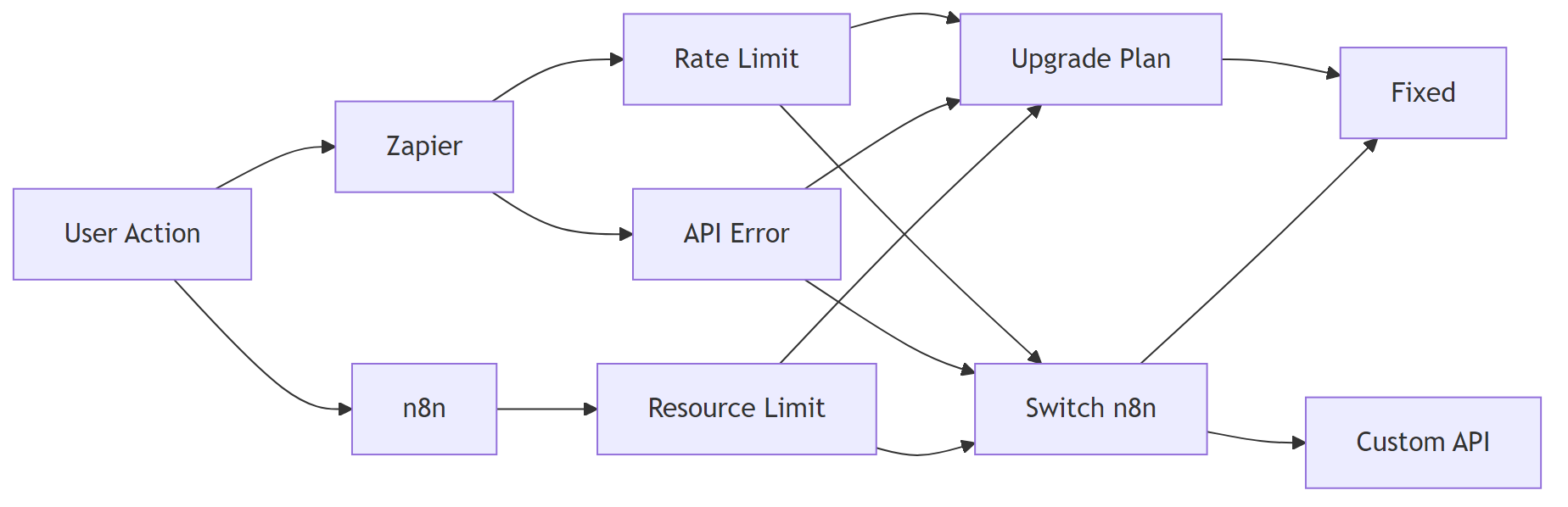
<h2 style="margin-bottom: 45px; line-height: 1.3;">Quick Diagnosis: When Your Automation Choice Stalls?</h2>
<table style="border-collapse: collapse; width: 100%; margin-bottom: 2em;">
<thead>
<tr>
<th style="border: 1px solid #e0e0e0; padding: 12px;">Symptom</th>
<th style="border: 1px solid #e0e0e0; padding: 12px;">Likely Cause</th>
<th style="border: 1px solid #e0e0e0; padding: 12px;">Immediate Fix</th>
</tr>
</thead>
<tbody>
<tr>
<td style="border: 1px solid #e0e0e0; padding: 12px;">“My workflow hits a rate‑limit after 100 runs”</td>
<td style="border: 1px solid #e0e0e0; padding: 12px;">Using Zapier free tier (100 tasks/mo)</td>
<td style="border: 1px solid #e0e0e0; padding: 12px;">Upgrade to a paid Zapier plan <strong>or</strong> switch to n8n’s self‑hosted free tier.</td>
</tr>
<tr>
<td style="border: 1px solid #e0e0e0; padding: 12px;">“Custom API returns 401 in Zapier but works in Postman”</td>
<td style="border: 1px solid #e0e0e0; padding: 12px;">Zapier’s “Code” step hides auth headers</td>
<td style="border: 1px solid #e0e0e0; padding: 12px;">Use n8n’s <strong>HTTP Request</strong> node to fully control headers, or add the missing <code>Authorization</code> header in Zapier’s “Headers” field.</td>
</tr>
<tr>
<td style="border: 1px solid #e0e0e0; padding: 12px;">“Workflow execution slows down after a month”</td>
<td style="border: 1px solid #e0e0e0; padding: 12px;">n8n running on a single‑node Docker without resource limits</td>
<td style="border: 1px solid #e0e0e0; padding: 12px;">Scale n8n horizontally (K8s) or increase Docker memory/CPU limits.</td>
</tr>
</tbody>
</table>
<hr style="margin: 55px 0; border: none;"/>
<figure class="wp-block-image aligncenter" style="padding-top:20px; padding-bottom:40px;">
<img src="https://flowgenius.in/wp-content/uploads/2026/02/6199_diagram-2-3.png"/><br />
</figure>
<h2 style="margin-bottom: 45px; line-height: 1.3;">1. Core Architectural Differences</h2>
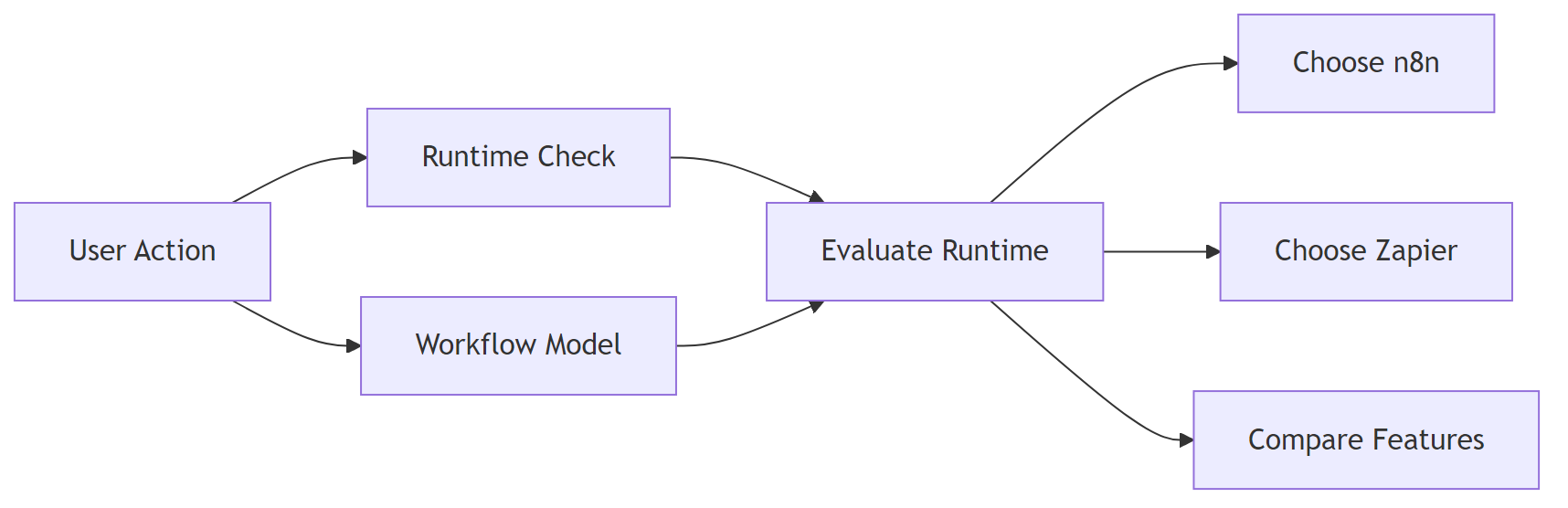
<p style="margin-bottom: 2em; line-height: 1.9;">*It explains runtimes and workflow models so you can gauge effort.*<br />
If you encounter any <a href="/n8n-vs-zapier-features-comparison">n8n vs zapier features comparison </a>resolve them before continuing with the setup.</p>
<table style="border-collapse: collapse; width: 100%; margin-bottom: 2em;">
<thead>
<tr>
<th style="border: 1px solid #e0e0e0; padding: 12px;">Aspect</th>
<th style="border: 1px solid #e0e0e0; padding: 12px;">n8n</th>
<th style="border: 1px solid #e0e0e0; padding: 12px;">Zapier</th>
</tr>
</thead>
<tbody>
<tr>
<td style="border: 1px solid #e0e0e0; padding: 12px;"><strong>Runtime</strong></td>
<td style="border: 1px solid #e0e0e0; padding: 12px;">Node.js, open‑source, runs anywhere Docker/K8s/Vercel supports</td>
<td style="border: 1px solid #e0e0e0; padding: 12px;">Proprietary SaaS, managed runtime</td>
</tr>
<tr>
<td style="border: 1px solid #e0e0e0; padding: 12px;"><strong>Workflow Model</strong></td>
<td style="border: 1px solid #e0e0e0; padding: 12px;">Directed acyclic graph (DAG) with conditional branches; each node can be a custom JS function</td>
<td style="border: 1px solid #e0e0e0; padding: 12px;">Linear “Zap” steps; limited branching via “Paths” (requires paid plan)</td>
</tr>
<tr>
<td style="border: 1px solid #e0e0e0; padding: 12px;"><strong>Extensibility</strong></td>
<td style="border: 1px solid #e0e0e0; padding: 12px;">Add custom nodes via NPM, write raw JS in <strong>Function</strong> node, fork the repo</td>
<td style="border: 1px solid #e0e0e0; padding: 12px;">“Code” step (Python/JS) but no node marketplace; limited to pre‑built integrations</td>
</tr>
<tr>
<td style="border: 1px solid #e0e0e0; padding: 12px;"><strong>Data Persistence</strong></td>
<td style="border: 1px solid #e0e0e0; padding: 12px;">PostgreSQL (or SQLite) on your infra; can be encrypted at rest</td>
<td style="border: 1px solid #e0e0e0; padding: 12px;">Managed PostgreSQL; data stored in Zapier’s cloud</td>
</tr>
<tr>
<td style="border: 1px solid #e0e0e0; padding: 12px;"><strong>Community</strong></td>
<td style="border: 1px solid #e0e0e0; padding: 12px;">10k+ community‑contributed nodes, active Discord, GitHub issues</td>
<td style="border: 1px solid #e0e0e0; padding: 12px;">Zapier Community forums; fewer open‑source contributions</td>
</tr>
</tbody>
</table>
<p style="margin-bottom: 2em; line-height: 1.9;">That difference shows up in how you plan upgrades and incident response.</p>
<p style="margin-bottom: 2em; line-height: 1.9;"><strong>EEFA Note:</strong> Self‑hosting n8n adds operational security responsibilities (OS patches, DB credential rotation, TLS, log monitoring). Zapier offloads this but you must trust their compliance certifications.</p>
<hr style="margin: 55px 0; border: none;"/>
<figure class="wp-block-image aligncenter" style="padding-top:20px; padding-bottom:40px;">
<img src="https://flowgenius.in/wp-content/uploads/2026/02/6199_diagram-3-3.png"/><br />
</figure>
<h2 style="margin-bottom: 45px; line-height: 1.3;">2. Pricing & Cost Modeling (Real‑World Scenarios)</h2>
<h3 style="margin-bottom: 45px; line-height: 1.3;">2.1. Small Startup (≤5 integrations, ≤1,000 monthly runs)</h3>
<table style="border-collapse: collapse; width: 100%; margin-bottom: 2em;">
<thead>
<tr>
<th style="border: 1px solid #e0e0e0; padding: 12px;">Platform</th>
<th style="border: 1px solid #e0e0e0; padding: 12px;">Monthly Cost</th>
<th style="border: 1px solid #e0e0e0; padding: 12px;">Hidden Costs</th>
</tr>
</thead>
<tbody>
<tr>
<td style="border: 1px solid #e0e0e0; padding: 12px;"><strong>n8n</strong> (Docker on cheap VPS)</td>
<td style="border: 1px solid #e0e0e0; padding: 12px;">$0 (free tier) + $5‑$10 VPS</td>
<td style="border: 1px solid #e0e0e0; padding: 12px;">Maintenance time (~2 hrs/mo)</td>
</tr>
<tr>
<td style="border: 1px solid #e0e0e0; padding: 12px;"><strong>Zapier</strong> (Free)</td>
<td style="border: 1px solid #e0e0e0; padding: 12px;">$0</td>
<td style="border: 1px solid #e0e0e0; padding: 12px;">Task cap 100 tasks → upgrade to Starter $19.99/mo for 3,000 tasks</td>
</tr>
</tbody>
</table>
<p style="margin-bottom: 2em; line-height: 1.9;"><strong>Recommendation:</strong> n8n wins if you have a dev who can maintain a tiny VPS; otherwise Zapier Starter is cheaper in pure monetary terms. <em>When you’re already running Docker, adding n8n is a minimal incremental cost. If you encounter any <a href="/n8n-vs-zapier-pricing-cost">n8n vs zapier pricing cost </a>resolve them before continuing with the setup.</em></p>
<h3 style="margin-bottom: 45px; line-height: 1.3;">2.2. Enterprise (10,000+ runs, compliance needs)</h3>
<table style="border-collapse: collapse; width: 100%; margin-bottom: 2em;">
<thead>
<tr>
<th style="border: 1px solid #e0e0e0; padding: 12px;">Platform</th>
<th style="border: 1px solid #e0e0e0; padding: 12px;">License/Plan</th>
<th style="border: 1px solid #e0e0e0; padding: 12px;">Approx. Cost</th>
<th style="border: 1px solid #e0e0e0; padding: 12px;">Compliance Fit</th>
</tr>
</thead>
<tbody>
<tr>
<td style="border: 1px solid #e0e0e0; padding: 12px;"><strong>n8n Pro</strong> (Self‑hosted, support)</td>
<td style="border: 1px solid #e0e0e0; padding: 12px;">$20/seat + infrastructure</td>
<td style="border: 1px solid #e0e0e0; padding: 12px;">$500‑$2,000 (depends on infra)</td>
<td style="border: 1px solid #e0e0e0; padding: 12px;">Full data residency, can be audited</td>
</tr>
<tr>
<td style="border: 1px solid #e0e0e0; padding: 12px;"><strong>Zapier</strong> (Team/Enterprise)</td>
<td style="border: 1px solid #e0e0e0; padding: 12px;">$299+/seat</td>
<td style="border: 1px solid #e0e0e0; padding: 12px;">$2,500‑$5,000</td>
<td style="border: 1px solid #e0e0e0; padding: 12px;">SOC‑2, ISO‑27001, but data leaves your network</td>
</tr>
</tbody>
</table>
<p style="margin-bottom: 2em; line-height: 1.9;"><strong>EEFA Note:</strong> For GDPR‑critical workloads, n8n’s on‑prem option eliminates cross‑border data transfer risk, whereas Zapier requires a Data Processing Addendum (DPA) and may still store data in EU‑compliant regions.</p>
<hr style="margin: 55px 0; border: none;"/>
<h2 style="margin-bottom: 45px; line-height: 1.3;">3. Step‑by‑Step: Building a “New Lead → Slack → CRM” Automation</h2>
<h3 style="margin-bottom: 45px; line-height: 1.3;">3.1. n8n Implementation</h3>
<p style="margin-bottom: 2em; line-height: 1.9;"><strong>Deploy n8n with Docker:</strong> first set environment variables, then run the container.<br />
If you encounter any <a href="/n8n-vs-zapier-performance-scaling">n8n vs zapier performance scaling </a>resolve them before continuing with the setup.</p>
<pre style="background: #fafafa; padding: 20px; border: 1px solid #e0e0e0; overflow: auto;"># Environment variables (adjust values for your DB)
export DB_TYPE=postgresdb
export DB_POSTGRESDB_HOST=postgres
export DB_POSTGRESDB_PORT=5432
export DB_POSTGRESDB_DATABASE=n8n
export DB_POSTGRESDB_USER=n8n_user
export DB_POSTGRESDB_PASSWORD=StrongPass!
</pre>
<pre style="background: #fafafa; padding: 20px; border: 1px solid #e0e0e0; overflow: auto;"># Run n8n container (exposes UI on port 5678)
docker run -d \
--name n8n \
-p 5678:5678 \
-e DB_TYPE=$DB_TYPE \
-e DB_POSTGRESDB_HOST=$DB_POSTGRESDB_HOST \
-e DB_POSTGRESDB_PORT=$DB_POSTGRESDB_PORT \
-e DB_POSTGRESDB_DATABASE=$DB_POSTGRESDB_DATABASE \
-e DB_POSTGRESDB_USER=$DB_POSTGRESDB_USER \
-e DB_POSTGRESDB_PASSWORD=$DB_POSTGRESDB_PASSWORD \
n8nio/n8n
</pre>
<p style="margin-bottom: 2em; line-height: 1.9;"><em>Ensure DB credentials match the provisioned instance.</em></p>
<p style="margin-bottom: 2em; line-height: 1.9;"><strong>Create the workflow</strong></p>
<ol style="line-height: 1.9; margin-bottom: 1.8em;">
<li>Trigger Node – Webhook – <code>POST /lead</code> captures incoming lead JSON.</li>
<li>Optional Function Node – transforms payload:
<pre style="background: #fafafa; padding: 20px; border: 1px solid #e0e0e0; overflow: auto;">// n8n Function node (3 lines)
const { firstName, email } = items[0].json;
return [{ json: { text: `New lead: ${firstName} (${email})` } }];
</pre>
</li>
<li>Slack Node – send the <code>text</code> field to a channel.</li>
<li>HTTP Request Node (CRM) – POST to <code>https://api.mycrm.com/leads</code> with an <code>Authorization</code> header.</li>
</ol>
<p style="margin-bottom: 2em; line-height: 1.9;"><strong>EEFA Tip:</strong> Enable <em>Rate Limiting</em> in the Webhook node (<code>maxConcurrentRequests: 5</code>) to protect against traffic spikes.</p>
<h3 style="margin-bottom: 45px; line-height: 1.3;">3.2. Zapier Implementation</h3>
<ol style="line-height: 1.9; margin-bottom: 1.8em;">
<li>Create a Zap → Trigger: <em>Webhooks by Zapier – Catch Hook</em> (copy the generated URL).</li>
<li>Action 1 – Slack: <em>Send Channel Message</em> → map fields from the webhook payload.</li>
<li>Action 2 – Webhooks by Zapier: <em>Custom Request</em> →<br />
• Method: <code>POST</code><br />
• URL: <code>https://api.mycrm.com/leads</code><br />
• Headers: <code>Authorization: Bearer <API_KEY></code><br />
• JSON body: lead data.</li>
<li>Test & Turn On the Zap.</li>
</ol>
<p style="margin-bottom: 2em; line-height: 1.9;"><strong>EEFA Tip:</strong> Zapier’s free tier discards webhook payloads after 15 minutes. Add “Storage by Zapier” if you need temporary persistence.</p>
<hr style="margin: 55px 0; border: none;"/>
<h2 style="margin-bottom: 45px; line-height: 1.3;">4. Advanced Use Cases & Limitations</h2>
<table style="border-collapse: collapse; width: 100%; margin-bottom: 2em;">
<thead>
<tr>
<th style="border: 1px solid #e0e0e0; padding: 12px;">Use Case</th>
<th style="border: 1px solid #e0e0e0; padding: 12px;">n8n Strength</th>
<th style="border: 1px solid #e0e0e0; padding: 12px;">Zapier Limitation</th>
</tr>
</thead>
<tbody>
<tr>
<td style="border: 1px solid #e0e0e0; padding: 12px;">Complex branching (multi‑path, loops)</td>
<td style="border: 1px solid #e0e0e0; padding: 12px;">Full DAG, loop nodes, conditional expressions (<code>{{ $json["status"] === "active" }}</code>)</td>
<td style="border: 1px solid #e0e0e0; padding: 12px;">Paths only on paid plans; no loops</td>
</tr>
<tr>
<td style="border: 1px solid #e0e0e0; padding: 12px;">Bulk data processing (≥10k rows)</td>
<td style="border: 1px solid #e0e0e0; padding: 12px;">Stream via <strong>SplitInBatches</strong> node, process in chunks</td>
<td style="border: 1px solid #e0e0e0; padding: 12px;">Each row counts as a task → quickly exceeds quota</td>
</tr>
<tr>
<td style="border: 1px solid #e0e0e0; padding: 12px;">Real‑time file transformation</td>
<td style="border: 1px solid #e0e0e0; padding: 12px;"><strong>FFmpeg</strong> node (custom Docker image) for media processing</td>
<td style="border: 1px solid #e0e0e0; padding: 12px;">No native media handling; must call external service</td>
</tr>
<tr>
<td style="border: 1px solid #e0e0e0; padding: 12px;">OAuth 2.0 with PKCE</td>
<td style="border: 1px solid #e0e0e0; padding: 12px;">Custom HTTP node can implement PKCE flow</td>
<td style="border: 1px solid #e0e0e0; padding: 12px;">Zapier’s built‑in OAuth lacks PKCE support</td>
</tr>
</tbody>
</table>
<p style="margin-bottom: 2em; line-height: 1.9;">If you need loops, n8n is the only practical option – Zapier just can’t express them.</p>
<p style="margin-bottom: 2em; line-height: 1.9;"><strong>EEFA Note:</strong> When handling PII in bulk, encrypt n8n’s PostgreSQL at rest (e.g., <code>pgcrypto</code> extension) and enable audit logging. Zapier’s logs are not user‑accessible for compliance audits.</p>
<hr style="margin: 55px 0; border: none;"/>
<h2 style="margin-bottom: 45px; line-height: 1.3;">5. Troubleshooting Checklist</h2>
<table style="border-collapse: collapse; width: 100%; margin-bottom: 2em;">
<thead>
<tr>
<th style="border: 1px solid #e0e0e0; padding: 12px;">Symptom</th>
<th style="border: 1px solid #e0e0e0; padding: 12px;">Checklist (run in order)</th>
</tr>
</thead>
<tbody>
<tr>
<td style="border: 1px solid #e0e0e0; padding: 12px;"><strong>Workflow fails on HTTP Request</strong></td>
<td style="border: 1px solid #e0e0e0; padding: 12px;">1️⃣ Verify endpoint reachable (<code>curl -I <url></code>).<br />
2️⃣ Confirm auth headers (use n8n <strong>Set</strong> node to log them).<br />
3️⃣ Inspect response code in the **Error** output.<br />
4️⃣ Enable retry (<code>maxAttempts = 3</code>).</td>
</tr>
<tr>
<td style="border: 1px solid #e0e0e0; padding: 12px;"><strong>Zapier “Task Limit Exceeded”</strong></td>
<td style="border: 1px solid #e0e0e0; padding: 12px;">1️⃣ Review usage on **My Zaps → Usage**.<br />
2️⃣ Consolidate actions into a single “Code” step.<br />
3️⃣ Offload heavy logic to an external webhook (e.g., Cloud Function).</td>
</tr>
<tr>
<td style="border: 1px solid #e0e0e0; padding: 12px;"><strong>n8n “Cannot connect to DB”</strong></td>
<td style="border: 1px solid #e0e0e0; padding: 12px;">1️⃣ Check DB container health (<code>docker ps</code>).<br />
2️⃣ Verify env vars (<code>DB_POSTGRESDB_PASSWORD</code>).<br />
3️⃣ Ensure network bridge allows port 5432.<br />
4️⃣ View logs: <code>docker logs n8n</code>.</td>
</tr>
<tr>
<td style="border: 1px solid #e0e0e0; padding: 12px;"><strong>Data not arriving in Slack</strong></td>
<td style="border: 1px solid #e0e0e0; padding: 12px;">1️⃣ Test Slack token (<code>curl https://slack.com/api/auth.test</code>).<br />
2️⃣ Confirm channel ID.<br />
3️⃣ Review execution log for <code>invalid_auth</code> errors.</td>
</tr>
<tr>
<td style="border: 1px solid #e0e0e0; padding: 12px;"><strong>Latency > 5 s per run</strong></td>
<td style="border: 1px solid #e0e0e0; padding: 12px;">1️⃣ Profile each node’s execution time (n8n UI shows ms).<br />
2️⃣ Move heavy processing to a microservice.<br />
3️⃣ Scale n8n horizontally (add replicas).</td>
</tr>
</tbody>
</table>
<p style="margin-bottom: 2em; line-height: 1.9;">In our experience, the most common cause of a failed HTTP node is a missing trailing slash on the target URL.</p>
<hr style="margin: 55px 0; border: none;"/>
<h2 style="margin-bottom: 45px; line-height: 1.3;">Bottom Line</h2>
<ul style="line-height: 1.9; margin-bottom: 1.8em;">
<li><strong>Pick n8n</strong> when you need <strong>custom code, data sovereignty, or unlimited workflow complexity</strong> and you have the technical bandwidth to manage infrastructure.</li>
<li><strong>Pick Zapier</strong> when you prioritize <strong>speed of implementation, zero ops, and a UI that non‑developers can master</strong>—and your automation volume stays within the platform’s task limits.</li>
</ul>
<p style="margin-bottom: 2em; line-height: 1.9;"><em>Base your decision on the matrix above, your team’s skill set, and compliance requirements.</em></p>
Step by Step Guide to solve n8n vs zapier automation tool comparison
Who this is for:
Developers, DevOps engineers, and technical product teams evaluating low‑code automation platforms for production workloads. We cover this in detail in the n8n vs Zapier Comparison Guide.
Feature Table
Feature
n8n
Zapier
Hosting
Self‑hosted (Docker, Kubernetes, Vercel) – full data control
Cloud SaaS – no infra to manage
Pricing
Free core, paid “Pro” for advanced nodes & support
Free tier (100 tasks/mo), paid plans start at $19.99/mo
Scalability
Horizontal scaling via containers; unlimited workflows
Scales automatically, limited by task quota
Developer Flexibility
JavaScript code nodes, custom API calls, open‑source
SOC‑2, ISO‑27001, but data lives on Zapier’s cloud
Best for
Complex, custom, on‑prem integrations; dev‑heavy teams
Quick, low‑code automations; non‑technical users
Quick Decision:
– Choose n8n if you need full control, unlimited custom code, or must keep data on‑premise.
– Choose Zapier if you prefer a zero‑maintenance, UI‑first platform and your automations stay within Zapier’s task limits.
In production, you’ll often hit the rate‑limit edge case within the first few weeks, so keep an eye on usage early on.
Quick Diagnosis: When Your Automation Choice Stalls?
Symptom
Likely Cause
Immediate Fix
“My workflow hits a rate‑limit after 100 runs”
Using Zapier free tier (100 tasks/mo)
Upgrade to a paid Zapier plan or switch to n8n’s self‑hosted free tier.
“Custom API returns 401 in Zapier but works in Postman”
Zapier’s “Code” step hides auth headers
Use n8n’s HTTP Request node to fully control headers, or add the missing Authorization header in Zapier’s “Headers” field.
“Workflow execution slows down after a month”
n8n running on a single‑node Docker without resource limits
Scale n8n horizontally (K8s) or increase Docker memory/CPU limits.
1. Core Architectural Differences
*It explains runtimes and workflow models so you can gauge effort.*
If you encounter any n8n vs zapier features comparison resolve them before continuing with the setup.
Directed acyclic graph (DAG) with conditional branches; each node can be a custom JS function
Linear “Zap” steps; limited branching via “Paths” (requires paid plan)
Extensibility
Add custom nodes via NPM, write raw JS in Function node, fork the repo
“Code” step (Python/JS) but no node marketplace; limited to pre‑built integrations
Data Persistence
PostgreSQL (or SQLite) on your infra; can be encrypted at rest
Managed PostgreSQL; data stored in Zapier’s cloud
Community
10k+ community‑contributed nodes, active Discord, GitHub issues
Zapier Community forums; fewer open‑source contributions
That difference shows up in how you plan upgrades and incident response.
EEFA Note: Self‑hosting n8n adds operational security responsibilities (OS patches, DB credential rotation, TLS, log monitoring). Zapier offloads this but you must trust their compliance certifications.
2. Pricing & Cost Modeling (Real‑World Scenarios)
2.1. Small Startup (≤5 integrations, ≤1,000 monthly runs)
Platform
Monthly Cost
Hidden Costs
n8n (Docker on cheap VPS)
$0 (free tier) + $5‑$10 VPS
Maintenance time (~2 hrs/mo)
Zapier (Free)
$0
Task cap 100 tasks → upgrade to Starter $19.99/mo for 3,000 tasks
Recommendation: n8n wins if you have a dev who can maintain a tiny VPS; otherwise Zapier Starter is cheaper in pure monetary terms. When you’re already running Docker, adding n8n is a minimal incremental cost. If you encounter any n8n vs zapier pricing cost resolve them before continuing with the setup.
2.2. Enterprise (10,000+ runs, compliance needs)
Platform
License/Plan
Approx. Cost
Compliance Fit
n8n Pro (Self‑hosted, support)
$20/seat + infrastructure
$500‑$2,000 (depends on infra)
Full data residency, can be audited
Zapier (Team/Enterprise)
$299+/seat
$2,500‑$5,000
SOC‑2, ISO‑27001, but data leaves your network
EEFA Note: For GDPR‑critical workloads, n8n’s on‑prem option eliminates cross‑border data transfer risk, whereas Zapier requires a Data Processing Addendum (DPA) and may still store data in EU‑compliant regions.
3. Step‑by‑Step: Building a “New Lead → Slack → CRM” Automation
3.1. n8n Implementation
Deploy n8n with Docker: first set environment variables, then run the container.
If you encounter any n8n vs zapier performance scaling resolve them before continuing with the setup.
# Environment variables (adjust values for your DB)
export DB_TYPE=postgresdb
export DB_POSTGRESDB_HOST=postgres
export DB_POSTGRESDB_PORT=5432
export DB_POSTGRESDB_DATABASE=n8n
export DB_POSTGRESDB_USER=n8n_user
export DB_POSTGRESDB_PASSWORD=StrongPass!
# Run n8n container (exposes UI on port 5678)
docker run -d \
  --name n8n \
  -p 5678:5678 \
  -e DB_TYPE=$DB_TYPE \
  -e DB_POSTGRESDB_HOST=$DB_POSTGRESDB_HOST \
  -e DB_POSTGRESDB_PORT=$DB_POSTGRESDB_PORT \
  -e DB_POSTGRESDB_DATABASE=$DB_POSTGRESDB_DATABASE \
  -e DB_POSTGRESDB_USER=$DB_POSTGRESDB_USER \
  -e DB_POSTGRESDB_PASSWORD=$DB_POSTGRESDB_PASSWORD \
  n8nio/n8n
Ensure DB credentials match the provisioned instance.
Create the workflow
Trigger Node – Webhook – POST /lead captures incoming lead JSON.
FFmpeg node (custom Docker image) for media processing
No native media handling; must call external service
OAuth 2.0 with PKCE
Custom HTTP node can implement PKCE flow
Zapier’s built‑in OAuth lacks PKCE support
If you need loops, n8n is the only practical option – Zapier just can’t express them.
EEFA Note: When handling PII in bulk, encrypt n8n’s PostgreSQL at rest (e.g., pgcrypto extension) and enable audit logging. Zapier’s logs are not user‑accessible for compliance audits.
5. Troubleshooting Checklist
Symptom
Checklist (run in order)
Workflow fails on HTTP Request
1️⃣ Verify endpoint reachable (curl -I <url>).
2️⃣ Confirm auth headers (use n8n Set node to log them).
3️⃣ Inspect response code in the **Error** output.
4️⃣ Enable retry (maxAttempts = 3).
Zapier “Task Limit Exceeded”
1️⃣ Review usage on **My Zaps → Usage**.
2️⃣ Consolidate actions into a single “Code” step.
3️⃣ Offload heavy logic to an external webhook (e.g., Cloud Function).
n8n “Cannot connect to DB”
1️⃣ Check DB container health (docker ps).
2️⃣ Verify env vars (DB_POSTGRESDB_PASSWORD).
3️⃣ Ensure network bridge allows port 5432.
4️⃣ View logs: docker logs n8n.
Data not arriving in Slack
1️⃣ Test Slack token (curl https://slack.com/api/auth.test).
2️⃣ Confirm channel ID.
3️⃣ Review execution log for invalid_auth errors.
Latency > 5 s per run
1️⃣ Profile each node’s execution time (n8n UI shows ms).
2️⃣ Move heavy processing to a microservice.
3️⃣ Scale n8n horizontally (add replicas).
In our experience, the most common cause of a failed HTTP node is a missing trailing slash on the target URL.
Bottom Line
Pick n8n when you need custom code, data sovereignty, or unlimited workflow complexity and you have the technical bandwidth to manage infrastructure.
Pick Zapier when you prioritize speed of implementation, zero ops, and a UI that non‑developers can master—and your automation volume stays within the platform’s task limits.
Base your decision on the matrix above, your team’s skill set, and compliance requirements.