UPSERT Not Updating Existing Records
Quick Diagnosis
If your UPSERT command in n8n doesn’t modify pre-existing entries, the database did not find any row that matches the conflict criteria. Common reasons:
- Missing or misconfigured UNIQUE index
- Incorrect ON CONFLICT column(s)
- Differences in data formatting (e.g., case, trailing spaces)
n8n executes the query successfully but does not alert when no updates occur. Verification via RETURNING or a follow-up SELECT is essential.
This guide assumes your PostgreSQL connection is already working If your workflow cannot connect reliably, fix that first: n8n PostgreSQL Connection Not Working? SSL, Credentials & Network Fixes
Understanding Why Updates May Not Happen?
UPSERT operations only trigger changes when a conflict exists.
If the system finds no conflict:
- No update occurs
- Query completes without errors
- n8n displays success, though rows remain unchanged
This is expected behavior at the database level. If your PostgreSQL node runs successfully but neither INSERT nor UPDATE modifies any rows,
this may not be an UPSERT-specific issue. In such cases, review: n8n PostgreSQL Node Executes but Data Doesn’t Update
Show users how to confirm which rows exist:
-- Check if a row already exists
SELECT *
FROM customers
WHERE email = 'user@example.com';
Critical Rules for UPSERT Execution
- A UNIQUE index or constraint is mandatory on the column(s) used in the conflict clause.
- Columns listed in ON CONFLICT must match the index precisely.
- Partial or expression-based indexes may prevent updates.
- Be mindful of case sensitivity and whitespace; small mismatches stop the conflict detection.
Typical Scenarios Leading to No Updates
| Situation | Expected Result | Actual Behavior |
|---|---|---|
| No UNIQUE index on conflict column | Row updated | Database inserts new row |
| Conflict column mismatch | Row updated | Inserts silently |
| NULL in conflict column | Row updated | No update |
| Input data differs (capitalization, spacing) | Row updated | Skipped silently |
How to Validate Conflict Detection?
Run these queries to inspect constraints and execution:
-- Examine table constraints
SELECT conname, pg_get_constraintdef(oid)
FROM pg_constraint
WHERE conrelid = 'your_table'::regclass;
-- Analyze UPSERT execution plan
EXPLAIN INSERT INTO your_table (...)
ON CONFLICT (conflict_column)
DO UPDATE SET column = EXCLUDED.column;Ensure the conflict column has an index, and input matches the index format exactly.
n8n-Specific Considerations
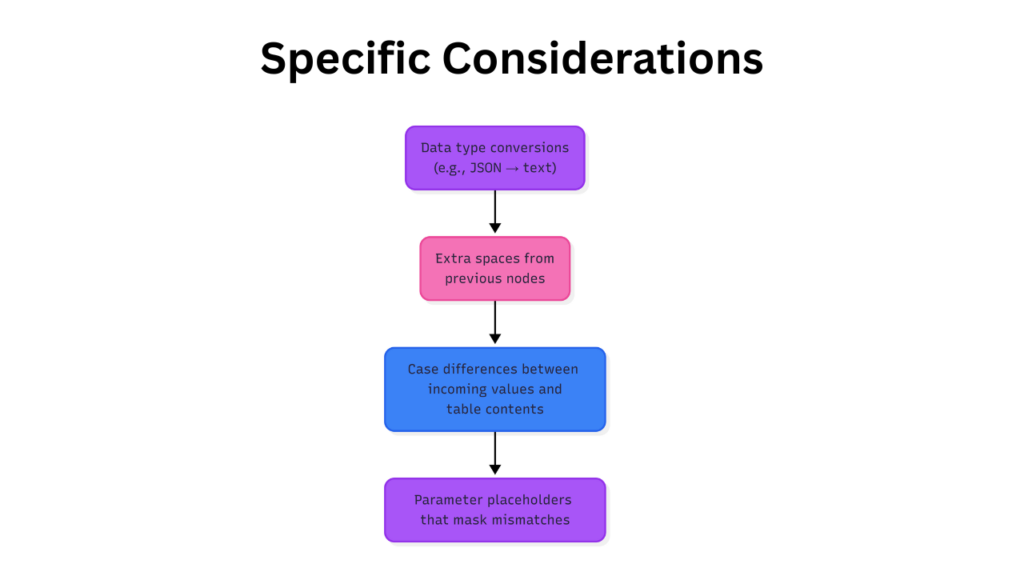
Representation of the n8n UPSERT Not Updating Existing Records Considerations
n8n workflows may introduce subtle issues:
If UPSERTs behave inconsistently during batch processing or under heavy workflow load,
this may be caused by concurrency, pooling, or transaction pressure: n8n PostgreSQL Optimization for High Concurrency, Connection Pooling & Performance.
- Data type conversions (e.g., JSON → text)
- Extra spaces from previous nodes
- Case differences between incoming values and table contents
- Parameter placeholders that mask mismatches
Inspect all input values to prevent UPSERT from skipping intended updates.
Example of Correct UPSERT Pattern:
INSERT INTO customers (email, name, status)
VALUES ('user@example.com', 'Alice Smith', 'active')
ON CONFLICT (email)
DO UPDATE SET
  name = EXCLUDED.name,
  status = EXCLUDED.status
RETURNING *;- The ON CONFLICT column is indexed
- Updates explicitly listed
- RETURNING confirms whether the row was inserted or updated
When UPSERT Is Not the Right Choice?
UPSERT may not suit all workflows:
- Complex conditional updates
- Deduplication based on multiple criteria
- Advanced business logic
Alternative: SELECT → UPDATE workflow
- Fetch the row
- Apply conditional updates
- Insert if row does not exist
Provides complete control and avoids silent failures.
Checklist for Reliable UPSERT
- UNIQUE index exists on conflict column
- Conflict target matches index exactly
- Execution affects expected rows
- RETURNING or SELECT confirms the update
Quick reference for workflow debugging:
| Step | Action | Verification |
|---|---|---|
| 1 | Ensure UNIQUE index exists | \d+ table_name or pg_constraint |
| 2 | Check conflict column(s) | EXPLAIN INSERT … ON CONFLICT |
| 3 | Validate input formatting | SELECT LENGTH(column), column FROM table |
| 4 | Test UPSERT with RETURNING | Confirm affected rows |
Related Guides:
- n8n PostgreSQL connection not working: SSL, credentials, and network fixes
- n8n PostgreSQL node runs successfully but nothing updates
- n8n PostgreSQL Optimization for High Concurrency, Connection Pooling & Performance
- How to Use n8n to Sync Databases (Beginner-Friendly No-Code Integration Guide)
- How to Use n8n to Integrate Slack: (Beginner Friendly Automation Guide)
Conclusion:
Silent UPSERT failures are almost always caused by index or data mismatches, not n8n itself. Confirm conflict targets, enforce proper indexes, and verify input formats to ensure updates occur reliably.