n8n PostgreSQL node showing successful execution but no data update in database
If your n8n PostgreSQL node runs successfully but fails to update or insert data, the issue is almost always query logic, table/column mapping, permissions, or database constraints not the connection itself. Always debug by checking workflow outputs, validating input data, using SELECT statements inside the workflow, and verifying database-level constraints such as triggers, Row-Level Security (RLS), or provider-specific rules.
PostgreSQL reports query success even when zero rows are affected, which makes these failures appear silent inside n8n. PostgreSQL treats zero-row UPDATE and INSERT operations as successful executions, which is why n8n reports success even when no data changes.
> **Scope Notice**
> If your workflow cannot reliably connect to PostgreSQL, fix the connection first:
> n8n PostgreSQL Connection Not Working? SSL, Credentials & Network Fixes
Why Your n8n PostgreSQL Node Executes Without Writing Data?
Even if the node logs success, data may not appear in your table. This guide assumes your n8n PostgreSQL connection is already stable. A passing connection only confirms authentication; it does not guarantee data writes succeed.
If your workflow uses INSERT ... ON CONFLICT and still shows no updates, this is a separate UPSERT-specific issue: n8n PostgreSQL UPSERT Not Updating Existing Records (ON CONFLICT Explained)
This applies to UPDATE, INSERT, and UPSERT queries that execute without errors but do not modify any rows.
Common Causes at a Glance:
| Cause | How to Check | Quick Fix |
|---|---|---|
| WHERE condition matches zero rows | Node succeeds but no rows change | Log input values and test WHERE clause with SELECT |
| Table/column mismatch | Logs show no change | Verify table name, schema, and column mapping |
| Insufficient permissions | Errors or silent skips | Grant INSERT/UPDATE to DB user |
| RLS / triggers blocking | Node logs success but DB rejects | Test with admin user or disable RLS temporarily |
| Provider-specific rules | Managed DBs (Supabase, Neon, AWS) | Check mandatory fields, SSL, or policies |
How to Debug Update Failures in n8n?
Step 1: Validate With SELECT Inside Workflow
Add an Execute Query node like this:
SELECT * FROM your_table WHERE id = {{ $json["id"] }};Step 2: Inspect Node Output
- Go to the
output.jsonof the node - Ensure payload matches your table structure
Step 3: Check Workflow Logic
- Confirm preceding nodes pass correct data
- Validate for missing or malformed fields
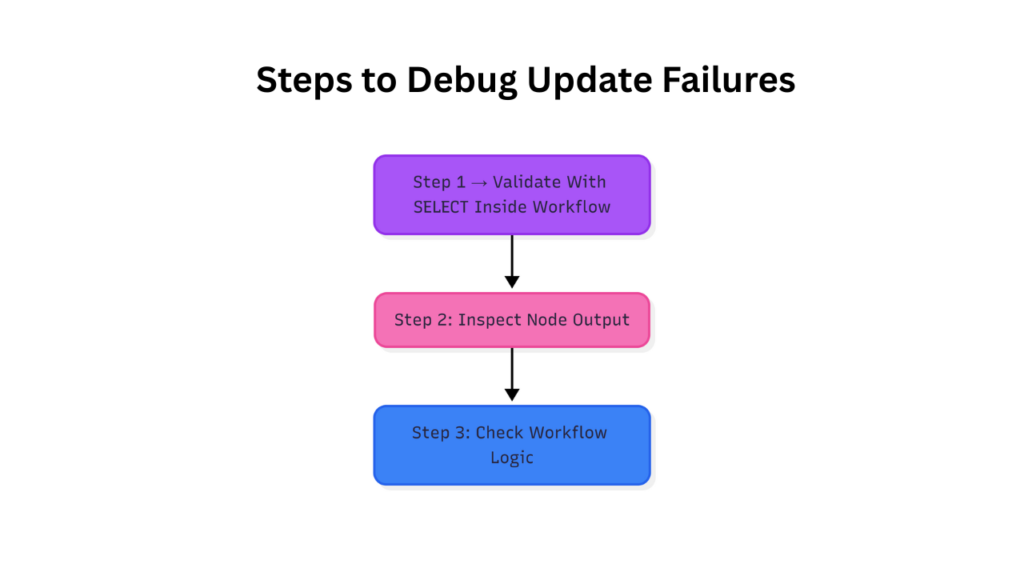
Steps to debug n8n PostgreSQL update failures using SELECT validation, node output inspection, and workflow logic checks
Provider-Specific Gotchas:
- Supabase: Supabase enforces Row-Level Security (RLS) by default. Even valid INSERT or UPDATE queries are blocked unless policies explicitly allow them.
- AWS RDS: AWS RDS requires explicit table-level privileges. Schema access alone does not grant INSERT or UPDATE rights.
- Neon / Railway: Neon and Railway may restrict writes based on role configuration, SSL enforcement, or required fields defined at the database level.
Pro Tip: Test your SQL updates directly in a console with the same credentials to isolate workflow vs DB restrictions.
Quick Validation Checklist:
- Node executes → connection is OK
- Verify table & column names match node configuration
- Provide all required columns and primary keys
- Confirm no explicit transactions are left uncommitted
- Ensure user permissions allow updates/inserts
- Check for triggers, RLS, and other DB constraints
- Test workflow updates with a
SELECTnode to confirm data writes
Advanced Debugging Tips:
- Logging Node Input: Add a Function node before the update to log payload data.
- Check Execution Timing: Intermittent failures may occur if dependent nodes produce delayed data
- Use “SplitInBatches” Carefully: Large data batches may silently skip updates if transactions fail
- If updates fail only under load or during batch executions, this may be a concurrency or pooling issue: n8n PostgreSQL Optimization for High Concurrency, Connection Pooling & Performance.
**Edge Case: Explicit Transactions**
If you manually use `BEGIN` in custom SQL, ensure a corresponding `COMMIT` executes.
n8n auto-commits by default unless you explicitly control transactions.
Related Guides:
- n8n PostgreSQL connection not working: SSL, credentials, and network fixes
- n8n PostgreSQL UPSERT not updating existing records
- n8n PostgreSQL Optimization for High Concurrency, Connection Pooling & Performance
- How to Use n8n to Sync Databases (Beginner-Friendly No-Code Integration Guide)
- How to Use n8n to Integrate Slack: (Beginner Friendly Automation Guide)
Final Takeaway:
If SELECT queries return expected rows but UPDATE or INSERT affects zero rows, the issue is logic, permissions, or constraints – not connectivity.
Silent updates are workflow-level, not connection-level issues. To fix:
- Verify table mapping and permissions
- Validate writes using
SELECTnodes inside workflows - Understand provider-specific triggers, RLS, and transaction handling
Only after these checks should you investigate UPSERT behavior, batching, or performance issues. A working node log does not guarantee data writes validate at runtime.