<p><img class="alignnone size-full wp-image-3630" style="max-width: 100%; height: auto;" src="https://flowgenius.in/wp-content/uploads/2025/12/14.png" alt="Redis vs Cache Alternatives for n8n Architecture Diagram" /></p>
<p style="text-align: center;">Complete Guide that discuss about the Redis vs Alternative Caches for n8n</p>
<p> </p>
<p> </p>
<p style="margin-bottom: 2em; line-height: 1.9;"><strong>Who this is for:</strong> DevOps engineers and backend developers deploying n8n at production scale who need a reliable cache for workflow state, OAuth tokens, and rate‑limiting data. For a complete overview of Redis usage, errors, performance tuning, and scaling in n8n, check out our detailed guide on <a href="https://flowgenius.in/n8n-redis-error-troubleshooting-guide/"><strong><em data-start="361" data-end="386">Redis for n8n Workflows</em></strong></a>.</p>
<hr style="border: none; margin: 55px 0;" />
<h2 style="margin-bottom: 45px; line-height: 1.3;">Quick Diagnosis</h2>
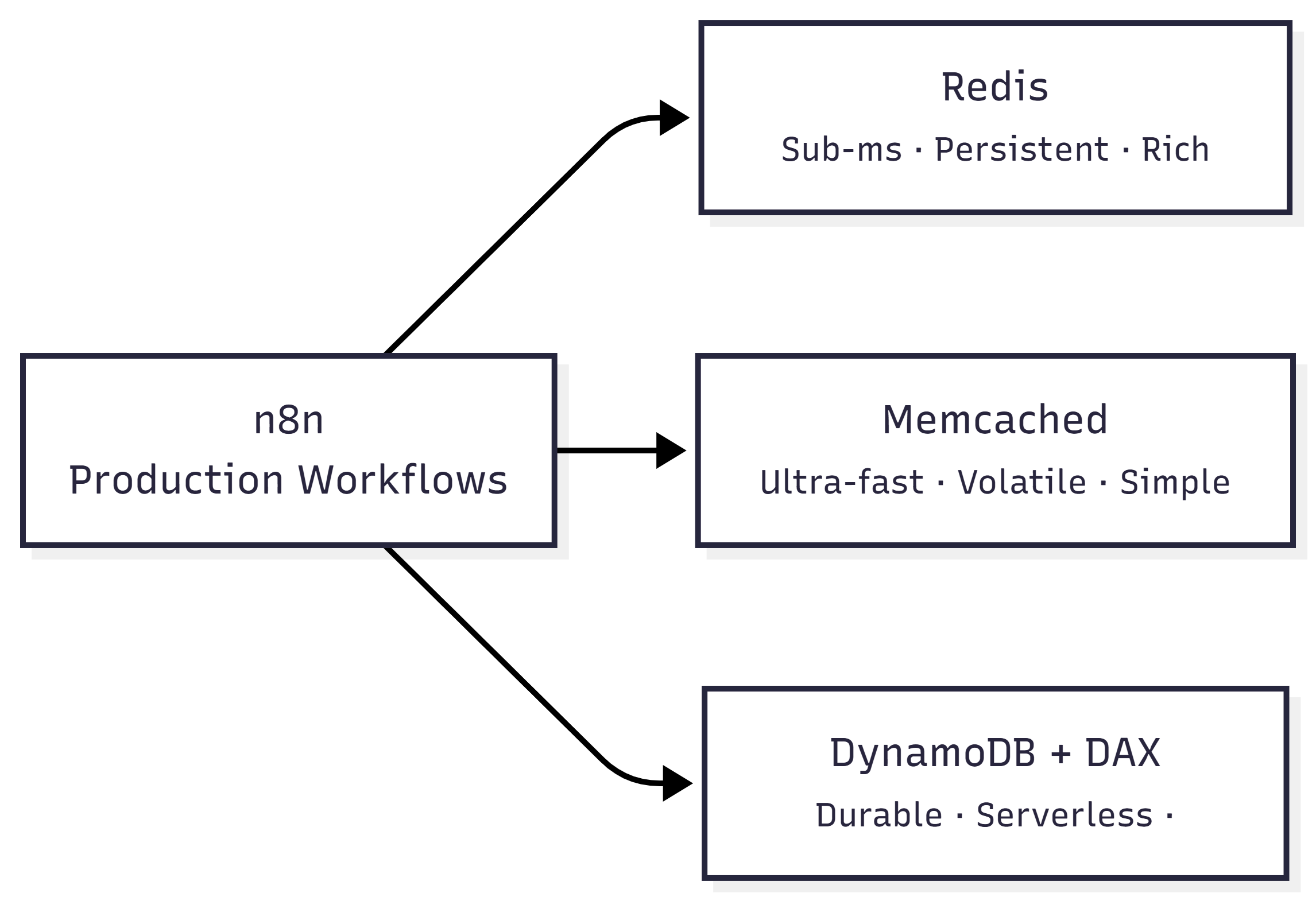
<p style="margin-bottom: 2em; line-height: 1.9;">If you need <strong>sub‑millisecond read/write latency</strong>, native data structures (hashes, streams, Pub/Sub) and built‑in expiration, <strong>Redis</strong> is the best fit for n8n’s workflow state and credential caching. Choose <strong>Memcached</strong> only when you need a pure in‑memory key/value store with the absolute lowest memory footprint and can tolerate data loss on restart. Opt for <strong>DynamoDB (or DynamoDB‑accelerated caches)</strong> when you require durable, server‑less scaling and want to avoid managing a separate cache cluster.</p>
<hr style="border: none; margin: 55px 0;" />
<h2 style="margin-bottom: 45px; line-height: 1.3;">Why n8n Caching Matters?</h2>
<p style="margin-bottom: 2em; line-height: 1.9;"><em>Micro‑summary:</em> Caching reduces external API calls, keeps triggers fast, and stores temporary tokens safely.</p>
<p style="margin-bottom: 2em; line-height: 1.9;">n8n stores temporary workflow state, OAuth tokens, and frequently‑used lookup tables in a cache to avoid costly API calls. The cache must:</p>
<ol style="line-height: 1.9; margin-bottom: 1.8em;">
<li>Serve < 5 ms latency for high‑throughput triggers.</li>
<li>Persist critical tokens across restarts (optional but recommended).</li>
<li>Scale horizontally as workflow executions grow.</li>
<li>Integrate via n8n’s built‑in “Cache” node or custom JavaScript without extra adapters.</li>
</ol>
<hr style="border: none; margin: 55px 0;" />
<h2 style="margin-bottom: 45px; line-height: 1.3;">Comparison Matrix</h2>
<table style="border-collapse: collapse; width: 100%; margin-bottom: 2em;">
<thead>
<tr>
<th style="border: 1px solid #ddd; padding: 12px;">Feature</th>
<th style="border: 1px solid #ddd; padding: 12px;">Redis</th>
<th style="border: 1px solid #ddd; padding: 12px;">Memcached</th>
<th style="border: 1px solid #ddd; padding: 12px;">DynamoDB (with DAX)</th>
</tr>
</thead>
<tbody>
<tr>
<td style="border: 1px solid #ddd; padding: 12px;">Data model</td>
<td style="border: 1px solid #ddd; padding: 12px;">Strings, hashes, lists, sets, sorted sets, streams, Pub/Sub</td>
<td style="border: 1px solid #ddd; padding: 12px;">Simple string key → binary value</td>
<td style="border: 1px solid #ddd; padding: 12px;">Document‑oriented items (key + attribute map)</td>
</tr>
<tr>
<td style="border: 1px solid #ddd; padding: 12px;">Persistence</td>
<td style="border: 1px solid #ddd; padding: 12px;">RDB snapshots, AOF (append‑only) – optional durability</td>
<td style="border: 1px solid #ddd; padding: 12px;">None (pure RAM)</td>
<td style="border: 1px solid #ddd; padding: 12px;">Fully durable (SSD) + optional DAX in‑memory accelerator</td>
</tr>
<tr>
<td style="border: 1px solid #ddd; padding: 12px;">TTL / Expiration</td>
<td style="border: 1px solid #ddd; padding: 12px;">Per‑key TTL, volatile‑LRU policies</td>
<td style="border: 1px solid #ddd; padding: 12px;">Per‑key TTL only</td>
<td style="border: 1px solid #ddd; padding: 12px;">TTL attribute (TTL feature)</td>
</tr>
<tr>
<td style="border: 1px solid #ddd; padding: 12px;">Latency (cold)</td>
<td style="border: 1px solid #ddd; padding: 12px;">~0.2 ms (single node)</td>
<td style="border: 1px solid #ddd; padding: 12px;">~0.1 ms (single node)</td>
<td style="border: 1px solid #ddd; padding: 12px;">~1 ms (DAX) / 5‑10 ms (DynamoDB)</td>
</tr>
<tr>
<td style="border: 1px solid #ddd; padding: 12px;">Horizontal scaling</td>
<td style="border: 1px solid #ddd; padding: 12px;">Cluster mode, sharding, read replicas</td>
<td style="border: 1px solid #ddd; padding: 12px;">Consistent hashing, limited scaling</td>
<td style="border: 1px solid #ddd; padding: 12px;">Auto‑scaling tables, DAX clusters</td>
</tr>
<tr>
<td style="border: 1px solid #ddd; padding: 12px;">n8n integration</td>
<td style="border: 1px solid #ddd; padding: 12px;">Native “Redis” node, community “Cache” node supports Redis</td>
<td style="border: 1px solid #ddd; padding: 12px;">Community “Memcached” node (requires custom JS)</td>
<td style="border: 1px solid #ddd; padding: 12px;">“DynamoDB” node (no native cache semantics)</td>
</tr>
<tr>
<td style="border: 1px solid #ddd; padding: 12px;">Operational overhead</td>
<td style="border: 1px solid #ddd; padding: 12px;">Moderate (cluster ops, backup)</td>
<td style="border: 1px solid #ddd; padding: 12px;">Low (stateless)</td>
<td style="border: 1px solid #ddd; padding: 12px;">Low (serverless)</td>
</tr>
<tr>
<td style="border: 1px solid #ddd; padding: 12px;">Cost (US‑East‑1)</td>
<td style="border: 1px solid #ddd; padding: 12px;">$0.018/GB‑hr (memory) + network</td>
<td style="border: 1px solid #ddd; padding: 12px;">$0.018/GB‑hr (memory)</td>
<td style="border: 1px solid #ddd; padding: 12px;">$1.25 M reads / $0.25 M writes per month (pay‑per‑use) + DAX $0.12/GB‑hr</td>
</tr>
<tr>
<td style="border: 1px solid #ddd; padding: 12px;">Typical n8n use‑case</td>
<td style="border: 1px solid #ddd; padding: 12px;">Workflow state, token cache, rate‑limit counters</td>
<td style="border: 1px solid #ddd; padding: 12px;">Simple lookup table for low‑risk data</td>
<td style="border: 1px solid #ddd; padding: 12px;">Long‑term credential storage, audit logs, cross‑region cache</td>
</tr>
</tbody>
</table>
<blockquote style="margin: 0 0 2em 0; padding-left: 1em; border-left: 4px solid #ddd;">
<p style="margin: 0; line-height: 1.9;"><strong>EEFA Note:</strong> Redis AOF can double write latency on busy nodes. In production, enable <code>appendfsync everysec</code> and monitor <code>redis-cli INFO persistence</code> to avoid full‑stop sync spikes that would stall n8n triggers.</p>
</blockquote>
<hr style="border: none; margin: 55px 0;" />
<h2 style="margin-bottom: 45px; line-height: 1.3;">1. When to Choose Redis for n8n</h2>
<p><img class="aligncenter wp-image-3631" style="max-width: 100%; height: 411px;" src="https://flowgenius.in/wp-content/uploads/2025/12/Cron-Triggered-Data-Sync-2025-12-24-101717.png" alt="Cron Triggered Data Sync Workflow in n8n" width="600" /></p>
<p style="margin-bottom: 2em; line-height: 1.9;"><em>Micro‑summary:</em> Use Redis when you need sub‑ms latency, durability, and advanced data structures.</p>
<table style="border-collapse: collapse; width: 100%; margin-bottom: 2em;">
<thead>
<tr>
<th style="border: 1px solid #ddd; padding: 12px;">Situation</th>
<th style="border: 1px solid #ddd; padding: 12px;">Reason</th>
<th style="border: 1px solid #ddd; padding: 12px;">n8n Configuration Example</th>
</tr>
</thead>
<tbody>
<tr>
<td style="border: 1px solid #ddd; padding: 12px;">High‑frequency webhook triggers (≥ 10 k/s)</td>
<td style="border: 1px solid #ddd; padding: 12px;">Sub‑ms latency, Pub/Sub for event broadcasting</td>
<td style="border: 1px solid #ddd; padding: 12px;">
<pre style="background: #fafafa; padding: 20px; border: 1px solid #e0e0e0; overflow: auto;">{
"type": "redis",
"host": "redis-prod.example.com",
"port": 6379,
"password": "{{ $env.REDIS_PWD }}"
}
</pre>
</td>
</tr>
<tr>
<td style="border: 1px solid #ddd; padding: 12px;">OAuth token caching (must survive pod restarts)</td>
<td style="border: 1px solid #ddd; padding: 12px;">Persistence via AOF, TTL per token</td>
<td style="border: 1px solid #ddd; padding: 12px;">
<pre style="background: #fafafa; padding: 20px; border: 1px solid #e0e0e0; overflow: auto;">const ttl = 60 * 60 * 24; // 24 h
await $cache.set(`token_${service}`, token, { ttl })
</pre>
</td>
</tr>
<tr>
<td style="border: 1px solid #ddd; padding: 12px;">Workflow state machines (queues, streams)</td>
<td style="border: 1px solid #ddd; padding: 12px;">Redis Streams provide reliable consumer groups</td>
<td style="border: 1px solid #ddd; padding: 12px;">
<pre style="background: #fafafa; padding: 20px; border: 1px solid #e0e0e0; overflow: auto;">const stream = await $redis.xadd('n8n:workflow', '*', { step: 'start', payload: JSON.stringify(data) })
</pre>
</td>
</tr>
<tr>
<td style="border: 1px solid #ddd; padding: 12px;">Cross‑instance rate limiting</td>
<td style="border: 1px solid #ddd; padding: 12px;">Atomic <code>INCR</code> + <code>EXPIRE</code> guarantees correct limits</td>
<td style="border: 1px solid #ddd; padding: 12px;">
<pre style="background: #fafafa; padding: 20px; border: 1px solid #e0e0e0; overflow: auto;">const key = `rate:$79.106.35.70`;
const count = await $redis.incr(key);
if (count === 1) await $redis.expire(key, 60);
</pre>
</td>
</tr>
</tbody>
</table>
<p style="margin-bottom: 2em; line-height: 1.9;"><strong>Production‑grade tips</strong></p>
<ul style="line-height: 1.9; margin-bottom: 1.8em;">
<li>Deploy Redis in <strong>cluster mode</strong> with at least 3 master nodes to avoid a single point of failure.</li>
<li>Enable <strong>TLS</strong> (<code>tls: true</code>) and rotate credentials via Kubernetes Secrets.</li>
<li>Use <strong>Redis Sentinel</strong> for automatic failover if you cannot run a full cluster.</li>
</ul>
<hr style="border: none; margin: 55px 0;" />
<h2 style="margin-bottom: 45px; line-height: 1.3;">2. When Memcached Might Be Better</h2>
<p style="margin-bottom: 2em; line-height: 1.9;"><em>Micro‑summary:</em> Choose Memcached for cheap, pure‑RAM caching of non‑critical data.</p>
<table style="border-collapse: collapse; width: 100%; margin-bottom: 2em;">
<thead>
<tr>
<th style="border: 1px solid #ddd; padding: 12px;">Situation</th>
<th style="border: 1px solid #ddd; padding: 12px;">Reason</th>
<th style="border: 1px solid #ddd; padding: 12px;">n8n Configuration Example</th>
</tr>
</thead>
<tbody>
<tr>
<td style="border: 1px solid #ddd; padding: 12px;">Ephemeral data (e.g., temporary UI‑prefetch)</td>
<td style="border: 1px solid #ddd; padding: 12px;">No durability needed, lowest memory overhead</td>
<td style="border: 1px solid #ddd; padding: 12px;">
<pre style="background: #fafafa; padding: 20px; border: 1px solid #e0e0e0; overflow: auto;">{
"type": "memcached",
"servers": ["mc1:11211","mc2:11211"]
}
</pre>
</td>
</tr>
<tr>
<td style="border: 1px solid #ddd; padding: 12px;">Strict budget & simple key/value</td>
<td style="border: 1px solid #ddd; padding: 12px;">Only string values, no complex data structures</td>
<td style="border: 1px solid #ddd; padding: 12px;">
<pre style="background: #fafafa; padding: 20px; border: 1px solid #e0e0e0; overflow: auto;">await $cache.set('tempKey', JSON.stringify(payload), { ttl: 30 })
</pre>
</td>
</tr>
<tr>
<td style="border: 1px solid #ddd; padding: 12px;">Stateless container scaling</td>
<td style="border: 1px solid #ddd; padding: 12px;">Stateless nodes can be added/removed without manual rebalancing</td>
<td style="border: 1px solid #ddd; padding: 12px;">Consistent‑hash client automatically redistributes keys.</td>
</tr>
</tbody>
</table>
<blockquote style="margin: 0 0 2em 0; padding-left: 1em; border-left: 4px solid #ddd;">
<p style="margin: 0; line-height: 1.9;"><strong>EEFA Warning:</strong> Memcached evicts <em>randomly</em> when memory is exhausted. If n8n relies on the cached value for authentication, a sudden eviction can cause a cascade of “unauthorized” errors. Pair with a fallback persistence layer (e.g., DynamoDB) for critical tokens.</p>
</blockquote>
<hr style="border: none; margin: 55px 0;" />
<h2 style="margin-bottom: 45px; line-height: 1.3;">3. When DynamoDB (or DAX) Is the Right Choice?</h2>
<p style="margin-bottom: 2em; line-height: 1.9;"><em>Micro‑summary:</em> Use DynamoDB when you need durability, global replication, and serverless scaling.</p>
<table style="border-collapse: collapse; width: 100%; margin-bottom: 2em;">
<thead>
<tr>
<th style="border: 1px solid #ddd; padding: 12px;">Situation</th>
<th style="border: 1px solid #ddd; padding: 12px;">Reason</th>
<th style="border: 1px solid #ddd; padding: 12px;">n8n Configuration Example</th>
</tr>
</thead>
<tbody>
<tr>
<td style="border: 1px solid #ddd; padding: 12px;">Globally distributed n8n fleet (multiple AWS regions)</td>
<td style="border: 1px solid #ddd; padding: 12px;">DynamoDB is multi‑AZ, DAX adds in‑memory acceleration</td>
<td style="border: 1px solid #ddd; padding: 12px;">
<pre style="background: #fafafa; padding: 20px; border: 1px solid #e0e0e0; overflow: auto;">{
"type": "dynamodb",
"region": "us-east-1",
"table": "n8nCache",
"useDAX": true
}
</pre>
</td>
</tr>
<tr>
<td style="border: 1px solid #ddd; padding: 12px;">Regulatory compliance (data must be persisted for 30 days)</td>
<td style="border: 1px solid #ddd; padding: 12px;">Built‑in point‑in‑time recovery, encryption at rest</td>
<td style="border: 1px solid #ddd; padding: 12px;">Enable <code>PITR</code> and <code>KMS</code> on the table.</td>
</tr>
<tr>
<td style="border: 1px solid #ddd; padding: 12px;">Variable traffic spikes (burst to millions of reads)</td>
<td style="border: 1px solid #ddd; padding: 12px;">Auto‑scaling capacity, pay‑per‑request eliminates over‑provisioning</td>
<td style="border: 1px solid #ddd; padding: 12px;">Set <code>BillingMode: PAY_PER_REQUEST</code>.</td>
</tr>
</tbody>
</table>
<blockquote style="margin: 0 0 2em 0; padding-left: 1em; border-left: 4px solid #ddd;">
<p style="margin: 0; line-height: 1.9;"><strong>EEFA Insight:</strong> DAX provides ~10× lower read latency than raw DynamoDB but <strong>does not support TTL expiration</strong>. Implement a background Lambda to delete stale items, otherwise the table will grow unchecked and increase costs.</p>
</blockquote>
<hr style="border: none; margin: 55px 0;" />
<h2 style="margin-bottom: 45px; line-height: 1.3;">4. Decision Checklist for n8n Cache Selection</h2>
<ul style="line-height: 1.9; margin-bottom: 1.8em;">
<li><strong>Latency requirement</strong>
<ul style="line-height: 1.9; margin-bottom: 1.5em;">
<li>< 5 ms → Redis or Memcached</li>
<li>5‑10 ms acceptable → DynamoDB + DAX</li>
</ul>
</li>
<li><strong>Data durability</strong>
<ul style="line-height: 1.9; margin-bottom: 1.5em;">
<li>Must survive restarts → Redis (AOF/RDB) or DynamoDB</li>
<li>Can be lost on restart → Memcached</li>
</ul>
</li>
<li><strong>Data complexity</strong>
<ul style="line-height: 1.9; margin-bottom: 1.5em;">
<li>Need hashes, sets, streams → Redis</li>
<li>Simple key/value → Memcached or DynamoDB</li>
</ul>
</li>
<li><strong>Scale & Ops</strong>
<ul style="line-height: 1.9; margin-bottom: 1.5em;">
<li>Want managed, serverless → DynamoDB</li>
<li>Comfortable managing clusters → Redis (or Memcached)</li>
</ul>
</li>
<li><strong>Cost constraints</strong>
<ul style="line-height: 1.9; margin-bottom: 1.5em;">
<li>Tight memory budget → Memcached (cheapest RAM)</li>
<li>Willing to pay for durability → DynamoDB</li>
</ul>
</li>
<li><strong>n8n ecosystem compatibility</strong>
<ul style="line-height: 1.9; margin-bottom: 1.5em;">
<li>Native node exists → Redis (official), DynamoDB (official)</li>
<li>Community node only → Memcached (may need custom JS)</li>
</ul>
</li>
</ul>
<p style="margin-bottom: 2em; line-height: 1.9;">If <strong>any</strong> of the above points favor Redis, it remains the default cache for n8n. Otherwise, pick the alternative that satisfies the most critical constraints. If you’d like to <a href="https://flowgenius.in/migrating-an-n8n-redis-instance/"><strong>migrate n8n Redis instance</strong></a>, complete it and continue the read.</p>
<hr style="border: none; margin: 55px 0;" />
<h2 style="margin-bottom: 45px; line-height: 1.3;">5. Quick Implementation Guide</h2>
<h3 style="margin-bottom: 45px; line-height: 1.3;">5.1 Adding Redis to an n8n Docker Compose</h3>
<p style="margin-bottom: 2em; line-height: 1.9;"><strong>Define the n8n service (environment variables only).</strong></p>
<pre style="background: #fafafa; padding: 20px; border: 1px solid #e0e0e0; overflow: auto;">services:
n8n:
image: n8nio/n8n
environment:
- CACHE_TYPE=redis
- REDIS_HOST=redis
</pre>
<p style="margin-bottom: 2em; line-height: 1.9;"><strong>Expose the Redis port and secret.</strong></p>
<pre style="background: #fafafa; padding: 20px; border: 1px solid #e0e0e0; overflow: auto;"> environment:
- REDIS_PORT=6379
- REDIS_PASSWORD=${REDIS_PASSWORD}
ports:
- "5678:5678"
</pre>
<p style="margin-bottom: 2em; line-height: 1.9;"><strong>Add the Redis container and a persistent volume.</strong></p>
<pre style="background: #fafafa; padding: 20px; border: 1px solid #e0e0e0; overflow: auto;"> redis:
image: redis:7-alpine
command: ["redis-server", "--save", "60", "1", "--appendonly", "yes"]
volumes:
- redis-data:/data
volumes:
redis-data:
</pre>
<blockquote style="margin: 0 0 2em 0; padding-left: 1em; border-left: 4px solid #ddd;">
<p style="margin: 0; line-height: 1.9;"><strong>EEFA tip:</strong> Set <code>--maxmemory 2gb --maxmemory-policy allkeys-lru</code> to prevent OOM crashes under load.</p>
</blockquote>
<h3 style="margin-bottom: 45px; line-height: 1.3;">5.2 Switching to Memcached (custom JavaScript node)</h3>
<p style="margin-bottom: 2em; line-height: 1.9;"><strong>Create a Memcached client.</strong></p>
<pre style="background: #fafafa; padding: 20px; border: 1px solid #e0e0e0; overflow: auto;">const memjs = require('memjs');
const client = memjs.Client.create('mc1:11211,mc2:11211');
</pre>
<p style="margin-bottom: 2em; line-height: 1.9;"><strong>Utility to set a cache entry.</strong></p>
<pre style="background: #fafafa; padding: 20px; border: 1px solid #e0e0e0; overflow: auto;">async function setCache(key, value, ttlSec) {
await client.set(key, JSON.stringify(value), { expires: ttlSec });
}
</pre>
<p style="margin-bottom: 2em; line-height: 1.9;"><strong>Utility to retrieve a cache entry.</strong></p>
<pre style="background: #fafafa; padding: 20px; border: 1px solid #e0e0e0; overflow: auto;">async function getCache(key) {
const { value } = await client.get(key);
return value ? JSON.parse(value.toString()) : null;
}
</pre>
<h3 style="margin-bottom: 45px; line-height: 1.3;">5.3 Using DynamoDB as a Cache</h3>
<p style="margin-bottom: 2em; line-height: 1.9;"><strong>Put an item with a TTL attribute (24 h).</strong></p>
<pre style="background: #fafafa; padding: 20px; border: 1px solid #e0e0e0; overflow: auto;">{
TableName: "n8nCache",
Item: {
PK: { S: "token#github" },
Value: { S: "{{ $json.access_token }}" },
TTL: { N: `${Math.floor(Date.now() / 1000) + 86400}` }
}
}
</pre>
<p style="margin-bottom: 2em; line-height: 1.9;"><strong>Note:</strong> DynamoDB TTL is processed in the background and may take up to an hour to delete expired items. For strict short‑term expiration, add an <code>ExpiresAt</code> attribute and filter it in your queries.</p>
<hr style="border: none; margin: 55px 0;" />
<h2 style="margin-bottom: 45px; line-height: 1.3;">6. Real‑World Pitfalls & How to Avoid Them</h2>
<table style="border-collapse: collapse; width: 100%; margin-bottom: 2em;">
<thead>
<tr>
<th style="border: 1px solid #ddd; padding: 12px;">Symptom</th>
<th style="border: 1px solid #ddd; padding: 12px;">Root Cause</th>
<th style="border: 1px solid #ddd; padding: 12px;">Fix</th>
</tr>
</thead>
<tbody>
<tr>
<td style="border: 1px solid #ddd; padding: 12px;">n8n webhook fails intermittently → “Cache miss” error</td>
<td style="border: 1px solid #ddd; padding: 12px;">Redis node restarted, AOF rewrite blocked I/O</td>
<td style="border: 1px solid #ddd; padding: 12px;">Enable <code>no-appendfsync-on-rewrite yes</code> and monitor <code>redis-cli INFO stats</code> for <code>rdb_changes_since_last_save</code>.</td>
</tr>
<tr>
<td style="border: 1px solid #ddd; padding: 12px;">Tokens disappear after pod restart (Redis)</td>
<td style="border: 1px solid #ddd; padding: 12px;">Persistence disabled (<code>save ""</code>)</td>
<td style="border: 1px solid #ddd; padding: 12px;">Turn on RDB snapshots (<code>save 900 1</code>) or enable AOF.</td>
</tr>
<tr>
<td style="border: 1px solid #ddd; padding: 12px;">Sudden latency spikes > 10 ms (Memcached)</td>
<td style="border: 1px solid #ddd; padding: 12px;">Memory pressure → eviction of hot keys</td>
<td style="border: 1px solid #ddd; padding: 12px;">Increase container memory limit or add another Memcached node to the pool.</td>
</tr>
<tr>
<td style="border: 1px solid #ddd; padding: 12px;">DynamoDB read throttling (Provisioned mode)</td>
<td style="border: 1px solid #ddd; padding: 12px;">Burst of workflow executions exceeds RCUs</td>
<td style="border: 1px solid #ddd; padding: 12px;">Switch to <strong>PAY_PER_REQUEST</strong> or pre‑warm RCUs using <code>UpdateTable</code> API.</td>
</tr>
</tbody>
</table>
<hr style="border: none; margin: 55px 0;" />
<h2 style="margin-bottom: 45px; line-height: 1.3;">Conclusion</h2>
<p style="margin-bottom: 2em; line-height: 1.9;">Redis delivers the sub‑millisecond latency, rich data structures, and optional durability that production n8n deployments demand. Memcached remains a viable low‑cost option for non‑critical, purely volatile data, while DynamoDB (with DAX) offers serverless durability and global scalability at the expense of higher latency and operational nuance. Use the decision checklist to align cache choice with latency, durability, data complexity, operational comfort, and cost constraints. When configured with persistence, TLS, and proper clustering, Redis becomes a robust, production‑grade cache that keeps n8n workflows fast, reliable, and scalable.</p>

Complete Guide that discuss about the Redis vs Alternative Caches for n8n
Who this is for: DevOps engineers and backend developers deploying n8n at production scale who need a reliable cache for workflow state, OAuth tokens, and rate‑limiting data. For a complete overview of Redis usage, errors, performance tuning, and scaling in n8n, check out our detailed guide on Redis for n8n Workflows.
Quick Diagnosis
If you need sub‑millisecond read/write latency, native data structures (hashes, streams, Pub/Sub) and built‑in expiration, Redis is the best fit for n8n’s workflow state and credential caching. Choose Memcached only when you need a pure in‑memory key/value store with the absolute lowest memory footprint and can tolerate data loss on restart. Opt for DynamoDB (or DynamoDB‑accelerated caches) when you require durable, server‑less scaling and want to avoid managing a separate cache cluster.
Why n8n Caching Matters?
Micro‑summary: Caching reduces external API calls, keeps triggers fast, and stores temporary tokens safely.
n8n stores temporary workflow state, OAuth tokens, and frequently‑used lookup tables in a cache to avoid costly API calls. The cache must:
- Serve < 5 ms latency for high‑throughput triggers.
- Persist critical tokens across restarts (optional but recommended).
- Scale horizontally as workflow executions grow.
- Integrate via n8n’s built‑in “Cache” node or custom JavaScript without extra adapters.
Comparison Matrix
| Feature |
Redis |
Memcached |
DynamoDB (with DAX) |
| Data model |
Strings, hashes, lists, sets, sorted sets, streams, Pub/Sub |
Simple string key → binary value |
Document‑oriented items (key + attribute map) |
| Persistence |
RDB snapshots, AOF (append‑only) – optional durability |
None (pure RAM) |
Fully durable (SSD) + optional DAX in‑memory accelerator |
| TTL / Expiration |
Per‑key TTL, volatile‑LRU policies |
Per‑key TTL only |
TTL attribute (TTL feature) |
| Latency (cold) |
~0.2 ms (single node) |
~0.1 ms (single node) |
~1 ms (DAX) / 5‑10 ms (DynamoDB) |
| Horizontal scaling |
Cluster mode, sharding, read replicas |
Consistent hashing, limited scaling |
Auto‑scaling tables, DAX clusters |
| n8n integration |
Native “Redis” node, community “Cache” node supports Redis |
Community “Memcached” node (requires custom JS) |
“DynamoDB” node (no native cache semantics) |
| Operational overhead |
Moderate (cluster ops, backup) |
Low (stateless) |
Low (serverless) |
| Cost (US‑East‑1) |
$0.018/GB‑hr (memory) + network |
$0.018/GB‑hr (memory) |
$1.25 M reads / $0.25 M writes per month (pay‑per‑use) + DAX $0.12/GB‑hr |
| Typical n8n use‑case |
Workflow state, token cache, rate‑limit counters |
Simple lookup table for low‑risk data |
Long‑term credential storage, audit logs, cross‑region cache |
EEFA Note: Redis AOF can double write latency on busy nodes. In production, enable appendfsync everysec and monitor redis-cli INFO persistence to avoid full‑stop sync spikes that would stall n8n triggers.
1. When to Choose Redis for n8n
Micro‑summary: Use Redis when you need sub‑ms latency, durability, and advanced data structures.
| Situation |
Reason |
n8n Configuration Example |
| High‑frequency webhook triggers (≥ 10 k/s) |
Sub‑ms latency, Pub/Sub for event broadcasting |
{
  "type": "redis",
  "host": "redis-prod.example.com",
  "port": 6379,
  "password": "{{ $env.REDIS_PWD }}"
}
|
| OAuth token caching (must survive pod restarts) |
Persistence via AOF, TTL per token |
const ttl = 60 * 60 * 24; // 24 h
await $cache.set(`token_${service}`, token, { ttl })
|
| Workflow state machines (queues, streams) |
Redis Streams provide reliable consumer groups |
const stream = await $redis.xadd('n8n:workflow', '*', { step: 'start', payload: JSON.stringify(data) })
|
| Cross‑instance rate limiting |
Atomic INCR + EXPIRE guarantees correct limits |
const key = `rate:$79.106.35.70`;
const count = await $redis.incr(key);
if (count === 1) await $redis.expire(key, 60);
|
Production‑grade tips
- Deploy Redis in cluster mode with at least 3 master nodes to avoid a single point of failure.
- Enable TLS (
tls: true) and rotate credentials via Kubernetes Secrets.
- Use Redis Sentinel for automatic failover if you cannot run a full cluster.
2. When Memcached Might Be Better
Micro‑summary: Choose Memcached for cheap, pure‑RAM caching of non‑critical data.
| Situation |
Reason |
n8n Configuration Example |
| Ephemeral data (e.g., temporary UI‑prefetch) |
No durability needed, lowest memory overhead |
{
  "type": "memcached",
  "servers": ["mc1:11211","mc2:11211"]
}
|
| Strict budget & simple key/value |
Only string values, no complex data structures |
await $cache.set('tempKey', JSON.stringify(payload), { ttl: 30 })
|
| Stateless container scaling |
Stateless nodes can be added/removed without manual rebalancing |
Consistent‑hash client automatically redistributes keys. |
EEFA Warning: Memcached evicts randomly when memory is exhausted. If n8n relies on the cached value for authentication, a sudden eviction can cause a cascade of “unauthorized” errors. Pair with a fallback persistence layer (e.g., DynamoDB) for critical tokens.
3. When DynamoDB (or DAX) Is the Right Choice?
Micro‑summary: Use DynamoDB when you need durability, global replication, and serverless scaling.
| Situation |
Reason |
n8n Configuration Example |
| Globally distributed n8n fleet (multiple AWS regions) |
DynamoDB is multi‑AZ, DAX adds in‑memory acceleration |
{
  "type": "dynamodb",
  "region": "us-east-1",
  "table": "n8nCache",
  "useDAX": true
}
|
| Regulatory compliance (data must be persisted for 30 days) |
Built‑in point‑in‑time recovery, encryption at rest |
Enable PITR and KMS on the table. |
| Variable traffic spikes (burst to millions of reads) |
Auto‑scaling capacity, pay‑per‑request eliminates over‑provisioning |
Set BillingMode: PAY_PER_REQUEST. |
EEFA Insight: DAX provides ~10× lower read latency than raw DynamoDB but does not support TTL expiration. Implement a background Lambda to delete stale items, otherwise the table will grow unchecked and increase costs.
4. Decision Checklist for n8n Cache Selection
- Latency requirement
- < 5 ms → Redis or Memcached
- 5‑10 ms acceptable → DynamoDB + DAX
- Data durability
- Must survive restarts → Redis (AOF/RDB) or DynamoDB
- Can be lost on restart → Memcached
- Data complexity
- Need hashes, sets, streams → Redis
- Simple key/value → Memcached or DynamoDB
- Scale & Ops
- Want managed, serverless → DynamoDB
- Comfortable managing clusters → Redis (or Memcached)
- Cost constraints
- Tight memory budget → Memcached (cheapest RAM)
- Willing to pay for durability → DynamoDB
- n8n ecosystem compatibility
- Native node exists → Redis (official), DynamoDB (official)
- Community node only → Memcached (may need custom JS)
If any of the above points favor Redis, it remains the default cache for n8n. Otherwise, pick the alternative that satisfies the most critical constraints. If you’d like to migrate n8n Redis instance, complete it and continue the read.
5. Quick Implementation Guide
5.1 Adding Redis to an n8n Docker Compose
Define the n8n service (environment variables only).
services:
  n8n:
    image: n8nio/n8n
    environment:
      - CACHE_TYPE=redis
      - REDIS_HOST=redis
Expose the Redis port and secret.
    environment:
      - REDIS_PORT=6379
      - REDIS_PASSWORD=${REDIS_PASSWORD}
    ports:
      - "5678:5678"
Add the Redis container and a persistent volume.
  redis:
    image: redis:7-alpine
    command: ["redis-server", "--save", "60", "1", "--appendonly", "yes"]
    volumes:
      - redis-data:/data
volumes:
  redis-data:
EEFA tip: Set --maxmemory 2gb --maxmemory-policy allkeys-lru to prevent OOM crashes under load.
5.2 Switching to Memcached (custom JavaScript node)
Create a Memcached client.
const memjs = require('memjs');
const client = memjs.Client.create('mc1:11211,mc2:11211');
Utility to set a cache entry.
async function setCache(key, value, ttlSec) {
  await client.set(key, JSON.stringify(value), { expires: ttlSec });
}
Utility to retrieve a cache entry.
async function getCache(key) {
  const { value } = await client.get(key);
  return value ? JSON.parse(value.toString()) : null;
}
5.3 Using DynamoDB as a Cache
Put an item with a TTL attribute (24 h).
{
  TableName: "n8nCache",
  Item: {
    PK: { S: "token#github" },
    Value: { S: "{{ $json.access_token }}" },
    TTL: { N: `${Math.floor(Date.now() / 1000) + 86400}` }
  }
}
Note: DynamoDB TTL is processed in the background and may take up to an hour to delete expired items. For strict short‑term expiration, add an ExpiresAt attribute and filter it in your queries.
6. Real‑World Pitfalls & How to Avoid Them
| Symptom |
Root Cause |
Fix |
| n8n webhook fails intermittently → “Cache miss” error |
Redis node restarted, AOF rewrite blocked I/O |
Enable no-appendfsync-on-rewrite yes and monitor redis-cli INFO stats for rdb_changes_since_last_save. |
| Tokens disappear after pod restart (Redis) |
Persistence disabled (save "") |
Turn on RDB snapshots (save 900 1) or enable AOF. |
| Sudden latency spikes > 10 ms (Memcached) |
Memory pressure → eviction of hot keys |
Increase container memory limit or add another Memcached node to the pool. |
| DynamoDB read throttling (Provisioned mode) |
Burst of workflow executions exceeds RCUs |
Switch to PAY_PER_REQUEST or pre‑warm RCUs using UpdateTable API. |
Conclusion
Redis delivers the sub‑millisecond latency, rich data structures, and optional durability that production n8n deployments demand. Memcached remains a viable low‑cost option for non‑critical, purely volatile data, while DynamoDB (with DAX) offers serverless durability and global scalability at the expense of higher latency and operational nuance. Use the decision checklist to align cache choice with latency, durability, data complexity, operational comfort, and cost constraints. When configured with persistence, TLS, and proper clustering, Redis becomes a robust, production‑grade cache that keeps n8n workflows fast, reliable, and scalable.