Step by Step Guide to Fix Docker Compose .env File Not Working
Updated your .env. Restarted the container. Still seeing the old value?
These 3 issues cause 90% of failures – and they’re easy to fix once you know where to look.
That’s expected.
docker compose restart does not reload environment variables.
To apply changes, you have to recreate the container – down, then up.
This guide shows exactly why and how to fix it without breaking your data.
⚠️ Before You Debug Anything: Run This First
These two commands will tell you whether Docker is reading your .env at all. Run them from the directory containing your docker-compose.yml before you change anything else.
| Command | What it tells you? | What to look for? |
|---|---|---|
docker compose config |
Shows the fully resolved compose file with all .env substitutions applied. |
Blank values like MY_VAR: "" mean the .env file was not found or not read. |
docker exec <name> env |
Shows every environment variable the running container actually sees. | If your variable is missing here entirely, it was never passed to the container. |
Who this is for: Developers and system administrators self-hosting apps on Docker Compose – n8n, Supabase, Traefik, Pocketbase, or anything else who update their .env file and find Docker ignoring the changes. For the complete n8n production setup, see the n8n Performance & Scaling Guide.
Why Docker Compose Silently Ignores a Missing .env
The first failure mode is the quietest one: your .env file is simply in the wrong location, and Docker Compose says nothing about it. No warning. No error. It proceeds with blank values as though the file does not exist.
Docker Compose looks for .env in one specific place – the same directory as your docker-compose.yml file, which must also be the directory you invoke docker compose from. Not the directory your shell is currently in. Not a parent directory. The compose file’s directory, at invocation time.
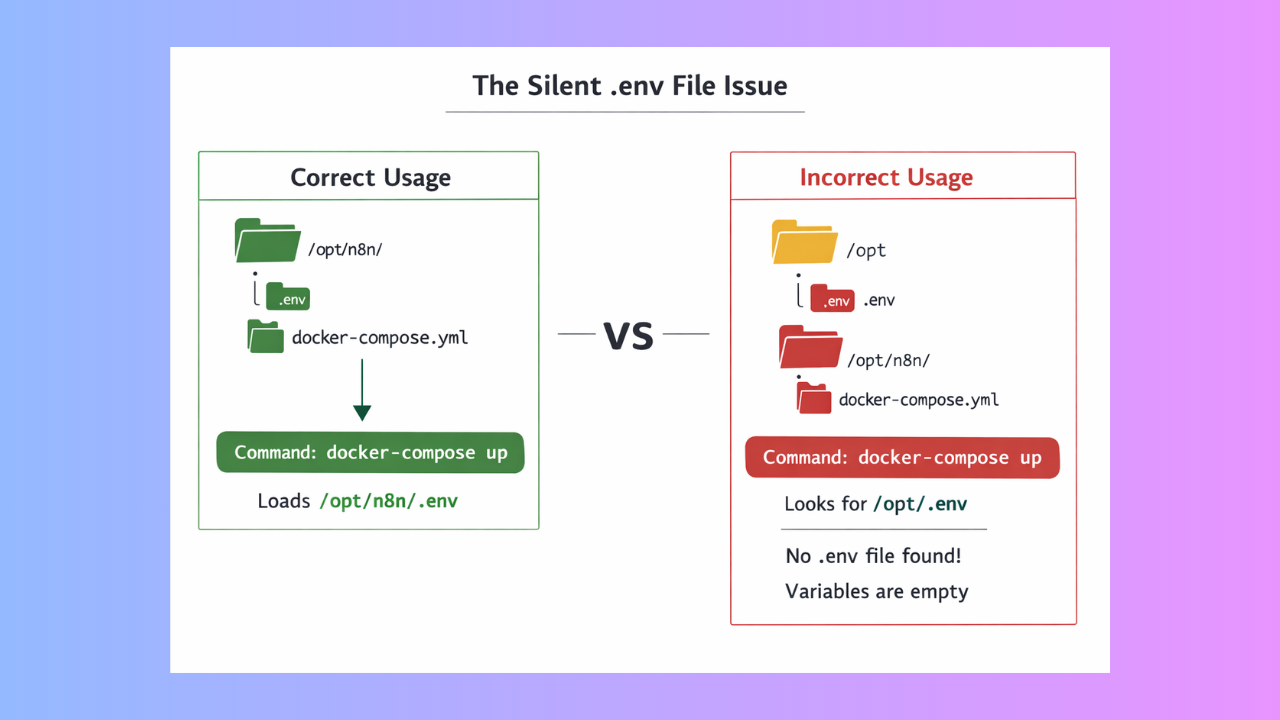
This becomes a silent killer the moment your project has any folder depth. If docker-compose.yml lives in /opt/n8n/ but you run the command from /opt/, Docker looks for /opt/.env not /opt/n8n/.env. It finds nothing, reports nothing, and your variables are all blank.
The fix: Always cd into the directory containing your compose file before running any docker compose command. If you need to call it from a different path in a CI script or a cron job use the --env-file flag to remove all ambiguity.
docker compose --env-file /opt/n8n/.env -f /opt/n8n/docker-compose.yml up -d
This pattern is also the right approach for multi-environment setups where you maintain a .env.staging and a .env.production alongside a single compose file. Pass the correct file explicitly rather than relying on Docker to find the right one.
The env_file vs environment Distinction Nobody Explains
This is the most conceptually confusing failure mode. Docker Compose has two completely separate mechanisms for environment variables, and they do fundamentally different things. Mixing them up or using only one when you need both produces variables that exist in your compose file but never reach the running container.
What the project-level .env file actually does?
The .env file at the root of your project (next to docker-compose.yml) is used exclusively for variable interpolation inside the compose YAML itself. When you write ${POSTGRES_PASSWORD} in your compose file, Docker reads .env and substitutes the value at parse time – before any container starts. That substitution happens in the YAML. The variable does not automatically become available inside the container’s environment.
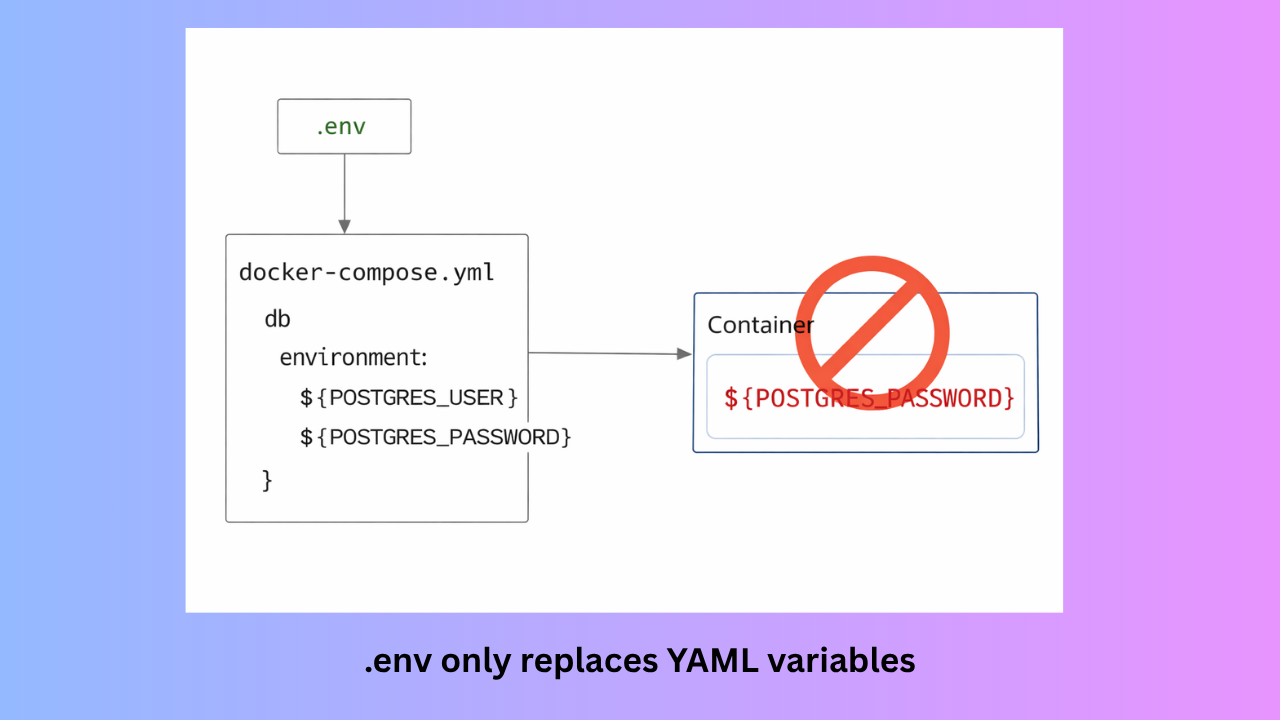
What env_file: in a service definition does?
The env_file: key inside a service definition tells Docker to load variables directly into the container’s runtime environment. This is a separate operation from YAML interpolation, and it is the mechanism your application code actually reads when it calls process.env.MY_VAR.
The practical consequence: if your container needs a variable and you only have it in .env without a corresponding env_file: or environment: entry in the service, the container never sees it even if the YAML parsed correctly.
| Mechanism | Where it works | Does the container see it? |
|---|---|---|
.env file (project root) |
Compose YAML interpolation only substitutes ${VAR} in the YAML at parse time |
Only if also mapped via environment: or env_file: |
env_file: in service |
Container runtime environment: file is read and injected directly | Yes, directly and immediately |
environment: key |
Container runtime environment: values hardcoded or interpolated from .env |
Yes, directly and immediately |
The rule that removes all confusion: Use the project-level .env for values that configure the compose file itself — image tags, port numbers, replica counts. Use env_file: in the service definition for every variable your application needs at runtime. When in doubt, use both.
services:
  n8n:
    image: n8nio/n8n:latest
    env_file:
      - .env          # loads ALL variables in .env into the container
    environment:
      - NODE_ENV=production    # hardcoded directly
      - N8N_PORT=${N8N_PORT}   # interpolated from .env at YAML parse time
If your only goal is to pass every variable in .env into the container, the env_file: block above is sufficient on its own. You do not need to re-list every variable under environment:.
Why Restarting Is Not Enough: You Need down Then up
This failure mode is the most common and the most maddening because it feels like a bug but is working exactly as designed. You update .env, run docker compose restart, and the old values persist. Nothing changed.
docker compose restart stops and restarts the existing containers. It does not recreate them. Environment variables are baked into a container when it is first created with docker compose up. Restarting that container simply boots the same frozen configuration again – it never re-reads your .env file. The same is true of docker compose stop && docker compose start.
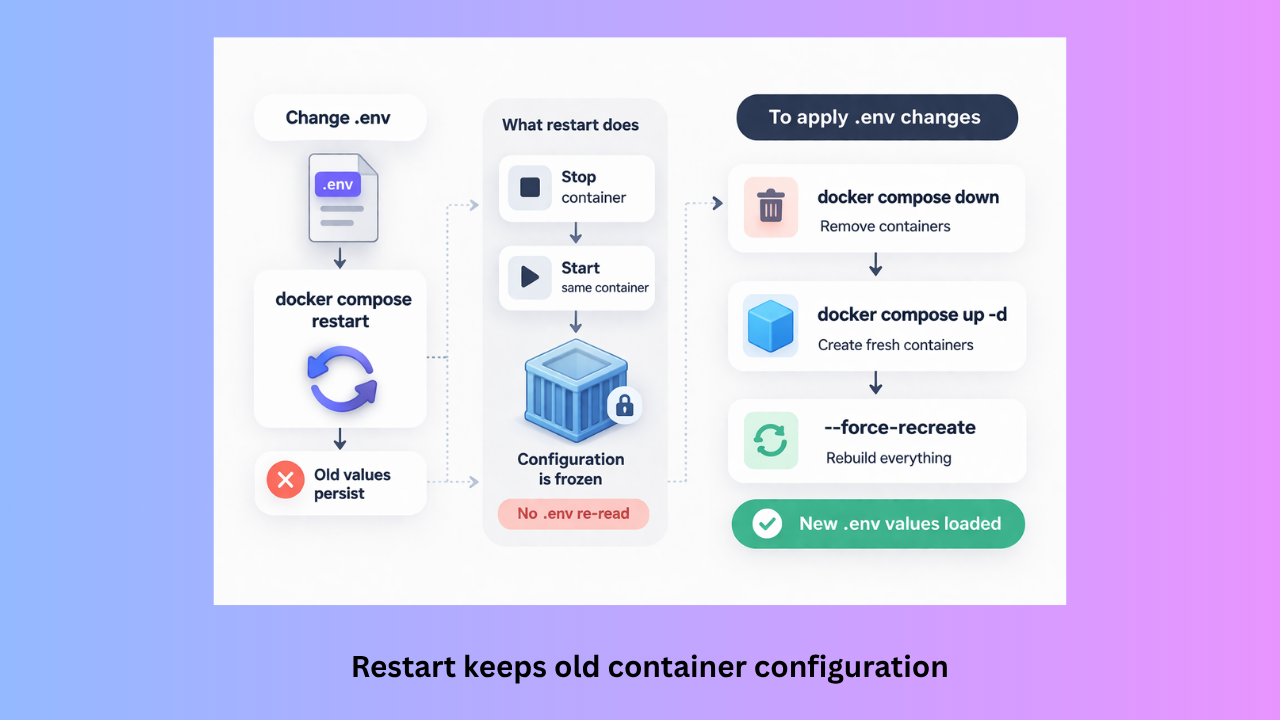
To apply .env changes, Docker must destroy the container and build a new one from the current compose configuration. That requires down followed by up.
docker compose down
docker compose up -d
If you have also changed image tags, volume mounts, or added new service keys alongside your env vars, add --force-recreate to guarantee every container is rebuilt from scratch — even if Docker’s change detection thinks nothing important was modified.
docker compose up -d --force-recreate
✅ Your data is safe
docker compose down removes containers but does not delete named volumes by default. Your database rows, uploaded files, and workflow data are preserved. Only add the --volumes flag if you explicitly intend to wipe volume data.
How to Verify Your Variables Actually Loaded Before Debugging Further?
Before spending time in application logs, spend two minutes confirming the variables exist inside the container. These three checks cover every layer of the stack.
Check 1: Verify compose-level interpolation
docker compose config prints the fully resolved compose file with all substitutions applied. If your ${VARIABLE} references show as blank here, the project-level .env was never read. This is your first stop.
docker compose config
Look for any variable that shows as an empty string. That tells you exactly which variables failed to interpolate and points directly to a file location problem.
Check 2: Verify what the running container sees
This bypasses the compose file entirely and shows the actual environment of the running process. Use this to confirm that env_file: is working correctly.
docker exec <container_name> env | sort
If a variable appears here with a blank value, the file was loaded but the value inside it is empty. If the variable is missing entirely, it was never passed to the container – check your env_file: or environment: block.
Check 3: Inspect the container configuration
For a container that is running but behaving unexpectedly, docker inspect shows the configuration as Docker stored it at creation time – including the full environment array.
docker inspect <container_name> | grep -A 30 '"Env"'
If the value here differs from what is in your .env file, the container was not recreated after your last change. Run docker compose down && docker compose up -d.
Running n8n? Here Are the Exact Env Vars That Commonly Fail This Way
n8n is one of the most widely self-hosted tools on Docker Compose, and its environment variables are sensitive to all three failure modes above. These are the variables that most commonly break silently and exactly why.
| Variable | How it breaks | What you see |
|---|---|---|
N8N_ENCRYPTION_KEY |
If the container is recreated without this set, n8n auto-generates a new key. Every credential saved under the old key becomes permanently unreadable. | Credentials appear to exist but throw decryption errors on use. |
WEBHOOK_URL |
Missing the trailing slash, or set correctly in .env but container was never recreated. n8n keeps displaying localhost:5678 in the editor. |
External services can’t reach the webhook URL. Triggers fail silently. |
DB_POSTGRESDB_HOST |
Must match the service name in docker-compose.yml exactly — postgres, not localhost. Breaks when the DB container is recreated under a different name. |
n8n fails to start with a database connection error, or silently falls back to SQLite. |
N8N_PROTOCOL |
Set to http while a reverse proxy is terminating HTTPS. n8n builds webhook URLs with the wrong scheme. |
OAuth callbacks fail. Webhooks register with http:// URLs that browsers reject over HTTPS pages. |
EXECUTIONS_DATA_PRUNEEXECUTIONS_DATA_MAX_AGE |
Commonly added to an existing stack’s .env without a down + up cycle. Silently ignored on restart. |
Execution history accumulates unchecked. Volume fills up. Container crashes with a disk-full error days later. |
Minimal working n8n configuration that covers all of the above:
services:
  n8n:
    image: n8nio/n8n:latest
    restart: unless-stopped
    env_file:
      - .env
    ports:
      - "5678:5678"
    volumes:
      - n8n_data:/home/node/.n8n

volumes:
  n8n_data:
Pair this with a .env file that includes N8N_ENCRYPTION_KEY, WEBHOOK_URL, N8N_HOST, N8N_PROTOCOL, and your database variables. All five must be set before first boot — changing N8N_ENCRYPTION_KEY after credentials are saved has no safe recovery path.
Quick Diagnosis: “Which Failure Mode Is This?”
If your env changes are being ignored and you are not sure which cause applies, work through this decision tree before changing anything:
🔍 Start: Does docker compose config show blank values?
Yes — variables are blank in the config output
→ The project-level .env was not found
→ Check: is .env in the same directory as docker-compose.yml?
→ Check: are you running docker compose from that same directory?
→ Fix: cd into the compose directory, or use --env-file explicitly
No — config shows correct values but container still has old ones
→ The container was not recreated after your last change
→ Fix: docker compose down && docker compose up -d
Config is correct, container is fresh, but app still can’t read the variable
→ The variable was never passed to the container’s runtime environment
→ Check: does the service have env_file: - .env or the variable under environment:?
→ Fix: add env_file: - .env to the service definition, then down + up again
Frequently Asked Questions (FAQ)
Does docker compose restart pick up .env changes?
No. docker compose restart stops and starts the existing container without recreating it. Environment variables are baked in at container creation time. To apply .env changes you must destroy and recreate the container with docker compose down && docker compose up -d.
Why does Docker Compose not warn me when .env is missing?
By design. Docker Compose treats a missing .env as a valid state — variables without a file simply resolve to empty strings. It will warn about undefined variables when you use ${VAR:?error message} syntax in your compose file, but only if you explicitly opt in to that strictness. For most setups, the safest habit is to always run docker compose config before up to verify interpolation worked correctly.
What is the difference between .env and env_file in Docker Compose?
The project-level .env file is for substituting values into the compose YAML itself it controls things like image tags and port numbers written in the YAML. The env_file: key inside a service definition injects variables directly into the container’s runtime environment so your application can read them. You often need both: .env for compose-level configuration, and env_file: to make those same values available inside the running container.
Can I have multiple .env files for different environments?
Yes. Name them .env.staging, .env.production, and so on, then pass the correct one at invocation time using the --env-file flag: docker compose --env-file .env.production up -d. This completely replaces the auto-discovered .env for that invocation. It is the cleanest pattern for multi-environment deployments from a single compose file.
Will docker compose down delete my database data?
No, not by default. docker compose down removes containers and the default network but leaves named volumes intact. Your database rows, uploaded files, and any other data stored in named volumes survives. Only docker compose down --volumes deletes volumes never run that on a production stack without a confirmed backup.
My variable is set in .env but the container reads an empty value. What is happening?
The most common cause is a formatting issue inside the .env file itself a space before or after the = sign, a trailing space after the value, or a Windows-style line ending (\r\n) if the file was edited on Windows. Docker Compose is strict about .env syntax. Each line must be exactly KEY=value with no surrounding spaces. Run cat -A .env to reveal hidden characters.
How do I pass secrets like database passwords without exposing them in docker inspect?
Append _FILE to supported variable names and point the value to a mounted secret file. For example: DB_POSTGRESDB_PASSWORD_FILE=/run/secrets/db_password. Docker reads the value from the file at startup rather than storing it as a plaintext environment variable, which keeps it out of docker inspect output and container metadata. This works with Docker Secrets and Kubernetes Secrets.
Conclusion
Docker Compose’s silence about missing or misread .env files is a long-standing design choice that catches almost everyone at least once. Once you understand the three distinct failure modes wrong file location, the env_file vs interpolation split, and the fact that restart does not recreate they become predictable and fast to diagnose.
- Always run
docker composefrom the same directory as yourdocker-compose.yml, or pass--env-fileexplicitly. - Use
env_file: - .envin the service definition to inject variables into the container’s runtime environment the project-level.envalone does not do this. - Use
docker compose down && docker compose up -dwhenever you change environment configuration notrestart. - Verify with
docker compose configanddocker exec <name> envbefore digging into application logs.
These four habits eliminate the vast majority of .env debugging permanently. For n8n specifically, make sure N8N_ENCRYPTION_KEY and WEBHOOK_URL are set before first boot both are silent-failure variables that become painful to fix after data accumulates.