Step by Step Guide to solve n8n SQLite Unsupported Feature Error
Who this is for: n8n developers and workflow engineers encountering SQLite errors in production workflows. For a complete guide on managing SQLite in n8n, including errors, performance, and migration, check out our n8n SQLite pillar guide.
Quick Diagnosis
| Step | Action | Why it works |
|---|---|---|
| 1 | Identify the offending function in the Execution Log. | Pinpoints the exact unsupported SQLite call. |
| 2 | Replace JSON functions with a Function node that uses JSON.parse. |
n8n’s runtime handles JSON without the json1 extension. |
| 3 | Swap window functions for a SplitInBatches node or a JavaScript loop. | The bundled SQLite binary lacks window‑function support. |
| 4 | Re‑write UPSERT logic as a two‑step insert‑then‑update, or migrate to PostgreSQL. | Avoids the missing UPSERT syntax. |
| 5 | Test the workflow in Test Mode before redeploying. | Confirms the fix without affecting production. |
1. Why n8n Throws SQLite Unsupported Feature?
n8n bundles a minimal SQLite binary to keep Docker images lightweight. The build omits several optional extensions, resulting in the following gaps:
| SQLite Feature | Extension | Availability in n8n |
|---|---|---|
JSON functions (json(), json_extract()) |
json1 | Not compiled |
Window functions (ROW_NUMBER() OVER (…) ) |
core ≥ 3.25 | Not compiled |
UPSERT (INSERT … ON CONFLICT …) |
core ≥ 3.24 | Not compiled |
Partial indexes (WHERE …) |
core | Compiled (limited in ORM) |
ALTER TABLE DROP COLUMN |
core ≥ 3.35 | Compiled, but not exposed by ORM |
When a workflow’s SQLite node calls any of these, SQLite returns:
Error: SQLite error: not authorized (code: 1) – unsupported feature
n8n surfaces this as the “unsupported feature” error. Ensure smooth operation by addressing version conflicts, unsupported features, and constraint errors in n8n SQLite.
2. Diagnosing the Error in n8n
Step‑by‑step:
- Open the Execution Log for the failing workflow.
- Copy the exact SQL statement from the error stack.
- Scan the statement for any of the features listed above.
EEFA Note: Enable logging only for the affected workflow to avoid log bloat and accidental PII exposure.
Example Log Snippet
[2025-12-23 14:02:07] SQLite node "Run Query" error:
SQLite error: not authorized (code: 1) – unsupported feature
SQL: SELECT json_extract(data, '$.user.id') AS userId FROM users;
The offending call is json_extract.
3. Common Unsupported SQLite Features & n8n Alternatives
| Unsupported Feature | Typical Use‑Case | n8n Alternative | Example Transformation |
|---|---|---|---|
| json_extract() / json() | Pull a value from a JSON column | Function node with JSON.parse() |
SQL → SELECT json_extract(payload, '$.order.total') FROM orders;n8n → see Section 4.2 |
| Window functions (ROW_NUMBER() OVER …) | Ranking, pagination | SplitInBatches + Function node to compute rank | SQL → SELECT id, ROW_NUMBER() OVER (ORDER BY created_at) AS rn FROM logs;n8n → retrieve rows, then rank in JavaScript |
| INSERT … ON CONFLICT … DO UPDATE (UPSERT) | Idempotent inserts | Two‑step: INSERT … ON CONFLICT DO NOTHING then UPDATE, or use a PostgreSQL node | SQL → INSERT INTO users (id, name) VALUES (1,'Bob') ON CONFLICT(id) DO UPDATE SET name=excluded.name;n8n → see Section 5 |
| json_each() table‑valued function | Expanding JSON arrays | Function node that maps JSON.parse(arrayField) into separate items |
SQL → SELECT value FROM json_each('[1,2,3]');n8n → map array to items |
| ALTER TABLE … DROP COLUMN | Schema migration | Multi‑step migration script (CREATE → INSERT → DROP → RENAME) | SQL not possible directly → run a series of SQLite nodes (see Section 6) |
4. Step‑by‑Step Migration Example: Replacing json_extract
4.1 Original SQLite Node
SELECT
  id,
  json_extract(metadata, '$.customer.email') AS email
FROM orders
WHERE json_extract(metadata, '$.status') = 'shipped';
4.2 n8n Replacement Workflow
4.2.1 SQLite Node – fetch raw rows (no JSON extraction)
SELECT id, metadata FROM orders;
4.2.2 Function Node – filter rows by status
// Keep only rows where status === 'shipped'
return items.filter(item => {
  const data = JSON.parse(item.json.metadata);
  return data.status === 'shipped';
});
4.2.3 Function Node – extract the email field
// Add an `email` property from the JSON payload
return items.map(item => {
  const data = JSON.parse(item.json.metadata);
  return {
    json: {
      id: item.json.id,
      email: data.customer.email,
    },
  };
});
EEFA Note: For >10 k rows, insert a SplitInBatches node between the SQLite and Function nodes to stay under the 128 MB Node.js memory limit. Debug logging issues and monitor constraints, compatibility, and migration steps in SQLite for n8n.
5. Checklist: Fixing “Unsupported Feature” Errors
- Open the execution log and copy the failing SQL.
- Identify the unsupported keyword (JSON, WINDOW, UPSERT, etc.).
- Consult the Unsupported Feature Table above for the matching n8n alternative.
- Replace the SQLite node with:
- a simpler SQLite query (no unsupported calls)
- Function / Set / SplitInBatches nodes for post‑processing.
- Run a single execution in Test Mode to verify the error disappears.
- If processing >5 k rows, add Batching to avoid memory limits.
- Document the change in the workflow description for future maintainers.
6. When to Switch to a Full‑Featured Database
Consider migrating to PostgreSQL or MySQL if your workflow:
- Performs JSON queries on millions of rows, or
- Requires complex ranking/window calculations, or
- Relies heavily on UPSERT with conflict handling.
n8n provides native PostgreSQL and MySQL nodes with complete feature support. See the sibling guide “n8n PostgreSQL vs. SQLite – When to Upgrade” for a migration path.
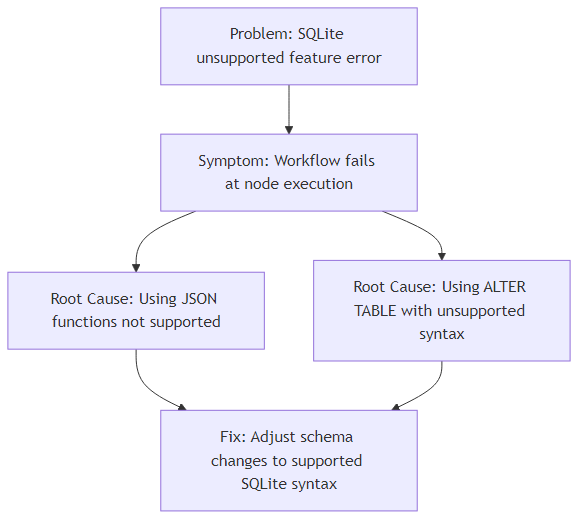
Diagram: Replacing an unsupported SQLite JSON function with a Function node in an n8n workflow.
Next Steps
- Apply the checklist to your failing workflow.
- If the error persists, review the Execution Log for hidden sub‑queries generated by other nodes.
- For advanced JSON handling without SQLite, read the sibling guide “n8n Advanced JSON Parsing without SQLite”.
- Explore migration strategies while considering SQLite constraints, compatibility, and feature limitations in n8n.
Prepared by the n8n SEO & Technical Strategy team – 2025.