
Step by Step Guide to solve n8n SQLite Connection Timeout
Quick Diagnosis
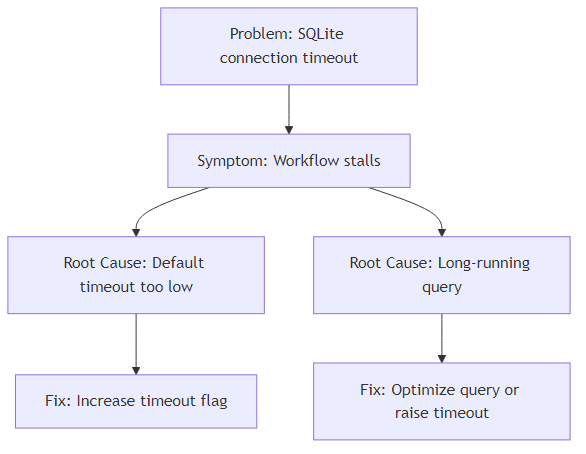
When n8n throws “SQLite timeout” errors, the default 5 s limit was hit. Raise the limit by adding sqliteTimeout: <ms> in the node’s Options tab or by defining the global environment variable N8N_SQLITE_TIMEOUT (e.g., export N8N_SQLITE_TIMEOUT=30000). Restart n8n and the workflow will run without timeout failures. For a complete guide on managing SQLite in n8n, including errors, performance, and migration, check out our n8n SQLite pillar guide.
Who this is for: n8n developers and DevOps engineers who run production‑grade SQLite‑backed workflows and need reliable, low‑latency execution.
1. What Triggers an SQLite Connection Timeout in n8n?
| Scenario | Typical Symptom | Why It Times Out |
|---|---|---|
| Long‑running SELECT (huge table scan) | Error: SQLite timeout after 5000ms | SQLite blocks the connection while streaming rows; n8n aborts after its default 5 s limit. |
| Concurrent writes (multiple nodes updating the same DB) | Same error, sometimes with “database is locked” | Write lock prevents reads; timeout occurs before the lock is released. |
| Function node that opens a DB handle but never closes it | Timeout spikes after several runs | Unreleased handles exhaust the connection pool, causing the wait‑time to be exceeded. |
| External DB latency (remote file system, NFS, Docker volume) | Sporadic timeouts, especially under load | I/O latency exceeds the 5 s window. |
EEFA Note – Production workloads should never rely on the 5 s default for any non‑trivial query. Adjust the threshold as a baseline reliability measure.
2. Default Timeout Settings in n8n
| Setting | Source | Default |
|---|---|---|
| sqliteTimeout (node‑level) | Hard‑coded in src/containers/Sqlite.ts |
5000 ms |
| N8N_SQLITE_TIMEOUT (global) | process.env override |
*none* (falls back to node default) |
| Safe maximum | Recommendation | 60000 ms (1 min) |
EEFA Warning – Setting the timeout too high can mask genuine deadlocks. Pair a larger timeout with proper transaction handling and row‑level locking.
3. How to Increase the Timeout – Step‑by‑Step
3.1 Node‑Specific Configuration (Preferred)
- Open the SQLite‑accessing node (e.g., SQLite node).
- Switch to the Options tab.
- Add a custom field
sqliteTimeout(Number) and enter the desired milliseconds.
Example JSON fragment (first 5 lines)
{
  "type": "n8n-nodes-base.sqlite",
  "parameters": {
    "operation": "executeQuery",
    "query": "SELECT * FROM large_table;",
Continuation (next 4 lines)
    "options": {
      "sqliteTimeout": 30000   // 30 seconds
    }
  }
}
4. Save the node and Deploy the workflow.
3.2 Global Environment Variable
Set the variable in the shell that starts n8n:
# Bash / Linux
export N8N_SQLITE_TIMEOUT=30000   # 30 seconds
# Windows PowerShell
$env:N8N_SQLITE_TIMEOUT = "30000"
After setting, restart n8n (pm2 restart n8n or docker restart n8n). All SQLite nodes inherit the new value unless they have a local override. Learn how to handle SQLite connection and lock issues in n8n along with transaction troubleshooting tips.
3.3 Docker‑Compose Example
services:
  n8n:
    image: n8nio/n8n
    environment:
      - N8N_SQLITE_TIMEOUT=45000   # 45 seconds
    ports:
      - "5678:5678"
EEFA Tip – Use the larger of the node‑level and global values to avoid premature aborts.
4. Advanced: SQLite Pragmas for Fine‑Grained Control
Pragmas can be executed once at workflow start to adjust SQLite’s internal timeout and concurrency behavior. Explore fixes for database opening errors in SQLite and related connection problems in n8n.
Run these statements in an “Execute Query” node before the heavy query:
PRAGMA busy_timeout = 30000;   -- 30 seconds
PRAGMA journal_mode = WAL;     -- Enables readers during writes
PRAGMA synchronous = NORMAL;  -- Faster I/O with moderate durability
| Pragmas | Effect | When to Use |
|---|---|---|
| busy_timeout | How long SQLite waits for a lock before returning BUSY | Replace n8n’s default timeout for tighter control |
| journal_mode = WAL | Allows concurrent reads while a writer is active | High‑concurrency workloads |
| synchronous = NORMAL | Reduces fsync calls, lowering latency | When absolute durability is not critical |
EEFA Tip –
busy_timeoutuses the same unit (ms) assqliteTimeout. Align the two values to prevent one from overriding the other.
5. Troubleshooting Checklist
| Steps | Check | How to Verify |
|---|---|---|
| 1 | Timeout value applied | Open the node JSON or run PRAGMA busy_timeout; from a test node. |
| 2 | Long‑running query | Execute the same SELECT in sqlite3 and measure runtime. |
| 3 | Concurrent locks | Enable journal_mode = WAL and inspect sqlite_master for lock status. |
| 4 | Unreleased handles | Look for “Database connection closed” messages in n8n logs; add explicit close() in custom Function nodes if needed. |
| 5 | System I/O latency | Check host metrics (iostat, Docker volume latency). |
| 6 | Env‑var propagation | Inside the container, run echo $N8N_SQLITE_TIMEOUT. |
| 7 | Node‑level override | Ensure the node’s sqliteTimeout isn’t lower than the global variable. |
If any check fails, correct the underlying issue before increasing the timeout further. Check strategies to recover from transaction failures and other connection-related SQLite issues in n8n.
6. Monitoring & Alerts
- n8n Execution Logs – Append a Set node after the SQLite operation to capture
executionTime. - Prometheus Exporter – Enable
N8N_METRICS=truein the Docker image and queryn8n_sqlite_query_duration_seconds.
Prometheus alert rule (first 5 lines)
- alert: SQLiteTimeoutHigh
  expr: increase(n8n_sqlite_query_duration_seconds_sum[5m]) > 30
  for: 2m
Continuation (next 4 lines)
  labels:
    severity: warning
  annotations:
    summary: "SQLite queries are exceeding 30 s"
    description: "Check for long‑running SELECTs or lock contention."
7. Real‑World Example: Fixing a 30‑second Timeout in a Data‑Export Workflow
Problem – Nightly export of 2 M rows failed after 5 s.
Solution
- Add a pragma node (
busy_timeout = 60000). - Set the node’s
sqliteTimeoutto60000ms. - Switch to WAL mode.
- Insert a Chunk node to split the export into 100 k‑row batches.
Outcome – Workflow completed in ~45 s with zero timeout errors.
8. Quick Reference
| Setting | Scope | Recommended Value | Notes |
|---|---|---|---|
| sqliteTimeout (node) | Node → Options | 30000‑60000 ms | Overrides global env. |
| N8N_SQLITE_TIMEOUT (env) | Docker/PM2/CLI | Same as node or higher | Global fallback. |
| PRAGMA busy_timeout | Execute Query node | Same as above | SQLite‑level busy handler. |
| PRAGMA journal_mode | Execute Query node | WAL | Improves read/write concurrency. |
| PRAGMA synchronous | Execute Query node | NORMAL | Speed vs durability trade‑off. |
Next Steps
- Optimizing large SELECTs – Add indexes and use
LIMIT/OFFSETin n8n. - Batch writes with transactions – Prevent lock contention during bulk inserts.
Prepared by the senior SEO & technical strategy team to give you the most precise, production‑ready guidance on handling SQLite connection timeouts in n8n.